Hello donkallnight,
First, make sure you have set up the phone number correctly. You can then choose if you want conversations to be from a phone number or your Apple ID. You may need to change the password for your Apple ID, and update your account information too.
"On your iPhone:
- Go to Settings > Messages and make sure that iMessage is on. You might need to wait a moment for it to activate.
- Tap Send & Receive. If you see “Use your Apple ID for iMessage,” tap it and sign in with the same Apple ID that you use on your Mac, iPad, and iPod touch.
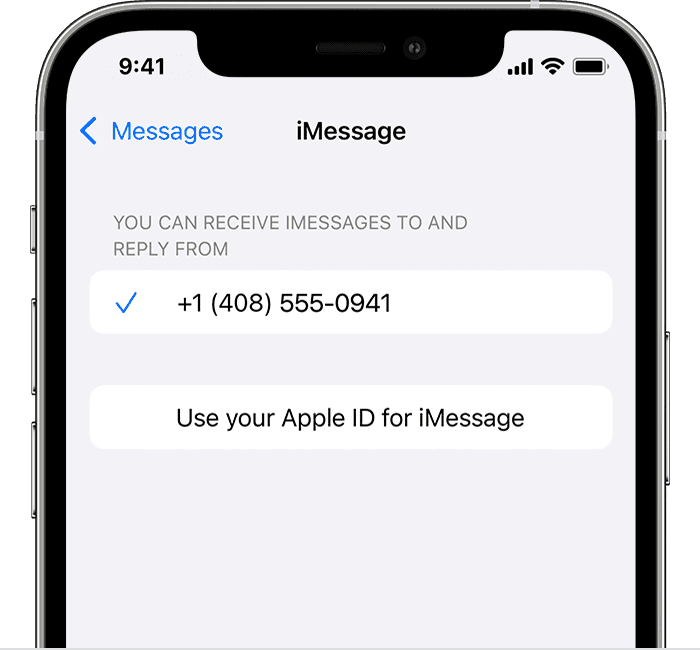
- In the "You can receive iMessages to and Reply From" section, make sure that your phone number and Apple ID are selected."
"If your phone number is unchecked and you can't select it, or you have some other issue, follow these steps:
- Go to Settings > Messages > Send & Receive. Tap your Apple ID, then tap Sign Out.
- On your iPhone:
- Go back to Settings > Messages and make sure that iMessage is turned on.
- Tap Send & Receive, then choose “Use your Apple ID for iMessage” and sign in with your Apple ID.
- Using the same Apple ID, sign back in to Messages and FaceTime on your other devices.
If you still need help, change your Apple ID password and repeat the setup steps. If that doesn't work, contact Apple Support."
Add or remove your phone number in Messages or FaceTime - Apple Support
If you have questions, contact Apple Support.
Thank you for using Apple Support Communities. Have a nice day.


