Verifying iMessage

When going to Settings --> Messages --> Send & Receive (under the iMessage toggle):


My phone number is listed twice and beneath those is my apple ID, which is my email. Next to the top phone number it says Verifying... with the icon spinning as if it's trying to....verify I suppose?


This seems to be why all of my iMessages are suddenly showing up as from my apple ID.


Any suggestions on how to address this issue? How do I get my iMessages to show up from my phone number and not my apple ID? How do I get the phone number verified, which presumably takes care of the first issue?


Thanks.


iPhone XR, iOS 15

Posted on Mar 8, 2022 7:13 PM

Reply
Question marked as Top-ranking reply

Posted on Mar 9, 2022 1:26 PM

Hello donkallnight,


First, make sure you have set up the phone number correctly. You can then choose if you want conversations to be from a phone number or your Apple ID. You may need to change the password for your Apple ID, and update your account information too.


"On your iPhone:

  1. Go to Settings > Messages and make sure that iMessage is on. You might need to wait a moment for it to activate.
  2. Tap Send & Receive. If you see “Use your Apple ID for iMessage,” tap it and sign in with the same Apple ID that you use on your Mac, iPad, and iPod touch.
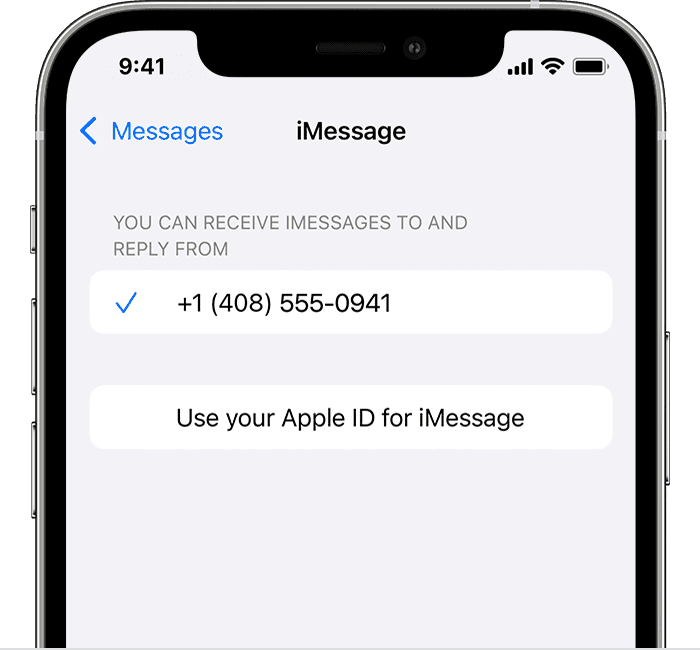
  3. iPhone showing how to select iMessage settings
  4. In the "You can receive iMessages to and Reply From" section, make sure that your phone number and Apple ID are selected."


"If your phone number is unchecked and you can't select it, or you have some other issue, follow these steps:


  • Go to Settings > Messages > Send & Receive. Tap your Apple ID, then tap Sign Out.


  1. On your iPhone:
    • Go back to Settings > Messages and make sure that iMessage is turned on.
    • Tap Send & Receive, then choose “Use your Apple ID for iMessage” and sign in with your Apple ID.


  1. Using the same Apple ID, sign back in to Messages and FaceTime on your other devices. 


If you still need help, change your Apple ID password and repeat the setup steps. If that doesn't work, contact Apple Support."


Add or remove your phone number in Messages or FaceTime - Apple Support


If you have questions, contact Apple Support.


Thank you for using Apple Support Communities. Have a nice day.

1 reply
Question marked as Top-ranking reply

Mar 9, 2022 1:26 PM in response to donkallnight

Hello donkallnight,


First, make sure you have set up the phone number correctly. You can then choose if you want conversations to be from a phone number or your Apple ID. You may need to change the password for your Apple ID, and update your account information too.


"On your iPhone:

  1. Go to Settings > Messages and make sure that iMessage is on. You might need to wait a moment for it to activate.
  2. Tap Send & Receive. If you see “Use your Apple ID for iMessage,” tap it and sign in with the same Apple ID that you use on your Mac, iPad, and iPod touch.
  3. iPhone showing how to select iMessage settings
  4. In the "You can receive iMessages to and Reply From" section, make sure that your phone number and Apple ID are selected."


"If your phone number is unchecked and you can't select it, or you have some other issue, follow these steps:


  • Go to Settings > Messages > Send & Receive. Tap your Apple ID, then tap Sign Out.


  1. On your iPhone:
    • Go back to Settings > Messages and make sure that iMessage is turned on.
    • Tap Send & Receive, then choose “Use your Apple ID for iMessage” and sign in with your Apple ID.


  1. Using the same Apple ID, sign back in to Messages and FaceTime on your other devices. 


If you still need help, change your Apple ID password and repeat the setup steps. If that doesn't work, contact Apple Support."


Add or remove your phone number in Messages or FaceTime - Apple Support


If you have questions, contact Apple Support.


Thank you for using Apple Support Communities. Have a nice day.

This thread has been closed by the system or the community team. You may vote for any posts you find helpful, or search the Community for additional answers.

Verifying iMessage

Welcome to Apple Support Community
A forum where Apple customers help each other with their products. Get started with your Apple Account.