What is Tap Media Pro? Did not subscribe to this.

This looks like a scam. Did NOT subscribe.

Downloaded QR Code Reader for iphone and it should be free.

The Tap Media website says it is 100% free and there is not any "Pro" version on their website.

Been charged monthly (59CZK) or cca 2.50USD) since last August 2021.

Has been a very difficult process to report and ask about it thru the app or apple id account.

Could not leave a review in the app store. Kept asking for a nickname and that it was already take. Not possible as I put some complete random text and numbers in multiple times and it still wouldn't let me leave a review.

Please, anyone who else has this problem?

The only way I found out was that the bank informed me.

Was able to remove the card from my apple ID.

Have never made any purchases on apple store or itunes, so this was a surprise.

All comments and suggests welcome.

Thanks

K


Posted on Mar 15, 2022 10:15 AM

Reply
Question marked as Top-ranking reply

Posted on Mar 16, 2022 8:55 AM

Hi, KittyKat2022,


To investigate where an unrecognized charge may have come from, we would suggest using the information in the Apple Support article If you see 'apple.com/bill' on your billing statement - Apple Support, which is designed to help identify such charges.


If you can confirm that a subscription for Tap Media has been subscribed via your Apple ID, you can follow the steps bellow from How to cancel a subscription from Apple - Apple Support to cancel it using your iPhone, and then use Request a refund for apps or content that you bought from Apple - Apple Support to request a refund.


How to cancel a subscription on your iPhone, iPad, or iPod touch

1. Open the Settings app.
2. Tap your name.
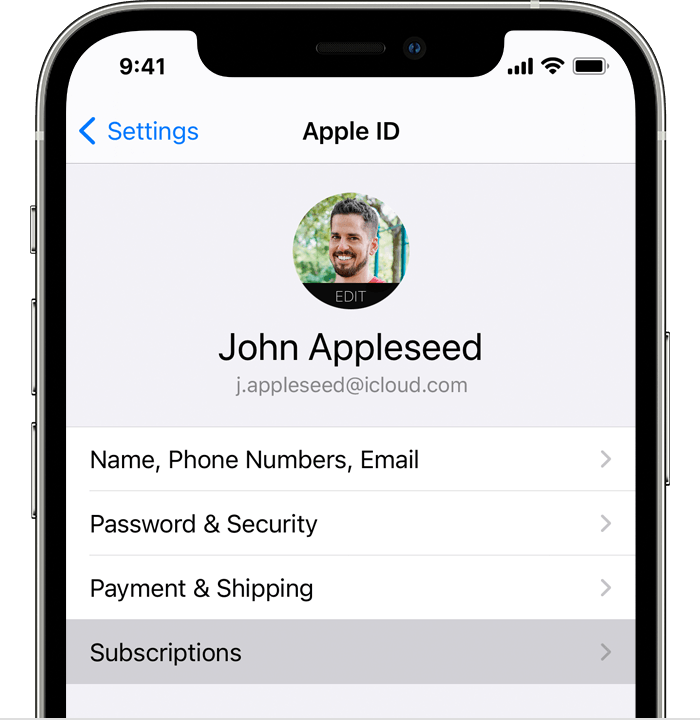
3. Tap Subscriptions.
iPhone showing the Subscriptions menu option in Settings.
4. Tap the subscription that you want to manage. Don't see the subscription that you're looking for?
5. Tap Cancel Subscription. (Or if you want to cancel Apple One but keep some subscriptions, tap Choose Individual Services.) If you don’t see Cancel, the subscription is already canceled and won't renew.


If you've followed the steps to request a refund and still have an issue, please get in touch with Apple Support directly, here: Get Support.


Have a wonderful day!

Similar questions

1 reply
Question marked as Top-ranking reply

Mar 16, 2022 8:55 AM in response to KittyKat2022

Hi, KittyKat2022,


To investigate where an unrecognized charge may have come from, we would suggest using the information in the Apple Support article If you see 'apple.com/bill' on your billing statement - Apple Support, which is designed to help identify such charges.


If you can confirm that a subscription for Tap Media has been subscribed via your Apple ID, you can follow the steps bellow from How to cancel a subscription from Apple - Apple Support to cancel it using your iPhone, and then use Request a refund for apps or content that you bought from Apple - Apple Support to request a refund.


How to cancel a subscription on your iPhone, iPad, or iPod touch

1. Open the Settings app.
2. Tap your name.
3. Tap Subscriptions.
iPhone showing the Subscriptions menu option in Settings.
4. Tap the subscription that you want to manage. Don't see the subscription that you're looking for?
5. Tap Cancel Subscription. (Or if you want to cancel Apple One but keep some subscriptions, tap Choose Individual Services.) If you don’t see Cancel, the subscription is already canceled and won't renew.


If you've followed the steps to request a refund and still have an issue, please get in touch with Apple Support directly, here: Get Support.


Have a wonderful day!

This thread has been closed by the system or the community team. You may vote for any posts you find helpful, or search the Community for additional answers.

What is Tap Media Pro? Did not subscribe to this.

Welcome to Apple Support Community
A forum where Apple customers help each other with their products. Get started with your Apple Account.