Security Update 2022-003 Catalina gives problem mounting usb storage

NTFS usb external storages can't be mounted anymore (and they used to work perfectly fine with Tuxera).

Disk utility sees it but can't mount with error: "Could not mount “UNTITLED”. (com.apple.DiskManagement.disenter error 49221."


exFAT formatted drive works fine.


MacBook Pro 13″, macOS 10.15

Posted on Mar 17, 2022 2:38 AM

Reply
Question marked as Top-ranking reply

Posted on Mar 17, 2022 3:50 AM

The latest update has caused NTFS for Mac to break - while you wait for an update that fixes it, you can mount your volumes manually bypassing Disk Utility and Tuxera Disk Manager.


  1. Open Terminal (Applications -> Utilities -> Terminal) and first create a mount point for your disk or volume with this command:
sudo mkdir /Volumes/ntfs-disk


...then you need to call the mount script (looks scary, but only one or two things have to be changed):

sudo /Library/Filesystems/tuxera_ntfs.fs/Contents/Resources/mount_tuxera_ntfs -o nodev -o noowners -o nosuid /dev/diskXsY /Volumes/ntfs-disk


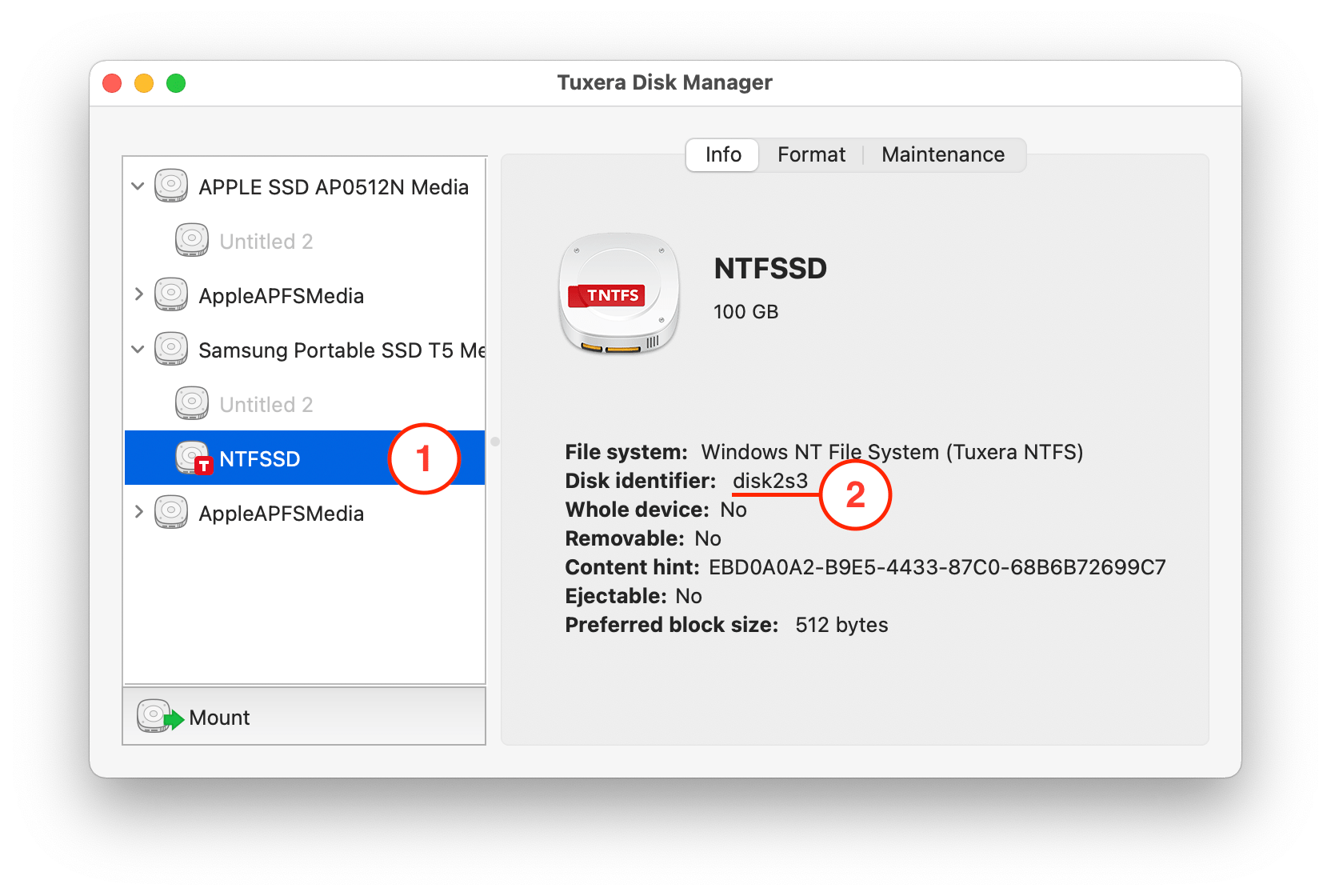
You have to change the part where it says diskXsY to indicate your actual disk number (X) and volume number (Y). You can find those using Tuxera Disk Manager by clicking on your volume:

...or you can use the command

diskutil list


in Terminal.


Contact Tuxera's support to let them know you're affected by the issue!

11 replies
Question marked as Top-ranking reply

Mar 17, 2022 3:50 AM in response to svtimmy_

The latest update has caused NTFS for Mac to break - while you wait for an update that fixes it, you can mount your volumes manually bypassing Disk Utility and Tuxera Disk Manager.


  1. Open Terminal (Applications -> Utilities -> Terminal) and first create a mount point for your disk or volume with this command:
sudo mkdir /Volumes/ntfs-disk


...then you need to call the mount script (looks scary, but only one or two things have to be changed):

sudo /Library/Filesystems/tuxera_ntfs.fs/Contents/Resources/mount_tuxera_ntfs -o nodev -o noowners -o nosuid /dev/diskXsY /Volumes/ntfs-disk


You have to change the part where it says diskXsY to indicate your actual disk number (X) and volume number (Y). You can find those using Tuxera Disk Manager by clicking on your volume:


...or you can use the command

diskutil list


in Terminal.


Contact Tuxera's support to let them know you're affected by the issue!

This thread has been closed by the system or the community team. You may vote for any posts you find helpful, or search the Community for additional answers.

Security Update 2022-003 Catalina gives problem mounting usb storage

Welcome to Apple Support Community
A forum where Apple customers help each other with their products. Get started with your Apple Account.


