Hi Th'Duffer,
It looks like it both can't be enabled at the same time based on what region(s) are selected.
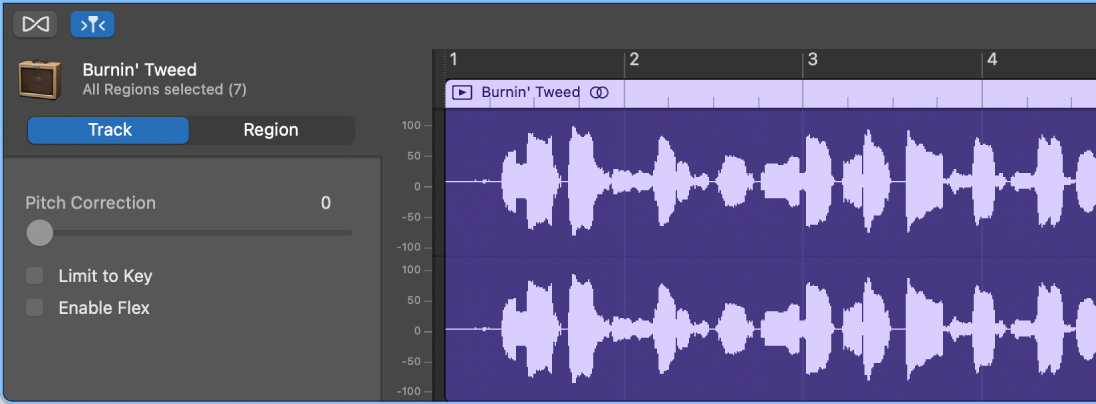
"When the track is selected (and no individual region is selected), the following controls appear in the Audio Editor inspector:
- Pitch Correction slider: Determines the amount of pitch correction applied to regions in the track.
- Limit to Key checkbox: Limits pitch correction to notes in the project key.
- Enable Flex checkbox: Turns on flex editing for the track.
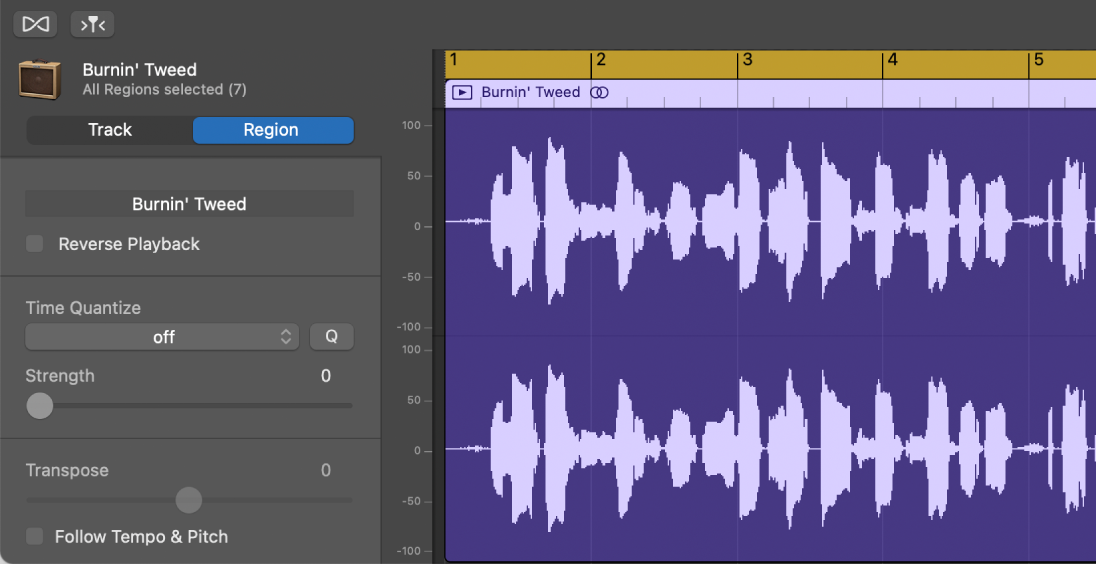
When one or more regions are selected, the following controls appear in the Audio Editor inspector to the left of the waveform:
- Region Name field: Edit the name of the selected regions.
- Reverse Playback checkbox: Play the audio region backwards.
- Time Quantize pop-up menu (with Strength slider): Quantize the timing of notes, beats, and other events in the selected regions.
- Transpose slider: Change the pitch of notes in the selected regions.
- Follow Tempo and Pitch checkbox: Sets whether the regions match the project tempo and key.
 "
"
That information and more can be found here: Intro to the Audio Editor in GarageBand on Mac
Quantize the timing of audio regions in GarageBand on Mac and Edit the note and beat timing in GarageBand on Mac may also help. If others aren't able to share personal experiences with what you're looking to accomplish, reach out to Apple Support directly using the link below.
Contact Apple Support
GarageBand Support
Cheers!


