my iphone xr keeps asking me to sign in and review my account info over and over and over. Why?

My Iphone XR keeps asking for my Apple ID when I try and download anything from the ITunes Store. It keeps asking me to enter my Apple ID and review my ITunes Account, over and over and over. It never goes anywhere or allows me to download anything.


iPhone XR, iOS 14

Posted on Mar 23, 2022 1:24 PM

Reply
Question marked as Top-ranking reply

Posted on Mar 24, 2022 11:55 AM

Hi there, proudgrandma4,


The message you're receiving indicates to us you may need to update your payment information on file with your Apple ID. If that is the case you will need to resolve any issues with it before you're able to continue downloading content. You can confirm your payment information following the steps in Change, add, or remove Apple ID payment methods - Apple Support, as described below;


How to change your payment method on your iPhone, iPad, or iPod touch

1. Open the Settings app.
2. Tap your name.
3. Tap Payment & Shipping. You might be asked to sign in with your Apple ID.
4. From here, you can do these things:
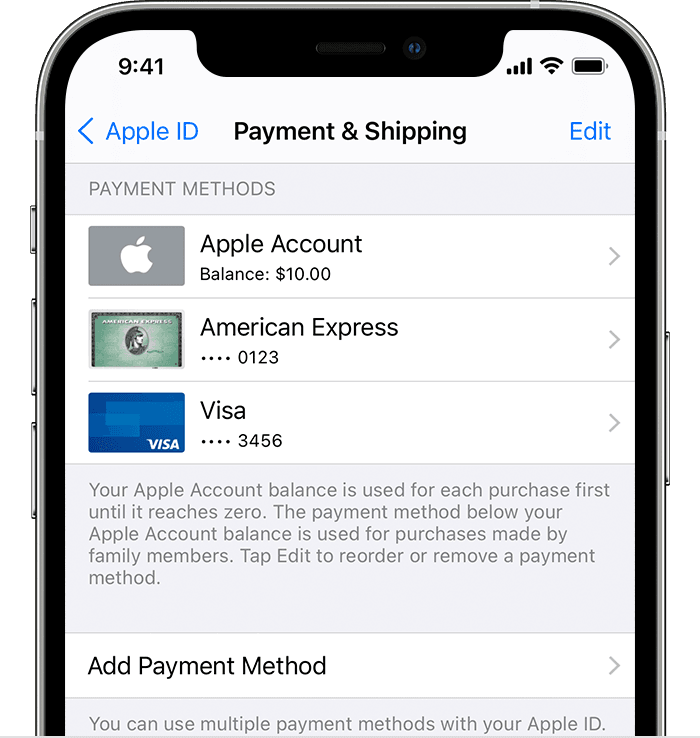
iPhone showing payment methods including Apple ID balance and credit cards
• Add a payment method — Tap Add Payment Method.
• Update a payment method — Tap the payment method, then edit your information. You might need to enter the security code that's printed on your credit or debit card. If you use the card with Apple Pay, go to the Wallet app to edit the card information.
• Remove a payment method — Tap Edit, tap the red Delete button, then tap Remove. If you have an unpaid balance, have subscriptions including an iCloud storage plan, or you use purchase sharing, you can't remove all payment methods. Learn how to remove all payment methods.
• Change the order of your payment methods — Tap Edit, then drag the move order icon .*


Don't hesitate to respond back if you still need help.


Have a great weekend!

1 reply
Question marked as Top-ranking reply

Mar 24, 2022 11:55 AM in response to proudgrandma4

Hi there, proudgrandma4,


The message you're receiving indicates to us you may need to update your payment information on file with your Apple ID. If that is the case you will need to resolve any issues with it before you're able to continue downloading content. You can confirm your payment information following the steps in Change, add, or remove Apple ID payment methods - Apple Support, as described below;


How to change your payment method on your iPhone, iPad, or iPod touch

1. Open the Settings app.
2. Tap your name.
3. Tap Payment & Shipping. You might be asked to sign in with your Apple ID.
4. From here, you can do these things:
iPhone showing payment methods including Apple ID balance and credit cards
• Add a payment method — Tap Add Payment Method.
• Update a payment method — Tap the payment method, then edit your information. You might need to enter the security code that's printed on your credit or debit card. If you use the card with Apple Pay, go to the Wallet app to edit the card information.
• Remove a payment method — Tap Edit, tap the red Delete button, then tap Remove. If you have an unpaid balance, have subscriptions including an iCloud storage plan, or you use purchase sharing, you can't remove all payment methods. Learn how to remove all payment methods.
• Change the order of your payment methods — Tap Edit, then drag the move order icon .*


Don't hesitate to respond back if you still need help.


Have a great weekend!

This thread has been closed by the system or the community team. You may vote for any posts you find helpful, or search the Community for additional answers.

my iphone xr keeps asking me to sign in and review my account info over and over and over. Why?

Welcome to Apple Support Community
A forum where Apple customers help each other with their products. Get started with your Apple Account.