Check if the correct date is in the image:
a) Open the image in Preview.app > Tools > Show Inspector > "i" icon > Exif tab > "Date Time Original" should show the shooting date ("the date and time when the original image data was generated"):

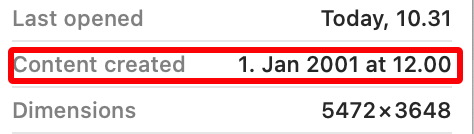
b) In Finder > View > Show Preview > Show More > "Content created" should show the shooting date (IMHO it should also read "Date Time Original" there):
c) In some 3rd party tool show the dates and check which one is the correct.
The shooting date is 'ExifIFD:DateTimeOriginal' but sometimes the correct date can be in the filename, or in the fragile 'MacOS:FileCreateDate' or 'System:FileModifyDate' or maybe in 'ExifIFD:CreateDate' or maybe in some other date metadata. Many social media sites strip off dates so you must guess the correct date.
exiftool -a -G1 -s -time:all -api RequestAll=2 image.jpg
[ExifTool]      Now                             : 2022:03:29 10:45:54+03:00
[System]        FileModifyDate                  : 2022:03:29 10:30:09+03:00
[System]        FileAccessDate                  : 2022:03:29 10:45:44+03:00
[System]        FileInodeChangeDate             : 2022:03:29 10:45:43+03:00
[MacOS]         FileCreateDate                  : 2022:03:29 10:30:09+03:00
[MacOS]         MDItemContentCreationDate       : 2001:01:01 12:00:00+02:00
[MacOS]         MDItemContentCreationDate_Ranking: 2001:01:01 02:00:00+02:00
[MacOS]         MDItemContentModificationDate   : 2008:08:08 08:08:08+03:00
[MacOS]         MDItemContentModificationDate_Ranking: 2008:08:08 03:00:00+03:00
[MacOS]         MDItemDateAdded                 : 2022:03:29 10:30:09+03:00
[MacOS]         MDItemDateAdded_Ranking         : 2022:03:29 03:00:00+03:00
[MacOS]         MDItemFSContentChangeDate       : 2022:03:29 10:30:09+03:00
[MacOS]         MDItemFSCreationDate            : 2022:03:29 10:30:09+03:00
[MacOS]         MDItemInterestingDate_Ranking   : 2022:03:29 03:00:00+03:00
[MacOS]         MDItemLastUsedDate              : 2022:03:29 10:31:37+03:00
[MacOS]         MDItemUsedDates                 : 2022:03:29 00:00:00+03:00
[MacOS]         XAttrLastUsedDate               : 2022:03:29 07:31:37
[IFD0]          ModifyDate                      : 2008:08:08 08:08:08
[ExifIFD]       DateTimeOriginal                : 2001:01:01 12:00:00
[ExifIFD]       CreateDate                      : 2008:08:08 08:08:08
[ExifIFD]       SubSecTimeOriginal              : 65
[ExifIFD]       SubSecTimeDigitized             : 65
[ICC-header]    ProfileDateTime                 : 1998:02:09 06:49:00
[XMP-exif]      DateTimeDigitized               : 2008:08:08 08:08:08
[XMP-exif]      DateTimeOriginal                : 2008:08:08 08:08:08
[XMP-photoshop] DateCreated                     : 2008:08:08 08:08:08
[XMP-xmp]       CreateDate                      : 2008:08:08 08:08:08
[XMP-xmp]       MetadataDate                    : 2022:01:04 16:47:15+02:00
[XMP-xmp]       ModifyDate                      : 2008:08:08 08:08:08
[XMP-xmpMM]     HistoryWhen                     : 2022:01:04 00:46:53+02:00, 2022:01:04 15:08:59+02:00
[Composite]     SubSecCreateDate                : 2008:08:08 08:08:08.65
[Composite]     SubSecDateTimeOriginal          : 2001:01:01 12:00:00.65