HomeKit notification while away

Hello,


I have a problem with my newly installed door sensor. I can't set the "Home" app to only notify me that the door is open when no one is home. I'm sure that there is some setting issues with my phone because I was able to set this feature on my girlfriend's phone without any problems.

I've already followed the setup requirements for this feature all the way through but it didn’t helped.


Has anyone had a similar problem, or does anyone have any clues what might be wrong?

iPhone 11 Pro

Posted on Mar 29, 2022 3:30 PM

Reply
Question marked as Top-ranking reply

Posted on Mar 30, 2022 2:10 PM

Hey bondard98,


We understand you're wanting your newly installed door sensor to only notify you when the door opens when you're away from home. You have reached an English community here though and we're unable to translate what's shown in your screenshot, but let's go ahead and go through the steps in the "Get alerts at a certain time or when someone arrives or leaves" section of the following resource: Get notifications for your HomeKit accessories


"Get alerts at a certain time or when someone arrives or leaves

You can customize notifications for your HomeKit accessories to alert you at specific times and based on who's present in your home.
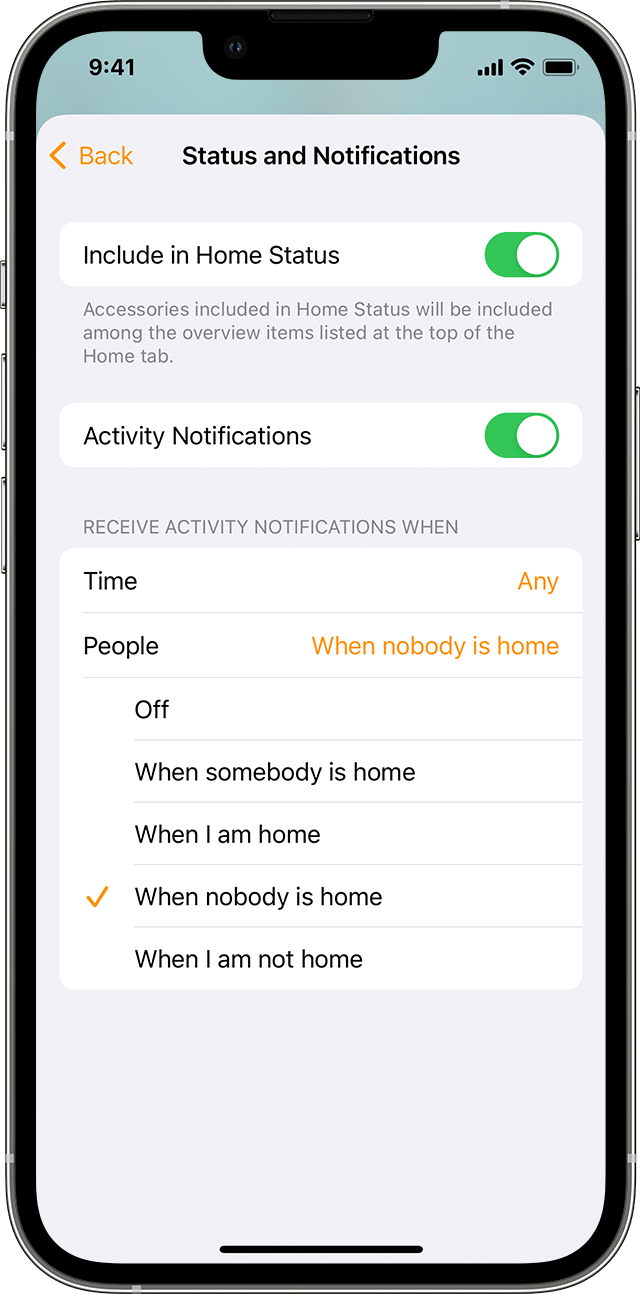


  • Open the Home app.
  • On an iPhone, iPad, or iPod touch, press and hold an accessory. On a Mac, double-click an accessory.
  • Scroll down and select Status and Notifications. Turn on Allow Notifications, then choose from these options:
    • Time: Set a time that you want to get alerts for your accessory.
    • People: Get alerts for the accessory when you or someone arrives or leaves your house. If you choose this option, you need to set up a home hub and make sure that everyone who can control your home has Share My Location turned on and has a primary iOS or iPadOS device selected in Settings > [your name] > Find My > Share My Location.
  • Tap or click BackBackin the upper-left corner, then Done.


To get notifications for your HomeKit accessories while you're not home, set up a home hub.


To see notifications that you set up in the Home app on more than one device, you need to set up notifications on each device."


We hope this information helps out.


Take care!

Similar questions

1 reply
Question marked as Top-ranking reply

Mar 30, 2022 2:10 PM in response to bondard98

Hey bondard98,


We understand you're wanting your newly installed door sensor to only notify you when the door opens when you're away from home. You have reached an English community here though and we're unable to translate what's shown in your screenshot, but let's go ahead and go through the steps in the "Get alerts at a certain time or when someone arrives or leaves" section of the following resource: Get notifications for your HomeKit accessories


"Get alerts at a certain time or when someone arrives or leaves

You can customize notifications for your HomeKit accessories to alert you at specific times and based on who's present in your home.


  • Open the Home app.
  • On an iPhone, iPad, or iPod touch, press and hold an accessory. On a Mac, double-click an accessory.
  • Scroll down and select Status and Notifications. Turn on Allow Notifications, then choose from these options:
    • Time: Set a time that you want to get alerts for your accessory.
    • People: Get alerts for the accessory when you or someone arrives or leaves your house. If you choose this option, you need to set up a home hub and make sure that everyone who can control your home has Share My Location turned on and has a primary iOS or iPadOS device selected in Settings > [your name] > Find My > Share My Location.
  • Tap or click BackBackin the upper-left corner, then Done.


To get notifications for your HomeKit accessories while you're not home, set up a home hub.


To see notifications that you set up in the Home app on more than one device, you need to set up notifications on each device."


We hope this information helps out.


Take care!

This thread has been closed by the system or the community team. You may vote for any posts you find helpful, or search the Community for additional answers.

HomeKit notification while away

Welcome to Apple Support Community
A forum where Apple customers help each other with their products. Get started with your Apple Account.