Exchange calendar not syncing in macOS Monterey 12.3

Every since upgrading to macOS Monterey 12.3, I'm having trouble with syncing my Exchange calendar in the native Calendar app. Note: by Exchange calendar, I mean the Office 365 calendar, a service my university subscribes to.


I am able to add the calendar to the native application and events do show up. But it seems that soon after that, it stops syncing and new events will not show even with a forced refresh.


Any ideas what to do? Is this is bug?

MacBook Pro with Touch Bar

Posted on Mar 31, 2022 4:13 AM

Reply
Question marked as Top-ranking reply

Posted on Apr 20, 2022 5:34 AM

I also have this problem, and it's probably because Office365/Azure indicates my time zone as +1 (CET) instead of +2 (CEST). In my case, manually adjusting the time zone in Office365 was the solution. I adjusted the time zone to something that corresponded to my situation (in my case, I adjusted the time zone from Amsterdam (+1) to Athens (+2).


After deactivating/activating the account including a restart of macOS 12.3.1, everything works properly again!

74 replies
Question marked as Top-ranking reply

Apr 20, 2022 5:34 AM in response to thauxley

I also have this problem, and it's probably because Office365/Azure indicates my time zone as +1 (CET) instead of +2 (CEST). In my case, manually adjusting the time zone in Office365 was the solution. I adjusted the time zone to something that corresponded to my situation (in my case, I adjusted the time zone from Amsterdam (+1) to Athens (+2).


After deactivating/activating the account including a restart of macOS 12.3.1, everything works properly again!

Aug 24, 2022 5:29 PM in response to thauxley

I've been having the same issue on Monterey 12.5.1. I changed the Exchange calendar to sync every 1 minute instead of "push" which seems to work around the problem.


The preference setting can be found by going to: Calendar->Preferences->Accounts. Select your Exchange account and change the "Refresh Calendars" setting from "Push" to "Every minute". There are also options for 5, 15, 30 minutes or hourly.

Sep 19, 2022 3:20 PM in response to AZMomto3

Well, if you aren't comfortable using the Terminal application then you might want to hold off trying. This is a command line application on your Mac and putting in the wrong lines of code could cause problems in your operating system (even though you'd need to know what those wrong lines are.)


The easiest fix would be to restart the Mac when you notice the exchange calendar isn't syncing, a restart will get the calendar agent running again.


Are you running the newest version of Mac OS 12.6? The Mac I'm having the issue on is updating right now and sounds like what was broken has been fixed in 12.6.


BUT if you want to try this Terminal fix to turn the calendar sync off, and then turn it back on again, its pretty simple.


The Terminal app lives in your Utilities application folder: /System/Applications/Utilities/Terminal.app


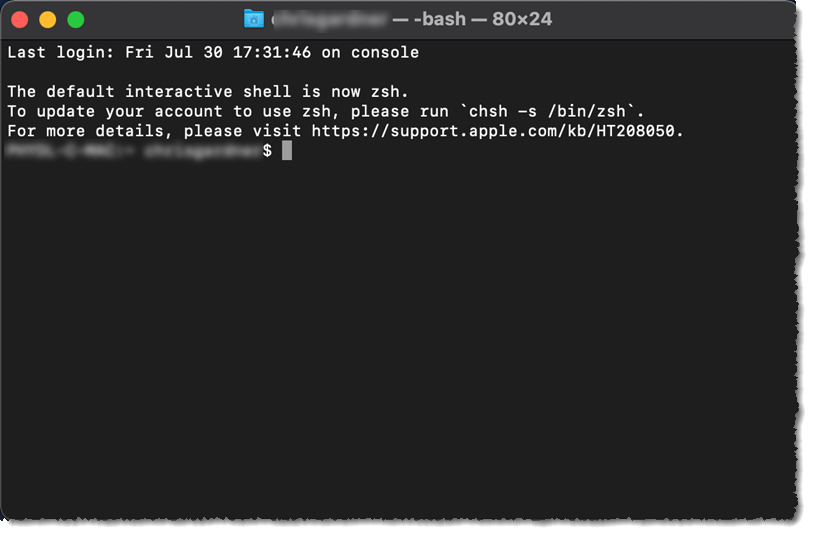
Below is attached an image I found online of what the application looks like after it opens. The blurred text will a combination of your computer name and your user name. After the $ is a gray cursor spot.


Once you have the application open, come back to the page and copy (CMD C) this line of code:

launchctl stop com.apple.CalendarAgent


Go back to Terminal and hit CMD V (Paste) and then hit enter.

You'll see that original first line of your computer and user name $ and gray cursor again. That will be the only acknowledgment that it was done correctly. If you get a message/error than the code line was not copy or pasted correctly. What this has done was shut down the running service in the background that is responsible for syncing new items when they come in, deleated or updated.


Come back to this page and copy this second line of code:

launchctl start com.apple.CalendarAgent


Go back to Terminal and paste this line of code in and hit enter. Again it will just show the cursor line to acknowledge that the code was accepted. If you know there was a calendar item that wasn't showing up on your Mac (say you can see it on your iPhone) then after these two steps above you should see that the calendar has updated.


Congrats, you did your first command line fix!


Dec 5, 2022 4:31 PM in response to thauxley

I also discovered that the com.apple.CalendarAgent service no longer exists - but I'm only on Monterey 12.6.1 (21G217) .

Anyway, after reading the above from salappsupp and commanderclif_me, and poking around in the process list, I tried:


ps -ax | grep CalNCService.xpc

(find the process ID <id>)

kill <id>


something-or-another will immediately spawn a new CalNCService instance.


Worked for me - my missing meetings reappeared.


I think. Or maybe i've just been grasping at so many straws, something else did it...

May 16, 2022 12:09 PM in response to corona2515

The only thing that resolves it for me is deleting the calendar cache files, and forcing it to rebuild from scratch. And even then, it only fixes for a few hours. Likewise, this is not an issue on my other Mac on 12.1, or my two iOS devices - only the Mac on MacOS 12.3.1.


I actually can't get the CalendarAgent process to terminate regardless of what I do - via terminal or a force quit in activity monitor. So it seems to have a crash-inducing bug that is critically bad.


Definitely a very frustrating bug. Made even worse that this came on with whatever changes were made for 12.3, and also how common exchange-based calendars are.

Aug 25, 2022 9:11 AM in response to awarrumbungle01

I use vi/vim for editing, which is painful to learn. I would suggest using nano.


Open Terminal


Type:


env EDITOR=nano crontab -e


Enter that text I have in my reply:


0 * * * *       launchctl stop com.apple.CalendarAgent && launchctl start com.apple.CalendarAgent


Hit control-x. It will ask you if you want to save. Press y to save. It will then ask you where to save. Just hit return here. If you did everything right it should drop you back into the shell with a "crontab: installing new crontab" message.


Hope this helps! It's the only working solution for me so far.

This thread has been closed by the system or the community team. You may vote for any posts you find helpful, or search the Community for additional answers.

Exchange calendar not syncing in macOS Monterey 12.3

Welcome to Apple Support Community
A forum where Apple customers help each other with their products. Get started with your Apple Account.
