
cannot send messages on macbook air
I can send text messages from my iphone but can no longr send them from my laptop, MacBook Air
MacBook Air 13″, OS X 10.10
I can send text messages from my iphone but can no longr send them from my laptop, MacBook Air
MacBook Air 13″, OS X 10.10
Hi Peeglet,
Is this issue affecting only text/SMS messages, or are you unable to send iMessages as well?
If the issue is only with SMS, you might need to set up text message forwarding from your iPhone with these steps. How to forward SMS/MMS text messages from your iPhone to your iPad, iPod touch or Mac:
"Set up text message forwarding

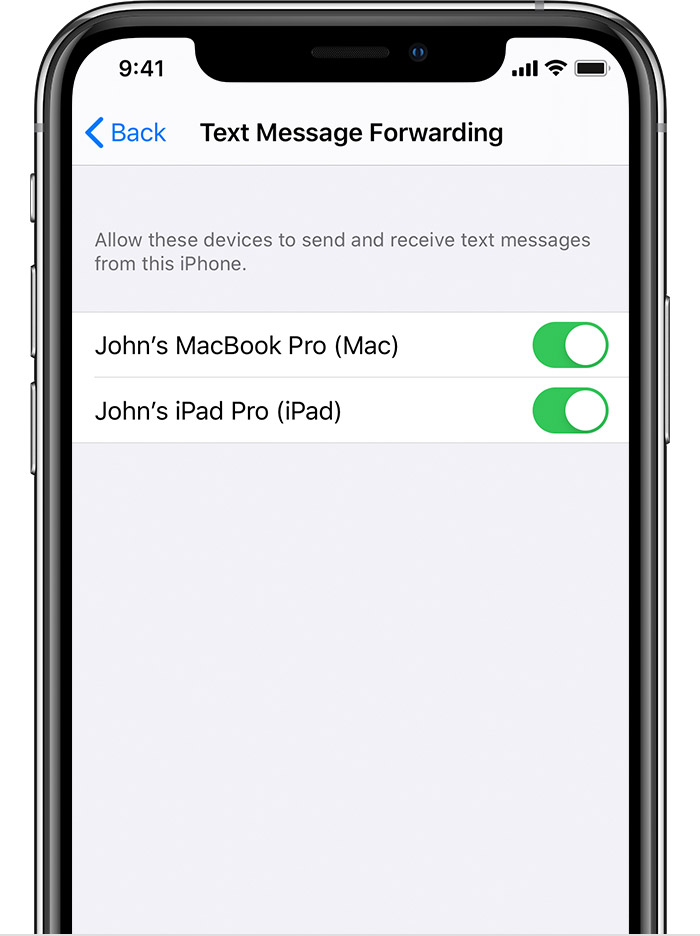
As long as your iPhone is turned on and connected to Wi-Fi or a cellular network, new SMS/MMS texts can be sent and received on the devices that you added.
iCloud now keeps your entire messages history updated and available on all your devices — even when you set up a new device. Learn how to keep all your messages in iCloud.
* Don't see the Text Message Forwarding setting on your iPhone? Go to Settings > Messages, turn off iMessage, turn it back on, tap Send & Receive, tap Use Your Apple ID for iMessage, then sign in with the same Apple ID used on your other devices."
Let us know if that helps, and have a good one.
Hi Peeglet,
Is this issue affecting only text/SMS messages, or are you unable to send iMessages as well?
If the issue is only with SMS, you might need to set up text message forwarding from your iPhone with these steps. How to forward SMS/MMS text messages from your iPhone to your iPad, iPod touch or Mac:
"Set up text message forwarding
As long as your iPhone is turned on and connected to Wi-Fi or a cellular network, new SMS/MMS texts can be sent and received on the devices that you added.
iCloud now keeps your entire messages history updated and available on all your devices — even when you set up a new device. Learn how to keep all your messages in iCloud.
* Don't see the Text Message Forwarding setting on your iPhone? Go to Settings > Messages, turn off iMessage, turn it back on, tap Send & Receive, tap Use Your Apple ID for iMessage, then sign in with the same Apple ID used on your other devices."
Let us know if that helps, and have a good one.
cannot send messages on macbook air

