Apple Article: About the read-only system volume in macOS Catalina

It states "macOS Catalina runs on a dedicated, read-only system volume called Macintosh HD. This volume is completely separate from all other data to help prevent the accidental overwriting of critical operating system files. Your files and data are stored in another volume named Macintosh HD - Data."


My Q- If this is so, why do I still find all my data files when I search Folders in the HD Icon on my Desktop? Yet, that HD is seen as the first HD (with System files only) in Disk Utility per the quote from the Apple article above.

MacBook Pro 15″, macOS 10.15

Posted on Apr 17, 2022 7:30 AM

Reply
Question marked as Top-ranking reply

Posted on Apr 17, 2022 10:03 AM

Al_Chance wrote:

It states "macOS Catalina runs on a dedicated, read-only system volume called Macintosh HD. This volume is completely separate from all other data to help prevent the accidental overwriting of critical operating system files. Your files and data are stored in another volume named Macintosh HD - Data."

My Q- If this is so, why do I still find all my data files when I search Folders in the HD Icon on my Desktop? Yet, that HD is seen as the first HD (with System files only) in Disk Utility per the quote from the Apple article above.


The Desktop icon "presents as" Macintosh HD in reality it is your " Macintosh HD- Data" as well.


this is normal..

it is designed to make it less confusing...not more confusing simplifying the interaction...


You can see from the Terminal.app all Volumes, copy and paste:

diskutil list internal


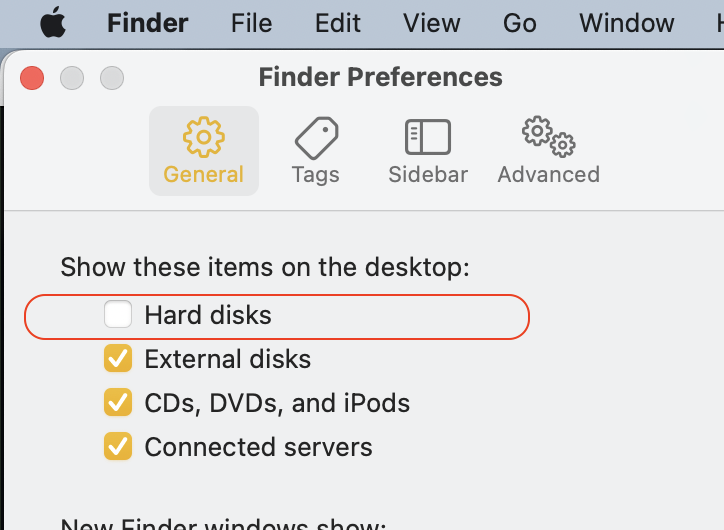
the Desktop icon is a bit of a throw back, a nod to older operating system for nostalgic reason—it does not have to be there taking up valuable screen real estate. You can remove it from the Desktop

Finder>Preferences>General


Get to know the Finder on your Mac

Get to know the Finder on your Mac - Apple Support


See and organize your files in the Finder on Mac - Apple ...

Organize your files in the Finder on Mac - Apple Support


Similar questions

1 reply
Question marked as Top-ranking reply

Apr 17, 2022 10:03 AM in response to Al_Chance

Al_Chance wrote:

It states "macOS Catalina runs on a dedicated, read-only system volume called Macintosh HD. This volume is completely separate from all other data to help prevent the accidental overwriting of critical operating system files. Your files and data are stored in another volume named Macintosh HD - Data."

My Q- If this is so, why do I still find all my data files when I search Folders in the HD Icon on my Desktop? Yet, that HD is seen as the first HD (with System files only) in Disk Utility per the quote from the Apple article above.


The Desktop icon "presents as" Macintosh HD in reality it is your " Macintosh HD- Data" as well.


this is normal..

it is designed to make it less confusing...not more confusing simplifying the interaction...


You can see from the Terminal.app all Volumes, copy and paste:

diskutil list internal


the Desktop icon is a bit of a throw back, a nod to older operating system for nostalgic reason—it does not have to be there taking up valuable screen real estate. You can remove it from the Desktop

Finder>Preferences>General


Get to know the Finder on your Mac

Get to know the Finder on your Mac - Apple Support


See and organize your files in the Finder on Mac - Apple ...

Organize your files in the Finder on Mac - Apple Support



This thread has been closed by the system or the community team. You may vote for any posts you find helpful, or search the Community for additional answers.

Apple Article: About the read-only system volume in macOS Catalina

Welcome to Apple Support Community
A forum where Apple customers help each other with their products. Get started with your Apple Account.