Not able to enable Internet Sharing

Internet sharing doesn't get enabled even when I tick the check box and click start to share internet over wifi. The sharing symbol which used to come instead of wifi doesn't appear even when the green light saying " Internet sharing: On " appears. Kindly share your feedback regarding this issue.

MacBook Air 13″, macOS 12.3

Posted on Apr 20, 2022 3:01 AM

Reply
Question marked as Top-ranking reply

Posted on Apr 20, 2022 4:21 AM

1 - Suggest restarting in Safe Mode. This will perform a Disk Repair, clear cache files and only load Apple Software, extensions and fonts. The boot up will be slow and can take some time - Normal.


2 - Sometimes a Safe Boot followed by a Normal Boot will just put things right.


3 - Does the issue present in this mode ?


4 - If not - there could be something in the main User Account playing up. To further isolate this - Set up users, guests, and groups on Mac. Then log out of the Main User account and log into the dummy account and test again if the issue persists.


5 - If the issue is present in the dummy account - then, this appears to be a System Wide issue on the computer.


6 - If after performing each of the above steps is the order that have been presents  and still hav issues - please advise for possible further assistance.


7- Suggest downloading the Application Etrecheck directly from a well Respected ASC Contributor. And Safe to use.


The application is free or paid from added features. 


Run the application with Full Disc Access ( Security & Privacy - Full Disc Access ).
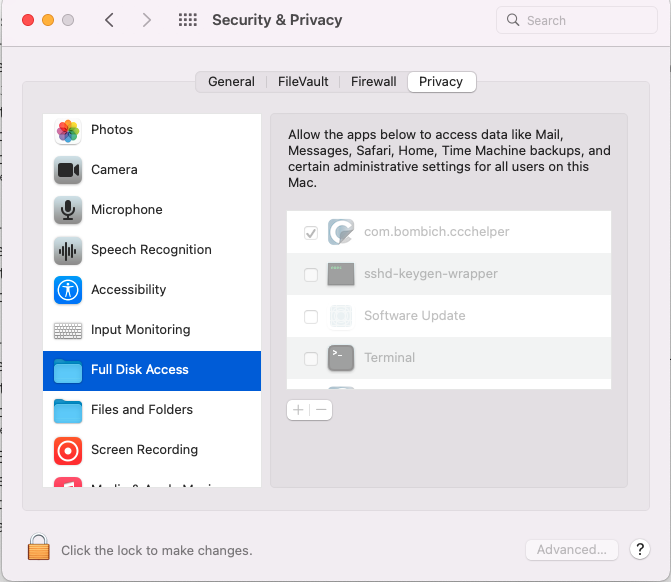


It will take a Snap Shot -  both the hardware and software.


 The Report will Not Reveal Any Personal Information. 


Post back the Full Report - copy and paste - using the Additional Text Icon ( 3rd Icon to last )
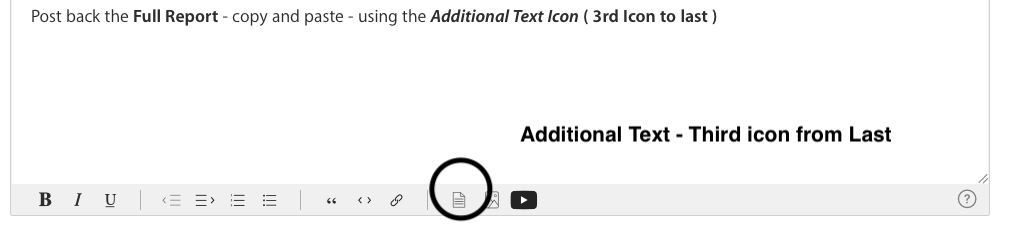


We can have a look at the report for possible issues and may have possible suggestions to resolve the issues.


Any Third Party Applications that will interfere with the normal operation of the OS, alter, modify, remove or delete or attempt to do so is an invitation for disaster and may require a Reinstallation of the OS in-order to replace any modified, altered, removed or corrupted elements of the OS this software has inflected on this computer 


Although some or all of these Applications maybe available on the Apple Apps Store, it does not mean Apple has verified what exactly the Application can do, does do or is doing to the Computer. That responsibility is left to the User to perform their due diligence on the Application before purchasing and installing it.


Any of the below should be removed as per Developers Instructions 


This includes AntiVirus, Disk Cleaners, Disk Optimizes, UnInstaller etc.


This will include CleanMyMac , This will include BitDefender


This will included Norton Antivirus , Sophos Av Software


Intego AntiVirus, McAfee, MacKeeper, Avast AntiVirus


Ad Guard, Webroot


The The Built in Security  is all that is required.

4 replies
Question marked as Top-ranking reply

Apr 20, 2022 4:21 AM in response to harshvardhan145

1 - Suggest restarting in Safe Mode. This will perform a Disk Repair, clear cache files and only load Apple Software, extensions and fonts. The boot up will be slow and can take some time - Normal.


2 - Sometimes a Safe Boot followed by a Normal Boot will just put things right.


3 - Does the issue present in this mode ?


4 - If not - there could be something in the main User Account playing up. To further isolate this - Set up users, guests, and groups on Mac. Then log out of the Main User account and log into the dummy account and test again if the issue persists.


5 - If the issue is present in the dummy account - then, this appears to be a System Wide issue on the computer.


6 - If after performing each of the above steps is the order that have been presents  and still hav issues - please advise for possible further assistance.


7- Suggest downloading the Application Etrecheck directly from a well Respected ASC Contributor. And Safe to use.


The application is free or paid from added features. 


Run the application with Full Disc Access ( Security & Privacy - Full Disc Access ).


It will take a Snap Shot -  both the hardware and software.


 The Report will Not Reveal Any Personal Information. 


Post back the Full Report - copy and paste - using the Additional Text Icon ( 3rd Icon to last )


We can have a look at the report for possible issues and may have possible suggestions to resolve the issues.


Any Third Party Applications that will interfere with the normal operation of the OS, alter, modify, remove or delete or attempt to do so is an invitation for disaster and may require a Reinstallation of the OS in-order to replace any modified, altered, removed or corrupted elements of the OS this software has inflected on this computer 


Although some or all of these Applications maybe available on the Apple Apps Store, it does not mean Apple has verified what exactly the Application can do, does do or is doing to the Computer. That responsibility is left to the User to perform their due diligence on the Application before purchasing and installing it.


Any of the below should be removed as per Developers Instructions 


This includes AntiVirus, Disk Cleaners, Disk Optimizes, UnInstaller etc.


This will include CleanMyMac , This will include BitDefender


This will included Norton Antivirus , Sophos Av Software


Intego AntiVirus, McAfee, MacKeeper, Avast AntiVirus


Ad Guard, Webroot


The The Built in Security  is all that is required.

This thread has been closed by the system or the community team. You may vote for any posts you find helpful, or search the Community for additional answers.

Not able to enable Internet Sharing

Welcome to Apple Support Community
A forum where Apple customers help each other with their products. Get started with your Apple Account.