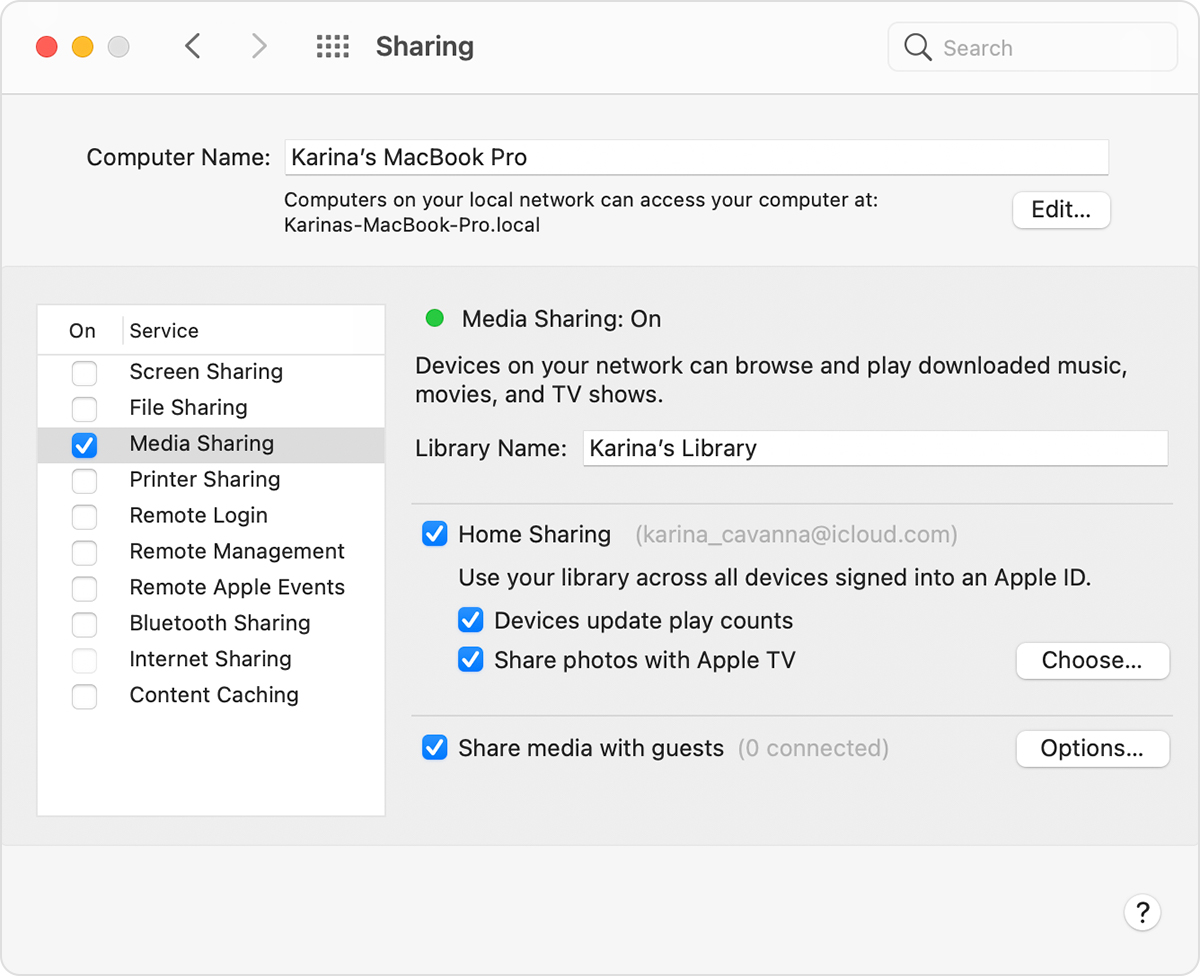
home sharing is on the computer and tv but no libraries.

IMac is running OS 12.3.1 and Apple TV is running 15.4.1 both up-to date and have the same Apple ID and password connected by Ethernet but Apple TV says no libraries available, I have restarted both the iMac and Apple TV more than twice still no libraries, there’s something I am missing any help been at it for over two hours.Thanks.

Apple TV HD, tvOS 14

Posted on Apr 30, 2022 4:41 AM

Reply
Question marked as Top-ranking reply

Posted on May 1, 2022 8:22 AM

Hello George,


Thanks for choosing the Apple Support Communities. Let's try these steps to successfully set up and use Home Sharing between your iMac and Apple TV.


Use Home Sharing to share media from a computer to other devices - Apple Support


"Before you set up Home Sharing

Apps and features might vary by country or region. Learn more about what's available in your country or region.


Set up Home Sharing on your Mac

  1. Choose Apple menu  > System Preferences.
  2. Click Sharing.
  3. Click Media Sharing.
  4. Select Home Sharing and sign in with your Apple ID. Use the same Apple ID for every computer or device on your Home Sharing network.
  5. Click Turn On Home Sharing.


Use Home Sharing on your Apple TV

To use Home Sharing to access your computer's media library on your Apple TV, sign in to Home Sharing on your Apple TV:

  1. Go to Settings > Users and Accounts > Home Sharing.
  2. Select Turn on Home Sharing.
  3. Sign in with your Apple ID. Use the same Apple ID for every computer or device on your Home Sharing network.

After you sign in, follow these steps to access your computer's media library on your Apple TV: 

  1. Connect your Apple TV to the same Wi-Fi network as your computer.
  2. On your computer, open the Music app, Apple TV app, or iTunes for Windows.
  3. On your Apple TV, go to the Home screen, select Computers, and choose a shared library.

You can also view photos from your computer on your Apple TV.

  • On your Mac: Choose Apple menu  > System Preferences. Click Sharing. Click Media Sharing, then select Share Photos with Apple TV.
  • On your PC: Open iTunes for Windows. In the menu bar, go to File > Home Sharing, then select Choose Photos to Share with Apple TV."


Cheers!


1 reply
Question marked as Top-ranking reply

May 1, 2022 8:22 AM in response to George Hilton

Hello George,


Thanks for choosing the Apple Support Communities. Let's try these steps to successfully set up and use Home Sharing between your iMac and Apple TV.


Use Home Sharing to share media from a computer to other devices - Apple Support


"Before you set up Home Sharing

Apps and features might vary by country or region. Learn more about what's available in your country or region.


Set up Home Sharing on your Mac

  1. Choose Apple menu  > System Preferences.
  2. Click Sharing.
  3. Click Media Sharing.
  4. Select Home Sharing and sign in with your Apple ID. Use the same Apple ID for every computer or device on your Home Sharing network.
  5. Click Turn On Home Sharing.


Use Home Sharing on your Apple TV

To use Home Sharing to access your computer's media library on your Apple TV, sign in to Home Sharing on your Apple TV:

  1. Go to Settings > Users and Accounts > Home Sharing.
  2. Select Turn on Home Sharing.
  3. Sign in with your Apple ID. Use the same Apple ID for every computer or device on your Home Sharing network.

After you sign in, follow these steps to access your computer's media library on your Apple TV: 

  1. Connect your Apple TV to the same Wi-Fi network as your computer.
  2. On your computer, open the Music app, Apple TV app, or iTunes for Windows.
  3. On your Apple TV, go to the Home screen, select Computers, and choose a shared library.

You can also view photos from your computer on your Apple TV.

  • On your Mac: Choose Apple menu  > System Preferences. Click Sharing. Click Media Sharing, then select Share Photos with Apple TV.
  • On your PC: Open iTunes for Windows. In the menu bar, go to File > Home Sharing, then select Choose Photos to Share with Apple TV."


Cheers!


This thread has been closed by the system or the community team. You may vote for any posts you find helpful, or search the Community for additional answers.

home sharing is on the computer and tv but no libraries.

Welcome to Apple Support Community
A forum where Apple customers help each other with their products. Get started with your Apple Account.