iPhone 12 Pro iOS 15.4.1 not focusing

I previously loved using my iPhone for all my photography needs and looked forward to this one as it offered a better telephoto lens than the SE; however, it does not focus. I brought it into the Apple store and the "genius" ran tests, all of which showed the hardware to be fine. I explained the issue and he looked through the lens and said it looked fine to him. I explained again that it was not focusing outside when trying to get close-ups, nor when trying to videotape birds in motion. I asked to see a manager and he said it must be software related and erased my phone and restored it. For a few days it worked, then it again reverted to fuzzy close-ups and inability to remain focused in motion. Tapping the screen does not work when this occurs. Locking it in will ultimately work, but by then the opportunity is gone, the immediacy of the shot destroyed. I can't believe Apple hasn't addressed this issue as it is foundational to their product. Photos are of a rose bush (notice that the fence above is in focus), and screenshots from a video of an eagle (parts of the video are in focus, as seen in one screenshot, but then focus is lost for large segments)

Posted on May 2, 2022 12:00 AM

Reply
2 replies

May 2, 2022 5:52 PM in response to LinderDono

Adjust the camera’s focus and exposure

Before you take a photo, the iPhone camera automatically sets the focus and exposure, and face detection balances the exposure across many faces. If you want to manually adjust the focus and exposure, do the following:

  1. Tap the screen to show the automatic focus area and exposure setting.
  2. Tap where you want to move the focus area.
  3. Next to the focus area, drag  up or down to adjust the exposure.
  4. To lock your manual focus and exposure settings for upcoming shots, touch and hold the focus area until you see AE/AF Lock; tap the screen to unlock settings.


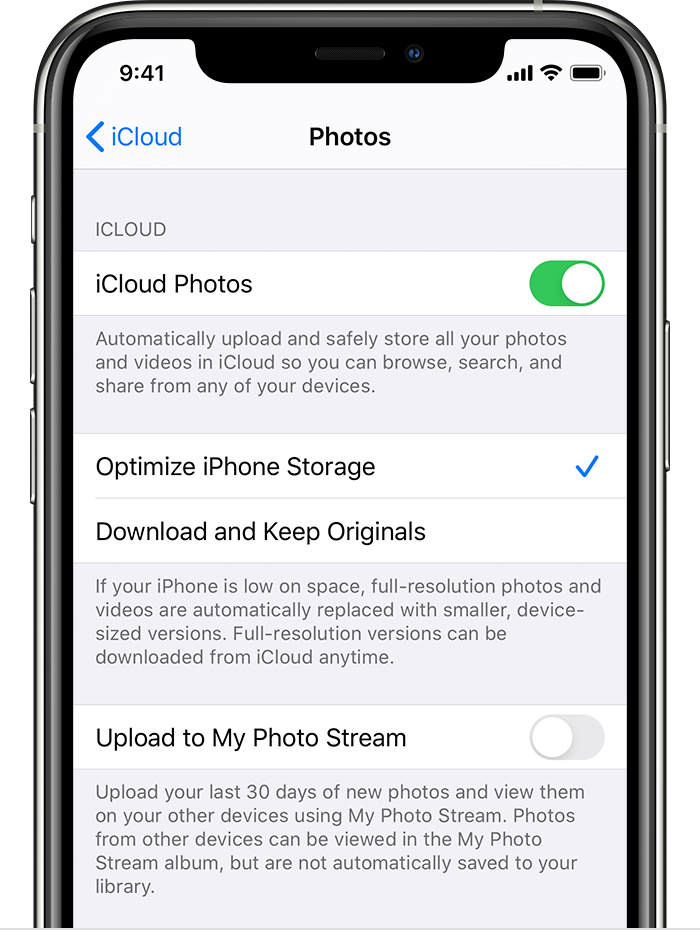
If your Photos and Videos are stored in iCloud and you share it before downloading the original then it may appear blurry but it is not.


Your photos and videos are stored on your device in their original, high-resolution version. This means that they use a lot of space on your iPhone, iPad, and iPod touch. With iCloud Photos, you can make more space available on your device and have your entire collection, everywhere you go.

Get started with iCloud Photos:

  1. Tap Settings > [your name] > iCloud > Photos.
  2. Turn on iCloud Photos.
  3. Select Optimize iPhone Storage to save space on your device.

With Optimize Storage, smaller, space-saving photos and videos are kept on your device while all of your original, full-resolution versions are stored in iCloud. And as long as you have enough space in iCloud, you can store as many photos and videos as you want.


May 2, 2022 7:08 PM in response to SravanKrA

Thanks for writing "touch and hold the focus area until you see AE/AF Lock" because I have been trying to press harder on the screen, believing that the protective film might be interfering with the touch. I just tried holding my finger on it for a bit and it worked. What you said about the blurry photo doesn't apply as the area on the outer edge, the wire fence, is in focus. Perhaps the lock was on at that distance? Also, can you address why the camera is unable to maintain focus on a moving subject, such as a plane or a bird? Thank you for writing. I do all the things you mention, but tapping the screen does not cause it to focus and I sometimes put my finger next to the flower bud to make it focus on it and it will until I move my finger away - even though they are both at the same exact distance from the lens. Clearly the software is disregarding what I'm pointing the lens at and tapping my finger on - perhaps the software needs to be taught that not all subjects are human faces or fingers.

This thread has been closed by the system or the community team. You may vote for any posts you find helpful, or search the Community for additional answers.

iPhone 12 Pro iOS 15.4.1 not focusing

Welcome to Apple Support Community
A forum where Apple customers help each other with their products. Get started with your Apple Account.