Finder Favorites Disappear

Every couple weeks folders in my finder sidebar disappear. Brand new computer, have reinstalled Monteray 12.3.1 but it still happens. It currently seems to be my google drive folders randomly disappearing. They were there this morning and now all of a sudden they are gone. This file "com.apple.finder.plist" is not on my computer to delete. Anyone know what is going on?

Posted on May 4, 2022 11:26 AM

Reply
Question marked as Top-ranking reply

Posted on Oct 17, 2022 3:32 AM

A few months late but I think I finally found the solution to this annoying issue of Google Drive folders disappearing from Favorites in Finder.


Same like Wazza_Mac and josiahpierce I've found the solution is to change the My Drive syncing options from 'Stream files' to 'Mirror files'.


I can confirm that now it's been 7-8 weeks after I changed the settings on mine, and all my Google Drive folders in Finder Favourites are still there - even after restarts and shut downs :)


I'm guessing with the 'Stream files' option, GDrive constantly purge the offline folders in the Mac, hence why they keep disappearing from Favourites. The 'Mirror files' option takes more space in your Mac as it will mirror everything in your GDrive, but it will solve this issue (and I believe the old Backup & Sync used to default to mirror mode anyway).

Similar questions

64 replies
Question marked as Top-ranking reply

Oct 17, 2022 3:32 AM in response to gagner

A few months late but I think I finally found the solution to this annoying issue of Google Drive folders disappearing from Favorites in Finder.


Same like Wazza_Mac and josiahpierce I've found the solution is to change the My Drive syncing options from 'Stream files' to 'Mirror files'.


I can confirm that now it's been 7-8 weeks after I changed the settings on mine, and all my Google Drive folders in Finder Favourites are still there - even after restarts and shut downs :)


I'm guessing with the 'Stream files' option, GDrive constantly purge the offline folders in the Mac, hence why they keep disappearing from Favourites. The 'Mirror files' option takes more space in your Mac as it will mirror everything in your GDrive, but it will solve this issue (and I believe the old Backup & Sync used to default to mirror mode anyway).

Jan 25, 2023 3:16 PM in response to mdgale

I'm on ventura, but its been happening to me since probably big sur, especially after I was forced to migrate from google stream to google drive, then things really got screwed up.


As far as I can tell, Finder is cued to reindex the directories in the finder.plist when certain events happen. A few examples are when directories are deleted and filesystems are unmounted. So if the file/directory isn't accessible, the favourite is removed.


It's annoying and manual, but if you make a symlink to a specific file or folder inside of google drive:

ln -s ~/Google\ Drive/My\ Drive/reports ~/reports

...and drag that symlink you created to your favourites. That directory will always remain and Finder wont purge it.

I'm a programmer so I wrote a little script to repopulate the favourites list, but it requires more setup than is reasonable. I'm working on making it simpler so you can just run it and it takes care of everything.

Oct 19, 2022 12:35 PM in response to josiahpierce

In addition to Josiah's post above, I can confirm that making aliases of the Google directories, and then putting those aliases in your favourites (as opposed to the originals) ALSO works. I've been split testing this by using a mixture of aliases alongside original Google directories in my favourites. This morning all the original Google directories disappeared (as per the problem we've all been experiencing), but the aliases remained and continue to work.

Nov 6, 2022 6:37 AM in response to Old Toad

@Old-Toad No, that's not what we're missing; there has been a known problem with MacOS and Google Drive.


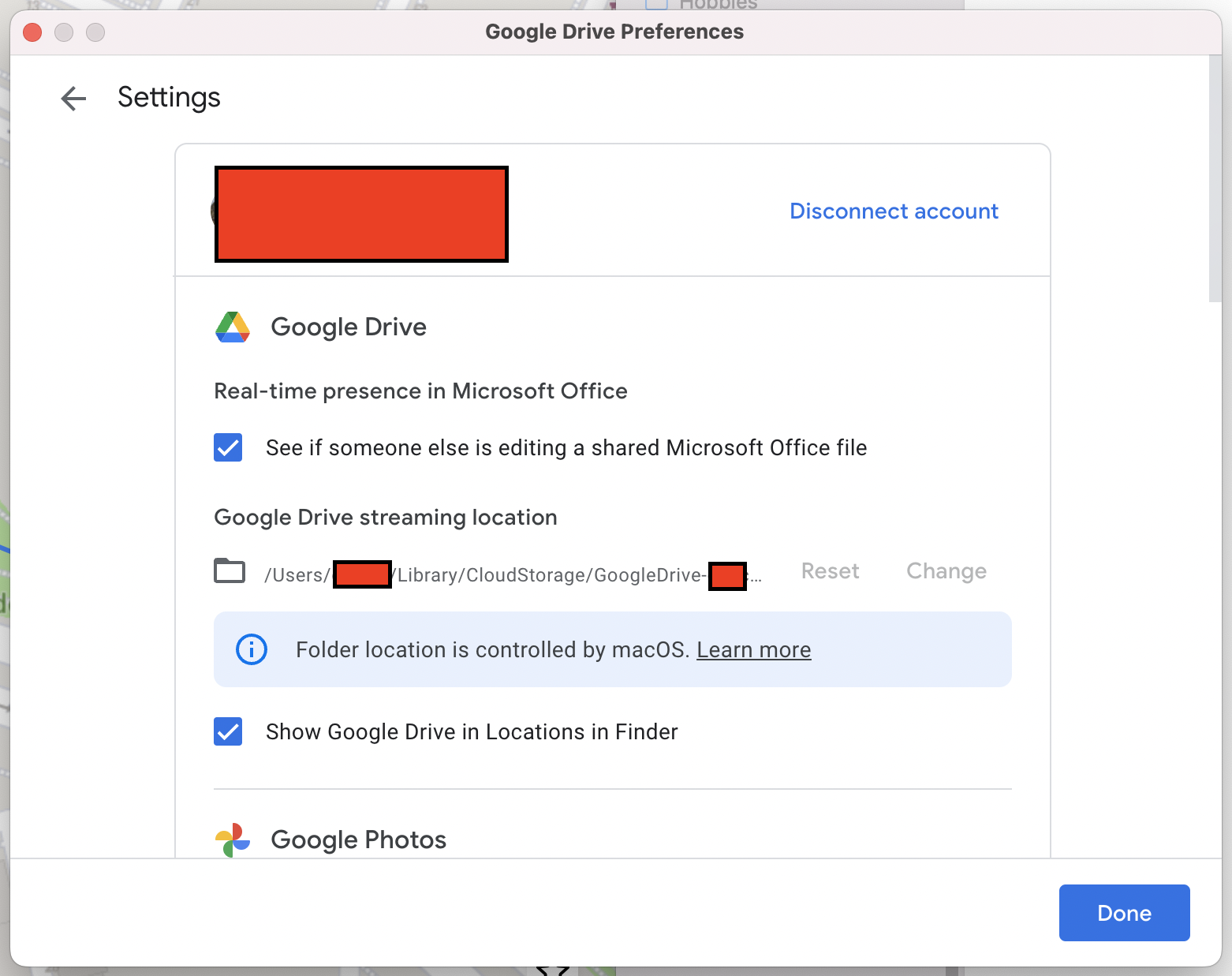
My experience has been fixed for the last couple of weeks, solution/checks below. I received a prompt from the Google Drive app one day, saying that due to an update (MacOS or Google Drive app -I can't remember which) that my Google Drive files would be moved to a new location on my 'Macintosh HD' (SSD, obviously). The prompt mentioned something about compatibility which got me hopeful for a fix. Since then I have not had any of my Google Drive shortcuts removed from my Favourites in Finder. It looks like Google/Apple found a way to keep Google Drive and Finder reliably in sync each time we run our MacOS. Hurrah!


I'm on Monterey 12.5.1 and Google Drive 66.0.3.0 if that helps, M1 Macbook Pro 2021.


TLDR: An update to Google Drive (and/or) MacOS fixed this for me; it involved a prompt telling me my Google Drive files would be moved from one location on my Macintosh HD to another. Screenshot below.


The new location looks like: /Users/macos-username/Library/CloudStorage/google-email-address


I don't recall what the previous location was, and I don't care. Everything works reliably. My preferences have Google Drive set to Streaming files, which is exactly how I'd like things. Screenshot below shows that I can no longer change the storage location on my Macintosh HD for the 'streaming location.' I believe this location could be changed before the update, though I couldn't care less if this has fixed the problem. It's difficult to recall, but this combination of updates likely happened 3-4 weeks ago.

Aug 11, 2022 5:07 AM in response to gagner

I think I have found a solution. It has been working for about a week now.

You create local aliases to the desired drive or drive folder and then drag them to the sidebar.

As a temporary solution, this is perfectly sufficient for me. The only drawback so far are the incorrect icons (file instead of folder).

If someone had a solution for that as well, you wouldn't even notice the difference.


Oct 19, 2022 9:14 AM in response to lileychristie

Hello all,


Wanted to confirm that mirroring your "My Drive" files is a fix for this issue. Some have commented that they primarily use Shared Drives. Mirroring files will also fix shared drive folders disappearing. I almost entirely use Shared Drives as well. Streamed and "available offline" folders do not disappear anymore. I am very excited to see this issue go away from my workflow.

Mar 11, 2023 9:40 AM in response to jayrancho

It's the booting into Safe Mode that's important because it does this:


NOTE 1: Safe Mode boot can take up to 3 - 5 minutes as it's doing the following; 

• Verifies your startup disk and attempts to repair directory issues, if needed

• Loads only required kernel extensions (prevents 3rd party kernel/extensions from loading)

• Prevents Startup Items and Login Items from opening automatically

• Disables user-installed fonts 

• Deletes font caches, kernel cache, and other system cache files


So boot into it and then reboot normally right away. Then test to see if the problem persists.

Aug 11, 2022 7:04 AM in response to mimagast

@mimagast, your reply just gave me an idea.


Type the following command into the terminal to create a symbolic link.


ln -s /Users/username/Google\ Drive/folder /Users/username/folder


This will create a symbolic link in the Home folder that points to a Google Drive folder. Drag the new folder to Favourites.


I haven't tried it long enough to check if it's working, but it is worth a try. Bonus: it shows a folder icon.

Aug 11, 2022 10:26 AM in response to samvdst

Have now created a link your way (directly to one of the desired subfolders) and it is indeed a folder icon displayed! In my case it looks like this:


ln -s /Users/[USER_NAME]/Google\ Drive/Shared\ drives/[FOLDER_NAME] /Users/[USER_NAME]/GoogleDrive/[FOLDER_NAME]


Let's see if that does not disappear with time ;). Then you can finally focus on the more important things in life again :D.

Oct 14, 2022 10:38 PM in response to Luis Sequeira1

THANK YOU Luis! I remember the bad old days when I actually had to have a weekly task backing up my sidebar.plist because it was getting screwed up so often. I assumed this was this case again when my favorites disappeared. I didn't even consider the fact that some other setting got screwed up and simply hid my favorites in EVERY window. But I stumbled across your answer and clicked the carrot and — boom! All my sidebar is back. Thanks for thinking *inside?* the box to save me a lot of extra effort. I'm sorry for anyone this didn't work for. I would still like to know where that setting is stored. Its clearly no longer in the sidebar.plist file.

Mar 10, 2023 4:45 PM in response to gagner

Boot into Safe Mode according to How to use safe mode on your Mac and test to see if the problem persists. Then reboot normally and test again. .


Note:  if you have a wireless keyboard with rechargeable batteries connect it with its charging cable before booting into Safe Mode.  This makes it act as a wired keyboard as will assure a successful boot into Safe Mode.


Mar 3, 2023 9:08 AM in response to gagner

It's very annoying, I agree. I believe I have found the file that stores the entries (in Ventura at-least...).


~/Library/Application Support/com.apple.sharedfilelist/com.apple.LSSharedFileList.FavoriteItems.sfl2


However, it's not a text file and would require manipulation but Apple have removed the ability with sfltool. :(


The only thing I can think of quickly, is to back this file up and have it copy across at every boot. It's not an ideal situation, as you would have to back it up every time you make a change to it. Which, in essence, isn't really that often for most people, I suppose...


I haven't tried this yet but I'm going to give it a shot as I'm sick of not only my NAS shares vanishing from Favorites, but the Desktop folder, of all things!!!!


This thread has been closed by the system or the community team. You may vote for any posts you find helpful, or search the Community for additional answers.

Finder Favorites Disappear

Welcome to Apple Support Community
A forum where Apple customers help each other with their products. Get started with your Apple Account.

