Finder Favorites Disappear

Every couple weeks folders in my finder sidebar disappear. Brand new computer, have reinstalled Monteray 12.3.1 but it still happens. It currently seems to be my google drive folders randomly disappearing. They were there this morning and now all of a sudden they are gone. This file "com.apple.finder.plist" is not on my computer to delete. Anyone know what is going on?

Posted on May 4, 2022 11:26 AM

Reply
Question marked as Top-ranking reply

Posted on Oct 17, 2022 3:32 AM

A few months late but I think I finally found the solution to this annoying issue of Google Drive folders disappearing from Favorites in Finder.


Same like Wazza_Mac and josiahpierce I've found the solution is to change the My Drive syncing options from 'Stream files' to 'Mirror files'.
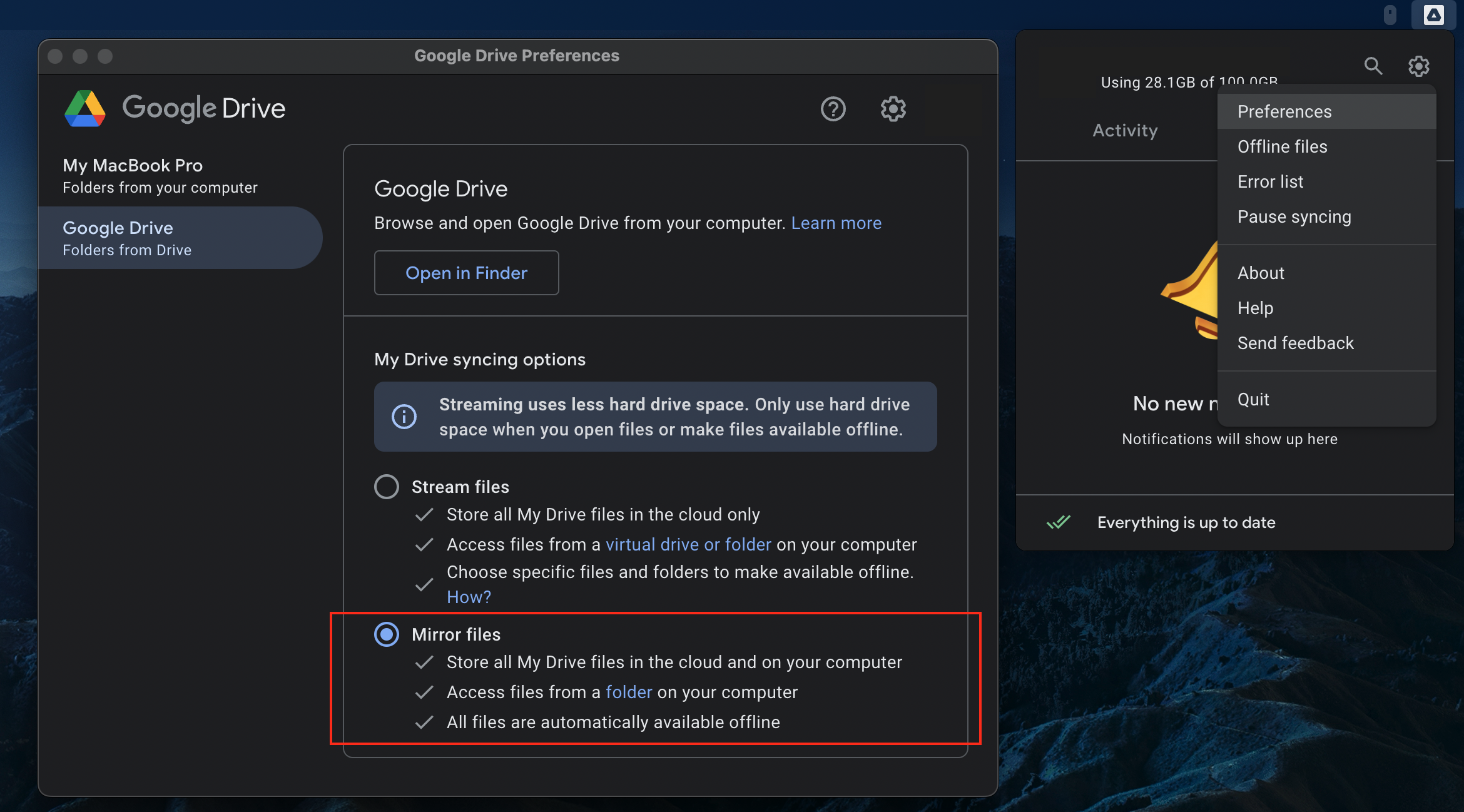


I can confirm that now it's been 7-8 weeks after I changed the settings on mine, and all my Google Drive folders in Finder Favourites are still there - even after restarts and shut downs :)


I'm guessing with the 'Stream files' option, GDrive constantly purge the offline folders in the Mac, hence why they keep disappearing from Favourites. The 'Mirror files' option takes more space in your Mac as it will mirror everything in your GDrive, but it will solve this issue (and I believe the old Backup & Sync used to default to mirror mode anyway).

Similar questions

64 replies

May 5, 2022 9:54 AM in response to gagner

Hi gagner,


You'll want to be sure your settings are correct with the help of the guide page here: Organize your files in the Finder on Mac


As you've isolated to Google Drive folders, check out some previous posts for helpful information or steps that may help using the links below.


Files/Folders Missing from Finder when using Google Drive FS on macOS


Google Drive in Finder Sidebar


Google drive disappeared from side bar


Dropbox / Google Drive Finder Integration Missing


Google Drive


How to Add Google Drive to Finder


Best.


Aug 2, 2022 1:18 PM in response to gagner

I'm having the same issue on both my computers, an iMac and a MacBook Pro, both running the latest version of Monterey. This has been going on for months (at least since march, it's now august), only for Google Drive folders as well.


Sometimes they will disappear when the computer is inactive (locked or off or sleeping), sometimes in the middle of working on something. When it happens while I work, all folders currently open on Finder tabs switch back to my home folder and the back button is disabled or just useless (keeps refreshing the same folder).

Aug 8, 2022 11:30 PM in response to jmwein

Same here, using M1 Macbook Pro and macOS Monterey 12.4. Only my Google Drive links in my Finder Favourites disappear, local shortcuts and my 'Google Drive' link remain. The problem is perhaps that Finder doesn't like/sync/find the folders in Google Drive and is unlinking them?


Question: Are we all using Google Drive app and using the 'Stream' option?


Is this happening to anyone using the other option in Google Drive where all files are stored locally? I am presuming there's a bug where Finder is deleting our Favourites link whilst Google Drive app is streaming/syncing folder statuses and Finder is not cool with that.

Oct 3, 2022 12:54 AM in response to kolosschumy

I've been testing the solution posted by mimagast about using aliases. So far it's working but it's a little early to say for sure as these Google drive favourites can sometimes remain in my sidebar for several months before they suddenly disappear.

I think the logic behind the solution is good though. Aliases that are located on your desktop are unlikely to disappear from your favourites in the same way that directories hosted in the cloud might. It's just a question of whether or not the alias continues to work if the link is broken.

Aug 6, 2022 9:45 AM in response to gagner

Same exact thing for me...i've noticed it for years and pretty much only with Google Drive. I'll add them to the bar and they will stay just a few days to maybe a week and then just disappear. The main Google Drive folder will stay there, but any shortcut to sub-folders will be gone...this is VERY annoying and I'd love for it to be solved. We are talking years in my instance, so pretty sure i'm not the only person with this issue...

May 9, 2022 9:09 AM in response to OrigamiFan1

Hi, I am also having this problem. None of the suggested links above address the problem. I went through my Google Drive and chose subfolders that I use often for projects and drag them into the sidebar as favorites in Finder. Then a week, maybe two weeks later all of these favorites disappear and I have to do it all over again. This did not used to happen until I was forced to change from Google Backup & Sync to Drive. I'm running Monterey 12.3.1.

Jul 3, 2022 7:19 AM in response to gagner

It's happening to me as well. Just started a couple weeks ago. My favorites disappear. It's possible it happens after I close files in the favorites folder. I do not have google docs...I went through and removed it from my system. But my favorites folders are on iCloud. I've tried everything I've read about this problem, and it doesn't help. Please...someone find out the problem.

Oct 6, 2022 12:43 PM in response to gagner

Same issue here. I do not have the option to switch to mirroring since the Google drive is a shared work drive and is larger than the memory on my macBook. Everyone else in our office on a mac has the same problem. It would be nice if this was fixed. For now I am storing pathnames in a note and copying and pasting when they disappear from my favorites sidebar.


This thread has been closed by the system or the community team. You may vote for any posts you find helpful, or search the Community for additional answers.

Finder Favorites Disappear

Welcome to Apple Support Community
A forum where Apple customers help each other with their products. Get started with your Apple Account.
