Finder Favorites Disappear

Every couple weeks folders in my finder sidebar disappear. Brand new computer, have reinstalled Monteray 12.3.1 but it still happens. It currently seems to be my google drive folders randomly disappearing. They were there this morning and now all of a sudden they are gone. This file "com.apple.finder.plist" is not on my computer to delete. Anyone know what is going on?

Posted on May 4, 2022 11:26 AM

Reply
Question marked as Top-ranking reply

Posted on Oct 17, 2022 3:32 AM

A few months late but I think I finally found the solution to this annoying issue of Google Drive folders disappearing from Favorites in Finder.


Same like Wazza_Mac and josiahpierce I've found the solution is to change the My Drive syncing options from 'Stream files' to 'Mirror files'.
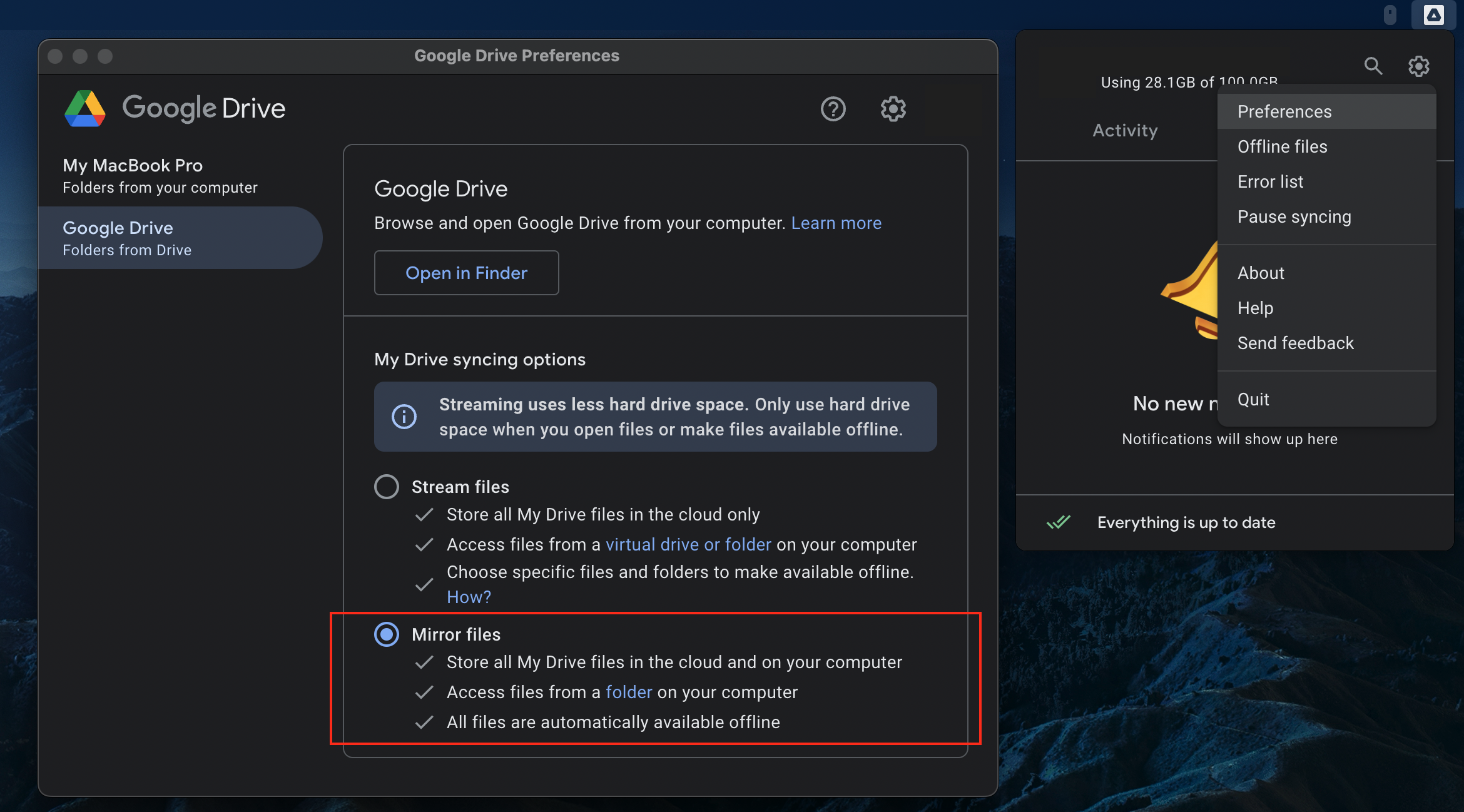


I can confirm that now it's been 7-8 weeks after I changed the settings on mine, and all my Google Drive folders in Finder Favourites are still there - even after restarts and shut downs :)


I'm guessing with the 'Stream files' option, GDrive constantly purge the offline folders in the Mac, hence why they keep disappearing from Favourites. The 'Mirror files' option takes more space in your Mac as it will mirror everything in your GDrive, but it will solve this issue (and I believe the old Backup & Sync used to default to mirror mode anyway).

Similar questions

64 replies

Feb 7, 2023 5:16 PM in response to mdgale

Still experiencing this issue. I thought mirroring files fixed it for me, but the problem resurfaced a few months ago.


That being said, I have noticed in a recent (GDrive) update that finder appears to be visualizing folders differently. It also asked me for permission to files recently in a way that looked promising.


Has anyone else noticed this? I will continue to test and see if there is any improvements.


Ready to see this issue finally be fixed.

Mar 11, 2023 9:01 AM in response to Old Toad

Safe mode is not much of a help, because this problem does not occur frequently enough. I would probably need to run in safe mode for a month or two before it would happen. And if it didn't happen it would be hard to know whether that was because I was in safe mode or I just had not waited long enough. And clearly running in safe mode is not practical for long periods.

Mar 14, 2023 5:45 AM in response to gagner

I upgraded to a new MacBook Pro (16-inch, 2023, Apple M2 Max) running Ventura 13.2.1. I do not have Google Drive; I use Dropbox. And every couple weeks or so I lose 15-20 favorites in my finder sidebar. They are all Dropbox folders, but another 10 Dropbox folders remain, so it doesn't seem to be an issue with Dropbox. And if I recall correctly, it's random as to what gets deleted and what remains.

Apr 4, 2023 11:47 AM in response to gagner

I don't have google docs or drop box and it's been happening to me since I got my M1 Max three months ago. Random folders just disappear. I have to restore everything. Really sucks working in a corporate environment and having many favorites that you rely on. I have to re-select desktop from the finder settings on the regular. Why are we seeing such an insane glitch?

This thread has been closed by the system or the community team. You may vote for any posts you find helpful, or search the Community for additional answers.

Finder Favorites Disappear

Welcome to Apple Support Community
A forum where Apple customers help each other with their products. Get started with your Apple Account.
