
Photo timeline
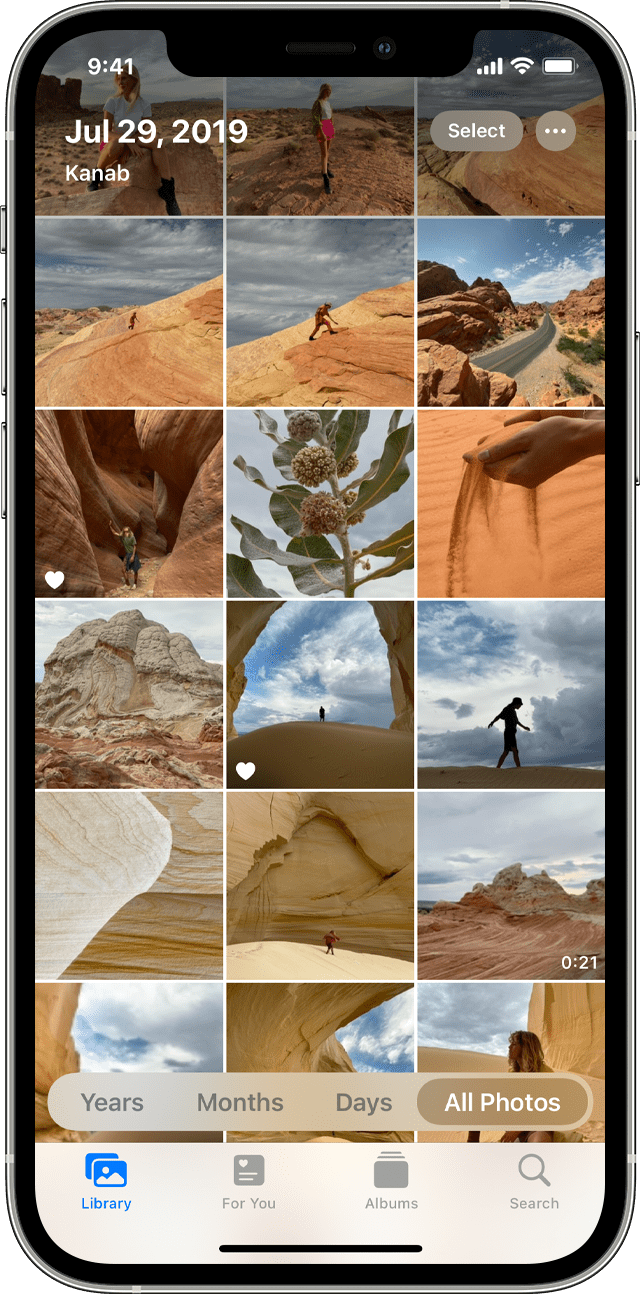
The month/date/year no longer is listed above my photos on my iphone when I scroll through them, making searching for a pic very time consuming. That essential feature has disappeared? Why?!
iPhone SE, iOS 15
The month/date/year no longer is listed above my photos on my iphone when I scroll through them, making searching for a pic very time consuming. That essential feature has disappeared? Why?!
iPhone SE, iOS 15
Hey there baked_apple,
You may have changed from "Library" view to "For You", or "Albums".
Following Organize and find your photos on your iPhone, iPad, or iPod touch,
"Library
Enjoy a curated view of your moments in the Library tab, then browse by years, months, days, or all photos. You'll also see Live Photos and videos come to life as you scroll and browse.
 to share or play a movie created from your moments.
With iOS 14 and later, you can filter what gets displayed, so it's easier to browse through your library. For example, you can choose to show only photos or only videos. To filter what you see:
in the upper-right corner.To undo the filter, tap the Filters button  near the top of your screen, then choose an option, and tap Done."
Have a good one!
Hey there baked_apple,
You may have changed from "Library" view to "For You", or "Albums".
Following Organize and find your photos on your iPhone, iPad, or iPod touch,
"Library
Enjoy a curated view of your moments in the Library tab, then browse by years, months, days, or all photos. You'll also see Live Photos and videos come to life as you scroll and browse.
to share or play a movie created from your moments.With iOS 14 and later, you can filter what gets displayed, so it's easier to browse through your library. For example, you can choose to show only photos or only videos. To filter what you see:
in the upper-right corner.To undo the filter, tap the Filters button near the top of your screen, then choose an option, and tap Done."
Have a good one!
Photo timeline

