How to close MacBook and Use Monitor (Clamshell Mode)

I think there is a way for me to connect a monitor to my MacBook, then shut the MacBook and use the monitor on its own. I believe it's called Clamshell Mode for your Mac, but I don't know how to do it.

Posted on May 10, 2022 12:49 PM

Reply
Question marked as Top-ranking reply

Posted on May 10, 2022 1:06 PM

  • Make sure the external keyboard, mouse, power adapter, and external monitor are connected to your MacBook ,MacBook Air, or MacBook Pro.
  • Put the machine to sleep and close the lid
  • Keep the lid closed, press any key on the external keyboard to wake your MacBook/Pro from sleep


5 replies

May 29, 2022 8:39 AM in response to AppleAnswerDude

My caveat about clamshell mode is heat. Some Macbook Pros draw cooling air in through the keyboard. In this article:


Keep your Mac notebook within acceptable operating temperatures - Apple Support


Apple says, "Don’t put anything over the keyboard." 



To me, closing the display puts something over the keyboard!


If your Macbook Pro has side vents, this is less of a problem. However, not all Macbook Pros have side vents.
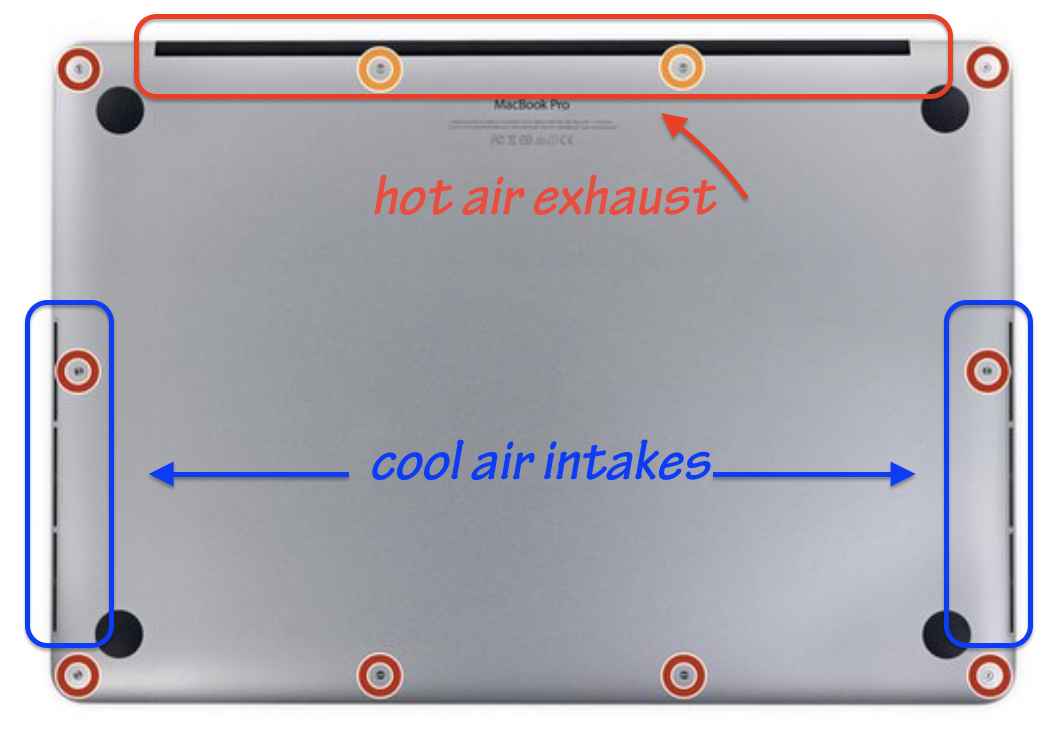


Another common mistake that people make when using clamshell mode is to put the closed computer vertically like a book on the workstation to get it out of the way.


Therein lies the problem. If you place it vertically with the hinge down, YOU BLOCK THE CRITICAL EXHAUST VENTING! High heat can cause premature failures.


If you must do this, place the computer with its hinge UP.

This thread has been closed by the system or the community team. You may vote for any posts you find helpful, or search the Community for additional answers.

How to close MacBook and Use Monitor (Clamshell Mode)

Welcome to Apple Support Community
A forum where Apple customers help each other with their products. Get started with your Apple Account.


