Free up iPhone storage by deleting photos

I know this question got asked a lot but I couldn’t find a clear enough explanation walking me through the process & most of the YouTubers never fully explain the process but make sure to either sell their course or advertisement. 😂 Basically l’m trying to delete all of my photos physically that are on my iPhone without deleting them on iCloud. L’m going on a vacation and my iPhone storage is getting full and photos and videos are taking up a lot of that space, so in order to be a-little proactive I’d rather make sure I have enough space through out my entire trip !! Thanks guys, hopefully someone can help.

iPhone 11 Pro Max, iOS 15

Posted on May 19, 2022 1:46 AM

Reply
Question marked as Top-ranking reply

Posted on May 19, 2022 4:24 AM

Store your photos and videos in iCloud. When you use this all high resolution pics are stored in icloud and you will free up a lot of phone memory. Make sure you let it back up so that you dont lose any pics. It can take hours to a day, depending on the internet connection.


Your photos and videos are stored on your device in their original, high-resolution version. This means that they use a lot of space on your iPhone, iPad, and iPod touch. With iCloud Photos, you can make more space available on your device and have your entire collection, everywhere you go.

Get started with iCloud Photos:

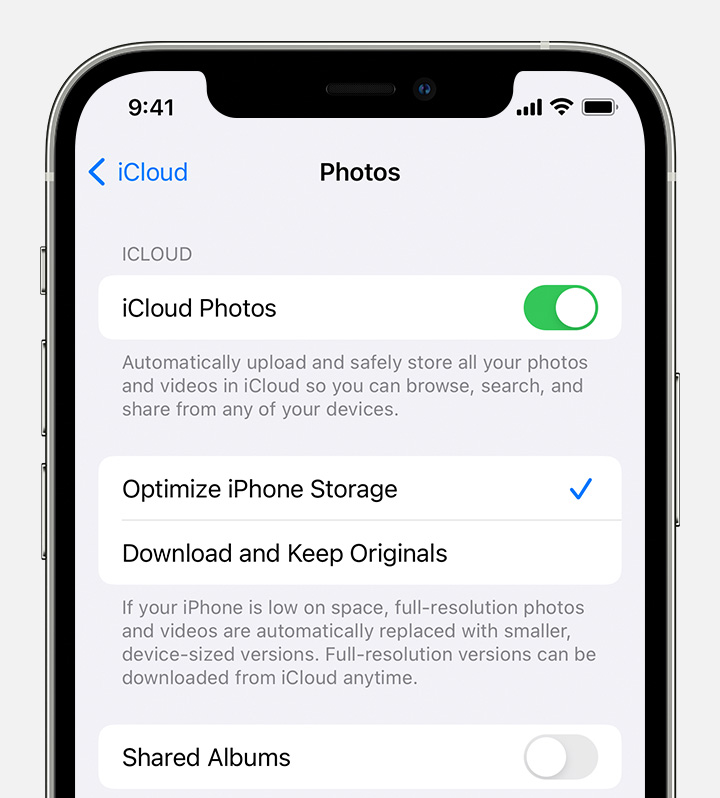
  1. Tap Settings > [your name] > iCloud > Photos.
  2. Turn on iCloud Photos.
  3. Select Optimize iPhone Storage to save space on your device.

With Optimize Storage, smaller, space-saving photos and videos are kept on your device while all of your original, full-resolution versions are stored in iCloud. And as long as you have enough space in iCloud, you can store as many photos and videos as you want.

2 replies
Question marked as Top-ranking reply

May 19, 2022 4:24 AM in response to Nigel_Thornberry

Store your photos and videos in iCloud. When you use this all high resolution pics are stored in icloud and you will free up a lot of phone memory. Make sure you let it back up so that you dont lose any pics. It can take hours to a day, depending on the internet connection.


Your photos and videos are stored on your device in their original, high-resolution version. This means that they use a lot of space on your iPhone, iPad, and iPod touch. With iCloud Photos, you can make more space available on your device and have your entire collection, everywhere you go.

Get started with iCloud Photos:

  1. Tap Settings > [your name] > iCloud > Photos.
  2. Turn on iCloud Photos.
  3. Select Optimize iPhone Storage to save space on your device.

With Optimize Storage, smaller, space-saving photos and videos are kept on your device while all of your original, full-resolution versions are stored in iCloud. And as long as you have enough space in iCloud, you can store as many photos and videos as you want.

This thread has been closed by the system or the community team. You may vote for any posts you find helpful, or search the Community for additional answers.

Free up iPhone storage by deleting photos

Welcome to Apple Support Community
A forum where Apple customers help each other with their products. Get started with your Apple Account.