iCloud erased all documents on my hard disk and prevents me from storing on my disk.

My iCloud "captured" my MAC. I can not any longer get access to anything but iCloud when I want to save a document. iCloud erased documents on my hard disk.

How should I proceed to fix the problem?


Posted on Jun 1, 2022 12:48 PM

Reply

Similar questions

1 reply

Jun 2, 2022 2:50 AM in response to ireneshe

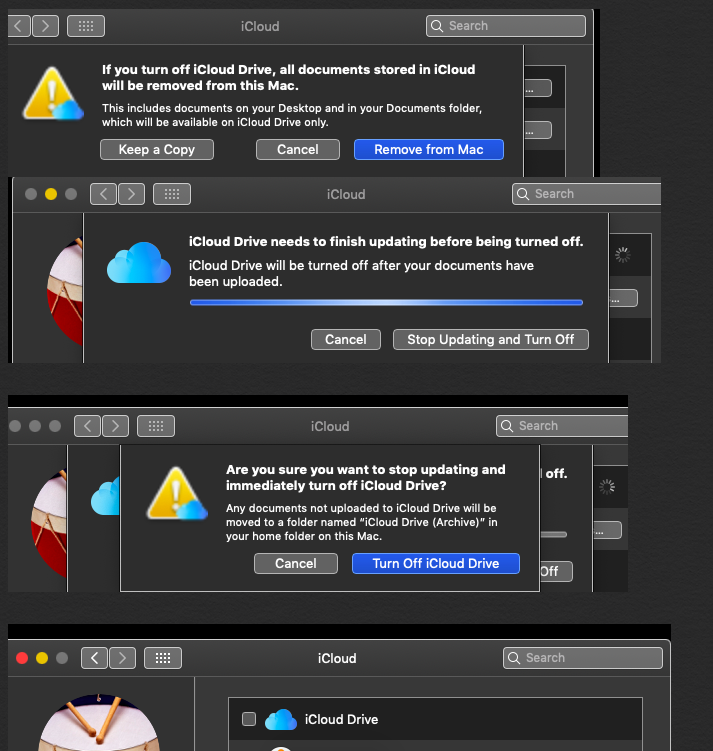
Open system preferences > iCloud and uncheck the box of iCloud Drive a pop up window appears , showing to keep a copy of documents , and remove from the Mac .

( a ) if you had clicked on keep a copy , they will be archived in home folder that can be viewed by clicking on finder in the dock , take cursor on top menu bar > Go > Home > your user name > iCloud Drive ( Archive ) .

( b ) if you had clicked on remove from Mac , the iCloud Drive box will be unchecked , you have to again click on empty iCloud Drive box it will turn on , make sure you had always turned on desktops and documents box Use iCloud Drive to store documents on your Mac and iOS devices - Apple Support


This thread has been closed by the system or the community team. You may vote for any posts you find helpful, or search the Community for additional answers.

iCloud erased all documents on my hard disk and prevents me from storing on my disk.

Welcome to Apple Support Community
A forum where Apple customers help each other with their products. Get started with your Apple Account.