Preview permissions changed

2013 MBP with macOS Big Sur v11.6.6. Recently when I open a PDF while in Safari, such as a bank statement, on my Mac, I use to be able to click the picture to the left of the download arrow and the PDF would open in Preview regardless if there were other PDFs open in Preview. Now when I click on the Open icon I receive a message that says "The file xxx couldn't be opened because you don't have permission to view it." This just started. My work around is to close Preview and click on the Open icon again and then it opens in Preview for me to read or save. I combed through the security settings in System Preferences but I don't see that as being an issue. Ideas? Thanks in advance.

MacBook Pro 15″, macOS 11.6

Posted on Jun 4, 2022 11:18 AM

Reply

Similar questions

1 reply

Jun 5, 2022 12:51 PM in response to tsgroup

Greetings, tsgroup.


Are you able to change the permissions to view the file? Or can you change the permissions for your user?


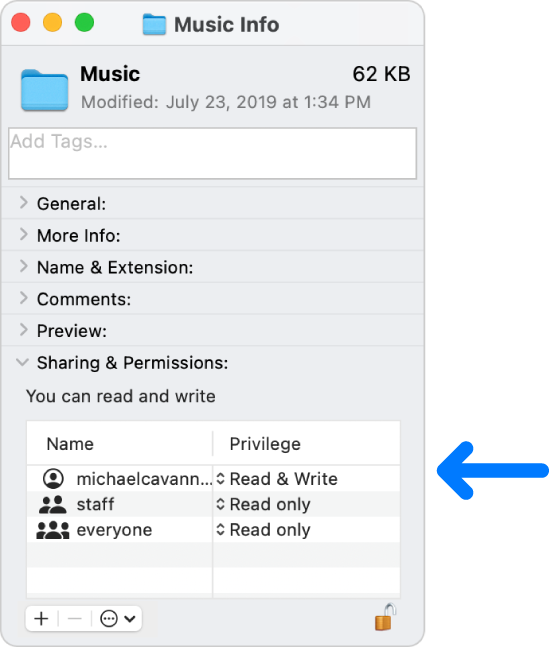
"Permission settings determine who can view and alter files on the computer. You change permission settings at the bottom of the Info window for a file, folder, or disk in the Finder. For example, you can change permission settings for a folder so that other users who log in to your Mac, or connect to it for file sharing, can view but not change files in a folder.

The permission settings at the bottom of an Info window."

"Assign permissions to users and groups

  1. On your Mac, select a disk, folder, or file, then choose File > Get Info.
  2. If the information in Sharing & Permissions isn’t visible, click the arrow .
  3. If the lock at the bottom right is locked , click it to unlock the Get Info options, then enter an administrator name and password.
  4. Click a user or group in the Name column, then choose a privilege setting from the pop-up menu. 
    • Read & Write: Allows a user to open the item and change it.
    • Read only: Allows a user to open the item, but not change its contents.
    • Write only (Drop Box): Makes a folder into a drop box. Users can copy items to the drop box, but can’t open it. Only the owner of the drop box can open it.

No Access: Blocks all access to the item" Change permissions for files, folders, or disks on Mac


We hope this helps!


Sincerely.

This thread has been closed by the system or the community team. You may vote for any posts you find helpful, or search the Community for additional answers.

Preview permissions changed

Welcome to Apple Support Community
A forum where Apple customers help each other with their products. Get started with your Apple Account.