When i disable automatic ear detection i cannot control airpods (stop,next,previous etc)

I bought recently airpods gen 3. Because i want to use them with ear pad i have to disable auto ear detection. When i do this i cannot control the airpods (answer deny call, play/pause etc). How can this be done??

Posted on Jul 7, 2022 4:29 AM

Reply
6 replies

Jul 8, 2022 9:02 AM in response to Space_21

Hello Space_21,


Welcome to Apple Support Communities.


Automatic Ear Detection should not be affecting the ability to answer call, or play/pause audio when AirPods are removed: Play audio on AirPods (3rd generation) - Apple Support

Play and pause audio
1. Wear one or both AirPods, and make sure they’re connected to your device.
2. Open an audio app, then play something. For example, you can play a song in Apple Music, or listen to an audio book in Books.
To pause audio while listening with both AirPods, remove one. When you return it to your ear, playback resumes automatically.
• If you don’t want AirPods to automatically play and stop the audio, you can Turn off Automatic Ear Detection.

AirPods (3rd generation) have different methods for controlling audio and answering calls than previous AirPods. Here's the guide with how to, so you can verify that you're doing the correct steps:

AirPods (3rd generation) controls
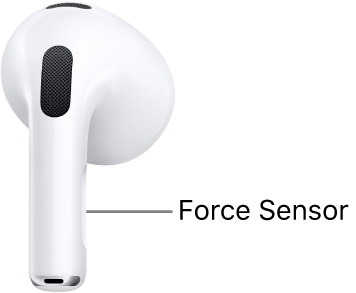
The location of the Force Sensor on AirPods (3rd generation), along the stem of each of your AirPods.
You can control your AirPods (3rd generation) by pressing the Force Sensor on the stem. The Force Sensor is automatically set up to do the following:
• Play and pause audio: Press the Force Sensor once. To resume playback, press it again.
• Play the next track: Double-press the Force Sensor.
• Play the previous track: Triple-press the Force Sensor.
• Answer a call: When you receive a call, press the Force Sensor.
• Activate Siri: Press and hold the Force Sensor, then ask questions, control apps, and more.

AirPods controls - Apple Support


Take care.


Jul 11, 2022 7:25 AM in response to Space_21

Space_21,


When the Automatic Ear Detection is turned off, you'll need to be sure your AirPods are showing connected on your iPhone in Settings > Bluetooth.


If they are showing connected, and the issue continues be sure the motion is a press of the Force Sensor on the stem and not a tap.


You can also test a reset of your AirPods, and testing the controls when paired to a different device. How to reset your AirPods and AirPods Pro - Apple Support


Should the issue remain, reach out to Apple Support directly to further assist.


Contact - Official Apple Support


Contact Apple for support and service - Apple Support


Cheers.


This thread has been closed by the system or the community team. You may vote for any posts you find helpful, or search the Community for additional answers.

When i disable automatic ear detection i cannot control airpods (stop,next,previous etc)

Welcome to Apple Support Community
A forum where Apple customers help each other with their products. Get started with your Apple Account.