only one of my airpods will connect to my phone
I can only get my right airpod to connect to my phone and i do not know why. I went through the steps to reconnect everything but only one will work. any answers?
iPhone 12 Pro Max, iOS 15
I can only get my right airpod to connect to my phone and i do not know why. I went through the steps to reconnect everything but only one will work. any answers?
iPhone 12 Pro Max, iOS 15
Hello _letsgo,
Thanks for posting in the Apple Support Communities.
We understand you've worked through the steps of the resource you've viewed already, but let's try resetting the AirPods again to see if that will clear this up. Before pairing your AirPods with the iPhone again, restart your iPhone and connect the AirPods to the charger to see if that provides any different results. For assistance with resetting your AirPods, check out this resource: How to reset your AirPods and AirPods Pro - Apple Support
If that isn't helpful, see if you can check the reported battery life of the AirPods to see if the left AirPod shows anything. If you need help with seeing how to check this, take a look at the information below which can also be found here: Charge your AirPods and learn about battery life - Apple Support
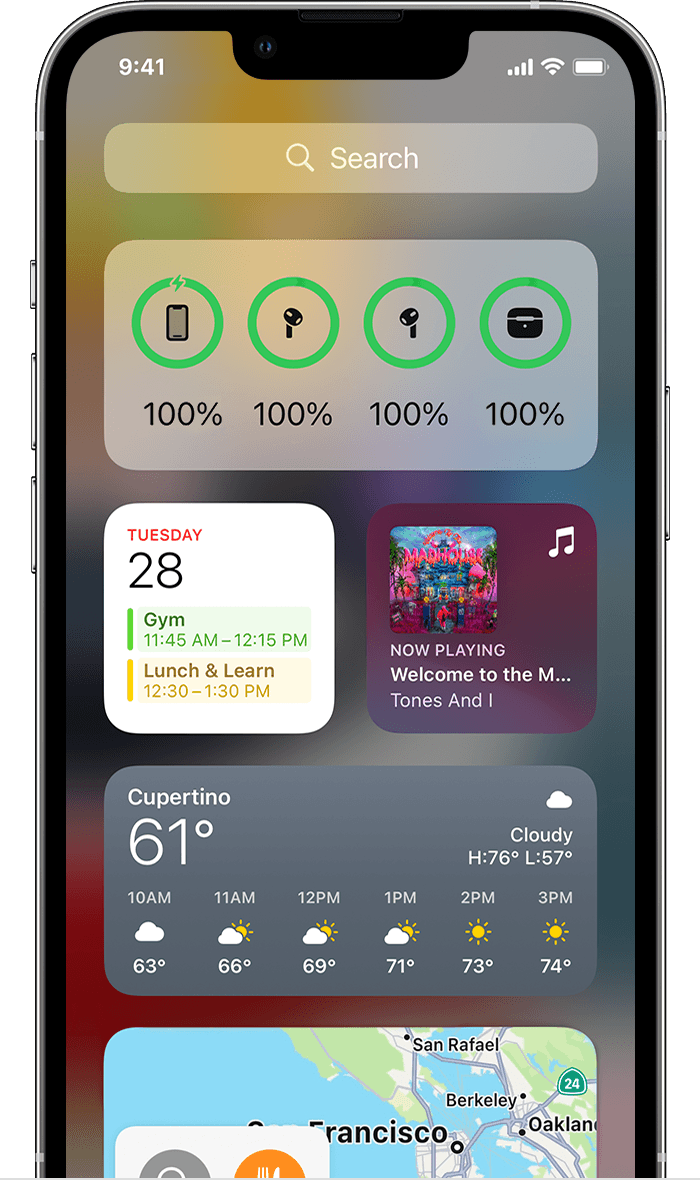
You can also check the charge status of your AirPods with the Batteries widget on your iPhone, iPad, or iPod touch. The charge for your case appears only when at least one AirPod is in the case.
If you're still unable to connect the AirPod, confirm that you're updated to the iOS 15.6 as this is the current version. If you're updated, Contact Apple Support directly to check into this with you in more detail.
Cheers!
Hello _letsgo,
Thanks for posting in the Apple Support Communities.
We understand you've worked through the steps of the resource you've viewed already, but let's try resetting the AirPods again to see if that will clear this up. Before pairing your AirPods with the iPhone again, restart your iPhone and connect the AirPods to the charger to see if that provides any different results. For assistance with resetting your AirPods, check out this resource: How to reset your AirPods and AirPods Pro - Apple Support
If that isn't helpful, see if you can check the reported battery life of the AirPods to see if the left AirPod shows anything. If you need help with seeing how to check this, take a look at the information below which can also be found here: Charge your AirPods and learn about battery life - Apple Support
You can also check the charge status of your AirPods with the Batteries widget on your iPhone, iPad, or iPod touch. The charge for your case appears only when at least one AirPod is in the case.
If you're still unable to connect the AirPod, confirm that you're updated to the iOS 15.6 as this is the current version. If you're updated, Contact Apple Support directly to check into this with you in more detail.
Cheers!
only one of my airpods will connect to my phone