
A lock comes up when restarting
I’m trying to wipe my Mac book and a lock comes up I need help
MacBook Pro Apple Silicon
I’m trying to wipe my Mac book and a lock comes up I need help
MacBook Pro Apple Silicon
Set a firmware password on your Mac
When you set a firmware password, users who don't have the password can't start up from any disk other than the designated startup disk.
This feature requires a Mac with an Intel processor. For the equivalent level of security on a Mac with Apple silicon, simply turn on FileVault. If the Mac is managed by MDM (mobile device management), MDM administrators can also remotely lock the Mac.
How to turn on a firmware password
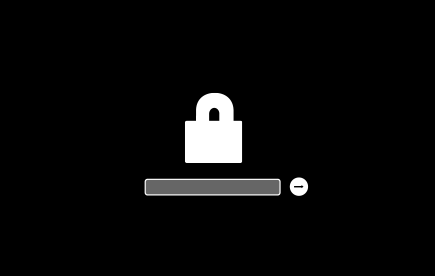
Your Mac asks for the firmware password only when attempting to start up from a storage device other than the one selected in Startup Disk preferences, or when starting up from macOS Recovery. Enter the firmware password when you see the lock and password field:

How to turn off a firmware password
If you forgot your firmware password
If you can't remember your firmware password, schedule an in-person service appointment with an Apple Store or Apple Authorized Service Provider. Bring your Mac to the appointment, and bring your original receipt or invoice as proof of purchase.
Set a firmware password on your Mac
When you set a firmware password, users who don't have the password can't start up from any disk other than the designated startup disk.
This feature requires a Mac with an Intel processor. For the equivalent level of security on a Mac with Apple silicon, simply turn on FileVault. If the Mac is managed by MDM (mobile device management), MDM administrators can also remotely lock the Mac.
How to turn on a firmware password
Your Mac asks for the firmware password only when attempting to start up from a storage device other than the one selected in Startup Disk preferences, or when starting up from macOS Recovery. Enter the firmware password when you see the lock and password field:
How to turn off a firmware password
If you forgot your firmware password
If you can't remember your firmware password, schedule an in-person service appointment with an Apple Store or Apple Authorized Service Provider. Bring your Mac to the appointment, and bring your original receipt or invoice as proof of purchase.
A lock comes up when restarting

