Handwashing feature has stopped working on my Apple Watch.
How do I get the handwashing work
[Re-Titled by Moderator]
How do I get the handwashing work
[Re-Titled by Moderator]
Hello Quiltedlady58,
It looks like you've already had the opportunity to follow the steps in the related article above to verify that feature is properly enabled.
Let's also use the steps below to make sure your Apple Watch is all up to date:
1. On your iPhone, open the Apple Watch app, then tap the My Watch tab.
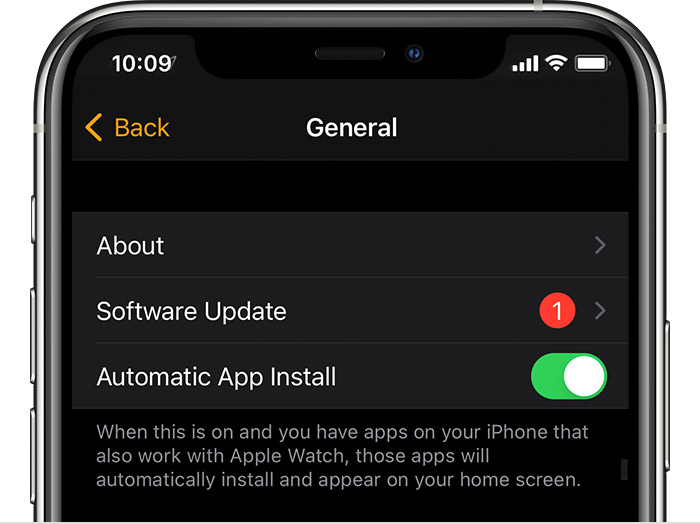
2. Tap General > Software Update.
3. Download the update. If asked for your iPhone passcode or Apple Watch passcode, enter it.
4. Wait for the progress wheel to appear on your Apple Watch. It could take from several minutes to an hour for the update to complete.
You can also find those steps in this resource: Update your Apple Watch - Apple Support Updating can help to address unexpected behaviors.
If you are already up to date, does that persist after restarting both your iPhone and Apple Watch?
Restart your Apple Watch - Apple Support
Restart your iPhone - Apple Support
Should that still persist, you'll want to reach out to Apple Support so they can look into this further: Contact - Official Apple Support
Take care.
Hello Quiltedlady58,
It looks like you've already had the opportunity to follow the steps in the related article above to verify that feature is properly enabled.
Let's also use the steps below to make sure your Apple Watch is all up to date:
1. On your iPhone, open the Apple Watch app, then tap the My Watch tab.
2. Tap General > Software Update.
3. Download the update. If asked for your iPhone passcode or Apple Watch passcode, enter it.
4. Wait for the progress wheel to appear on your Apple Watch. It could take from several minutes to an hour for the update to complete.
You can also find those steps in this resource: Update your Apple Watch - Apple Support Updating can help to address unexpected behaviors.
If you are already up to date, does that persist after restarting both your iPhone and Apple Watch?
Restart your Apple Watch - Apple Support
Restart your iPhone - Apple Support
Should that still persist, you'll want to reach out to Apple Support so they can look into this further: Contact - Official Apple Support
Take care.
Handwashing feature has stopped working on my Apple Watch.