AirPod Pro makes me sound like a robot in GoogleMeet

Hi,


I have to use Google Meet for work and lately, whenever I login for a meeting, I am told that I sound like a robot when I am using my AirPods. Once I disconnect the AirPods and use my computer speaker, they can hear me fine.


I have used my AirPods for phone calls and they work fine. This issue seems to only be happening within GoogleMeet. I have also already tried both resetting my AirPods and also disconnecting/reconnecting to my MacBook with no luck.


Please help! It is very frustrating that I can no longer use my AirPods for work calls.

MacBook Pro

Posted on Sep 6, 2022 11:03 AM

Reply
Question marked as Top-ranking reply

Posted on Sep 7, 2022 2:39 PM

Hi Ashli83,


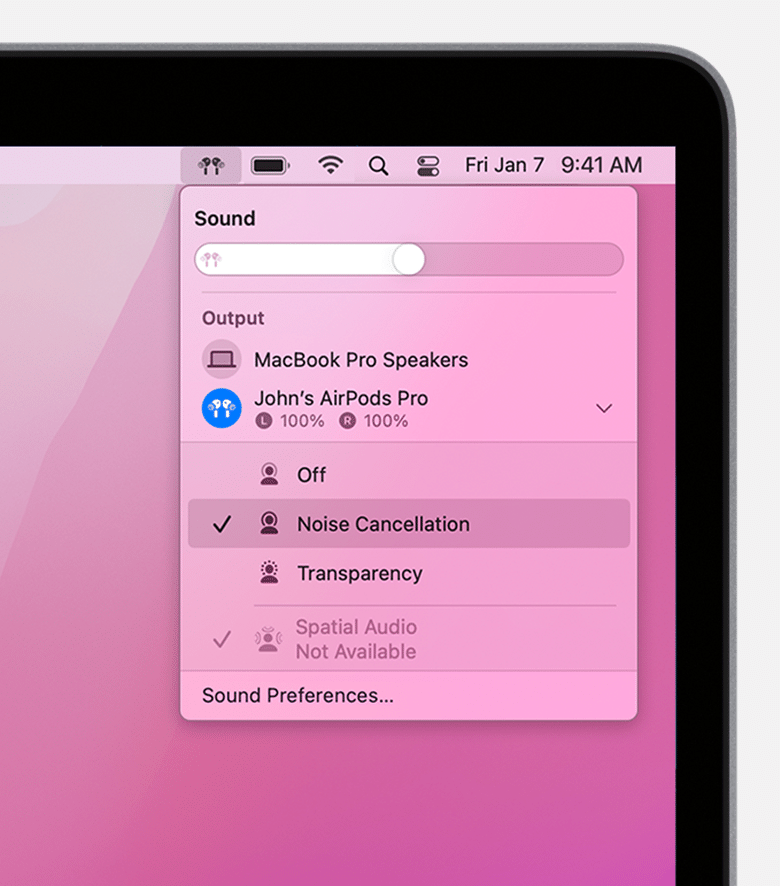
For help with the sound quality while using Google Meet and your AirPods, test changing the noise controls with the steps below found in the article here: AirPods Pro and AirPods Max Active Noise Cancellation and Transparency mode - Apple Support


"Switch between noise-control modes on your Mac


  1. With your AirPods Pro or AirPods Max connected to your Mac, click the volume control  in the menu bar on your Mac.*
  2. Choose your AirPods Pro or AirPods Max, then choose Noise Cancellation, Transparency, or Off.

Noise Cancellation and Transparency modes on Mac

"

If the issue continues, check the input settings with the articles below.


Change the sound input settings on Mac


Use Mic Modes on your Mac


Control access to the microphone on Mac


If the issue only occurs with the Google Meet app on your Mac, reach out to the app developer to further assist. How to contact an app developer - Apple Support


Best.


1 reply
Question marked as Top-ranking reply

Sep 7, 2022 2:39 PM in response to Ashli83

Hi Ashli83,


For help with the sound quality while using Google Meet and your AirPods, test changing the noise controls with the steps below found in the article here: AirPods Pro and AirPods Max Active Noise Cancellation and Transparency mode - Apple Support


"Switch between noise-control modes on your Mac


  1. With your AirPods Pro or AirPods Max connected to your Mac, click the volume control  in the menu bar on your Mac.*
  2. Choose your AirPods Pro or AirPods Max, then choose Noise Cancellation, Transparency, or Off.

Noise Cancellation and Transparency modes on Mac

"

If the issue continues, check the input settings with the articles below.


Change the sound input settings on Mac


Use Mic Modes on your Mac


Control access to the microphone on Mac


If the issue only occurs with the Google Meet app on your Mac, reach out to the app developer to further assist. How to contact an app developer - Apple Support


Best.


This thread has been closed by the system or the community team. You may vote for any posts you find helpful, or search the Community for additional answers.

AirPod Pro makes me sound like a robot in GoogleMeet

Welcome to Apple Support Community
A forum where Apple customers help each other with their products. Get started with your Apple Account.