Why can I not see my ipod music library on itunes

I was wondering why I can not see my ipod music library on itunes?

iPod Touch (6th Gen)

Posted on Sep 14, 2022 10:26 AM

Reply
Question marked as Top-ranking reply

Posted on Sep 18, 2022 10:36 AM

Hi degri,


For help with syncing and viewing your library with iTunes, test the steps below found in the article here: Use iTunes to sync your iPhone, iPad, or iPod with your computer


"Sync or remove content using iTunes


  1. Open iTunes and connect your device to your computer with a USB cable.
  2. Click the device icon in the upper-left corner of the iTunes window. Learn what to do if you don't see the icon
  3. The device icon in the upper left corner of the iTunes window.
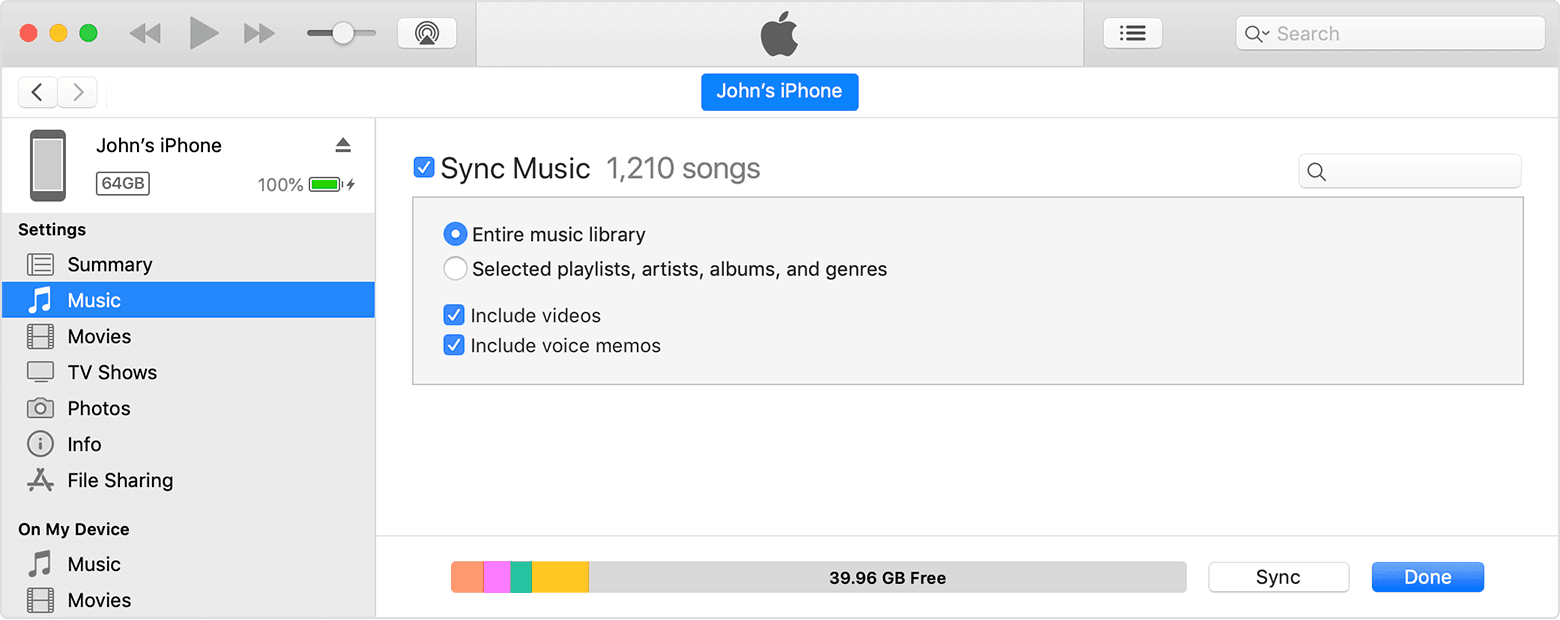
  4. From the list under Settings on the left side of the iTunes window, click the type of content that you want to sync or remove.* To turn syncing on for a content type, select the checkbox next to Sync.
  5. The checkbox next to Sync Music in iTunes.
  6. Select the checkbox next to each item that you want to sync.
  7. Click the Apply button in the lower-right corner of the window. If syncing doesn't start automatically, click the Sync button.


As shown in the picture, the "On My Device" section will allow you to view content you've already synced. If you need help locating or backup up your library, check out the steps here: Back up and restore your iTunes library on your PC


We also notice you followed the article If your computer doesn't recognize your iPhone, iPad, or iPod to reach Apple Support Communities. If the steps above don't clear up the issue and you don't see your iPod at all when connected, make sure you've worked through the troubleshooting in that link, and let us know.


Cheers.

1 reply
Question marked as Top-ranking reply

Sep 18, 2022 10:36 AM in response to degri

Hi degri,


For help with syncing and viewing your library with iTunes, test the steps below found in the article here: Use iTunes to sync your iPhone, iPad, or iPod with your computer


"Sync or remove content using iTunes

  1. Open iTunes and connect your device to your computer with a USB cable.
  2. Click the device icon in the upper-left corner of the iTunes window. Learn what to do if you don't see the icon
  3. The device icon in the upper left corner of the iTunes window.
  4. From the list under Settings on the left side of the iTunes window, click the type of content that you want to sync or remove.* To turn syncing on for a content type, select the checkbox next to Sync.
  5. The checkbox next to Sync Music in iTunes.
  6. Select the checkbox next to each item that you want to sync.
  7. Click the Apply button in the lower-right corner of the window. If syncing doesn't start automatically, click the Sync button.


As shown in the picture, the "On My Device" section will allow you to view content you've already synced. If you need help locating or backup up your library, check out the steps here: Back up and restore your iTunes library on your PC


We also notice you followed the article If your computer doesn't recognize your iPhone, iPad, or iPod to reach Apple Support Communities. If the steps above don't clear up the issue and you don't see your iPod at all when connected, make sure you've worked through the troubleshooting in that link, and let us know.


Cheers.

This thread has been closed by the system or the community team. You may vote for any posts you find helpful, or search the Community for additional answers.

Why can I not see my ipod music library on itunes

Welcome to Apple Support Community
A forum where Apple customers help each other with their products. Get started with your Apple Account.