Temperature tracking not working.

Sleep focus is on and I’ve been wearing Apple Watch 8 while sleeping for about 12 days now all night and it still says “no data” under temperature. I made sure that under privacy on watch settings that temperature is on. What else can I do? All other sleep data shows up.

Apple Watch Series 8, watchOS 9

Posted on Sep 29, 2022 5:32 AM

Reply
Question marked as Top-ranking reply

Posted on Oct 4, 2022 4:08 AM

I fixed it. I had a sleep schedule set up and a sleep focus set up but I didn’t have the sleep focus schedule to automatically turn on during my sleep cycle. Please make sure you have this button turned on in settings under focus - sleep focus - schedule.

78 replies

Nov 14, 2022 2:37 PM in response to Nycoy

I got a call back from Apple today after my logging file was analysed by the tech team. Basically my issue is similar to others they have seen. I was told to wait for a fix. I specifically asked if it was fixable with software/firmware and he said yes. Didn’t get any timescales though.


I’ll post here if I hear anything.

Oct 12, 2022 3:58 AM in response to rpk5078

Hmmm, I’m assuming your iOS is up to date on both phone and watch? My ultra will only take wrist temp if the sleep focus is on. The screen doesn’t dim it turns all the way off and requires me to hold the crown down for 10 seconds or so to unlock. This happens as soon as sleep focus comes on. I have sleep focus scheduled to come on at 9:30 and the Ultra and iPhone but deactivate the always on display as soon as the focus starts.


This is the settings for me sleep focus. I’m using the focus that come pre-installed on iPhone. Under options I have sleep screen turned on

Oct 12, 2022 7:29 AM in response to NickCampbell0089

My sleep focus is on, I have seen the Sleep stages each day since I have had the watch. At this point im considering replacing my device, because apple wants to recreate this issue, by having me start the logging of files, and the engineers look at it. Anyone else solve this by not turning on sleep focus, because all that is on, cause I see my sleep tracking with stages (REM, etc)

Nov 9, 2022 7:10 AM in response to Yuck6681

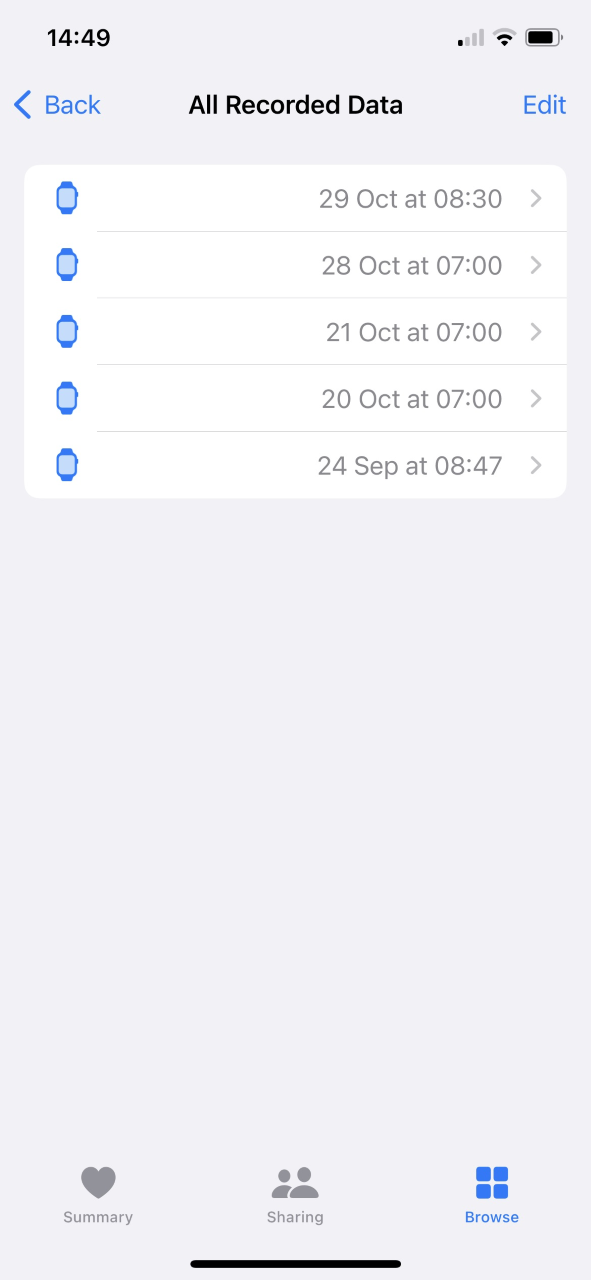
So I have this issue also. For me it worked the very first night I wore it, and then it has worked intermittently, as can be seen in the screen shot. I have now got 5 days of readings, but they are spread across over a month now, and nothing for the last 2 weeks! I have all the settings switched on as per recommendations. .


I am currently in the process of getting support from Apple. However this isn't going well...! We have been around the same routine several times, whereby they switch on enhanced logging on my phone, but for some reason, the log files don't seem to be sent (apparently this support process is fairly new!)


But my thinking is that as it HAS worked a number of times in the past, then the issue is most probably some variable relating to me/my sleep process/environment...? But I can't think what I did differently on those 5 times when it did actually work!


I've tried adjusting the strap to various levels of tightness.


Obviously my exact sleep times change, but engineering it around the set sleep schedule is not easy to test any connection relating to the schedule. But I've gone to sleep before and after the exact start time of the schedule and woken before/after it too.


I'm a bit reluctant to fully reset the watch, especially if it means not using the backup too.


But it is also frustrating that the Apple support process is so flaky - I'm currently doing the enhanced logging again now, so hopefully for this 4th or 5th time they will get a usable logging file.

Dec 7, 2022 3:09 AM in response to Yuck6681

So.... Just upgraded from an iPhone 12 Pro to a 14 Pro Max...


Now, it could be a coincidence but it recorded a wrist temperature last night! The last one it did was 29th Nov. And the one before that was 29th Oct! (every night all other sleep data was collected)


So, I'll report back over next day or so if it does record in next couple of nights. Hopefully its not just a coincidence and somehow it is fixed (for me). But this may be an expensive way to fix this issue...!!

Dec 15, 2022 8:47 AM in response to Nycoy

My method of turning sleep focus on manually turned out to be just a coincidence and still getting mixed results. At this point there is no rhyme or reason that I can figure out on why it just decides to work, tried resets, restarts, setting up as new, resetting the settings and setting back up the focuses and sleep schedule and the tracking just seems to have a mind of its own at this point.


It just works it some increments and sometimes goes for a few days in a row and then just stops. I stopped at November 5th and just let it flow, latest update for phone and watch and it’s still doing it.

This thread has been closed by the system or the community team. You may vote for any posts you find helpful, or search the Community for additional answers.

Temperature tracking not working.

Welcome to Apple Support Community
A forum where Apple customers help each other with their products. Get started with your Apple Account.
