Family Sharing Payment not updating for family members

Hi


I have recently updated my payment details which are linked to family sharing, its all updated on my phone and ID the previous payment method has been deleted, but it is not updated for my husband, it still shows as the old payment method which no longer exists. We have googled it to try to find answer and all answers we are finding we have done already… does anyone have any ideas on how we can get the payment details to update for him, this has never been an issue before it has always automatically updated…. Is there a glitch somewhere?


Thanks in advance for any help!


iPhone 13

Posted on Oct 1, 2022 6:24 AM

Reply
Question marked as Top-ranking reply

Posted on Dec 25, 2022 10:37 AM

I had the same issue. Resolved the problem by signing the Apple ID out of the device. Kept all data. Resigned in with the affected Apple ID. Merged data. Payment info was then updated. Hope this helps

Similar questions

17 replies

Oct 2, 2022 4:30 PM in response to lisa-marie67

Hey there, and welcome to Apple Support Communities lisa-marie67,


We can certainly understand your concern and can help provide some insight.


We recommend checking out these steps on how to manage your payment methods and see if everything matches up on your side.


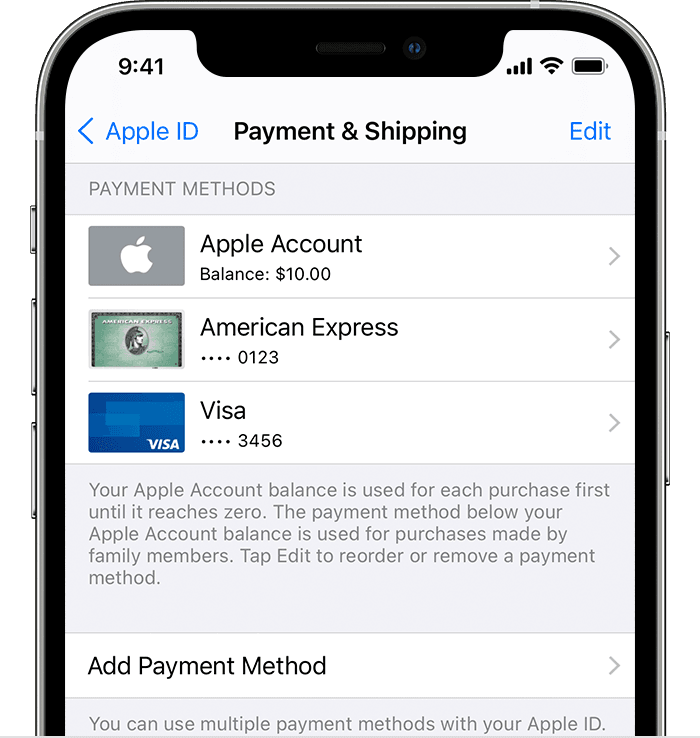
" How to change your payment method on your iPhone, iPad, or iPod touch

  1. Open the Settings app.
  2. Tap your name.
  3. Tap Payment & Shipping. You might be asked to sign in with your Apple ID.
  4. From here, you can do these things:

iPhone showing payment methods including Apple ID balance and credit cards


Add a payment method — Tap Add Payment Method.

    • Update a payment method — Tap the payment method, then edit your information. You might need to enter the security code that's printed on your credit or debit card. If you use the card with Apple Pay, go to the Wallet app to edit the card information.
    • Remove a payment method — Tap Edit, tap the red Delete button, then tap Remove. If you have an unpaid balance, have subscriptions including an iCloud storage plan, or you use purchase sharing, you can't remove all payment methods. Learn how to remove all payment methods.
    • Change the order of your payment methods — Tap Edit, then drag the move order icon .* "


For additional information, check out this link: Change, add, or remove Apple ID payment methods - Apple Support


Kindest regards!


This thread has been closed by the system or the community team. You may vote for any posts you find helpful, or search the Community for additional answers.

Family Sharing Payment not updating for family members

Welcome to Apple Support Community
A forum where Apple customers help each other with their products. Get started with your Apple Account.