Pixelated screen using Apple CarPlay

This is not a new topic here, as far as I see, I think it is the right thing to open this discussion for those of you having new generation cars from the VW group:


The Apple CarPlay problems are not only on Honda models. My Skoda Octavia 4 (VW MIB3 Infotainment System) has the same problem.


When using navigation apps (Waze, Apple Maps, Google Maps) on both my iPhone 11 Pro Max and iPhone 7, after a while, the navigation part of the screen is getting blurry.


Both iPhones have the newest updates, the car also. Restarting the iPhones or the car infotainment system doesn’t help.


You can refresh the blurred screen by changing shortly to a car menu and then back to Apple CarPlay. This holds for a while (5-10 Minutes) and then you go again.


iPhone 11 Pro Max, iOS 16

Posted on Oct 1, 2022 7:47 AM

Reply
Question marked as Top-ranking reply

Posted on May 9, 2023 5:36 AM

I can still confirm after weeks of driving that SW update 1896 (or higher) definitely solves this problem!

For months my dealer also mentioned that there was no SW update listed for my car but instead I threw in other infotainment issues like "reboots frequently" and "faults" until the dealer finally wanted to update to 1896. Very frustrating but very happy that this issue is finally resolved and hope all of you reading this topic can benefit from this info.


Similar questions

249 replies
Question marked as Top-ranking reply

May 9, 2023 5:36 AM in response to hegeduslevi

I can still confirm after weeks of driving that SW update 1896 (or higher) definitely solves this problem!

For months my dealer also mentioned that there was no SW update listed for my car but instead I threw in other infotainment issues like "reboots frequently" and "faults" until the dealer finally wanted to update to 1896. Very frustrating but very happy that this issue is finally resolved and hope all of you reading this topic can benefit from this info.


Aug 16, 2023 8:09 AM in response to Grevelingen

16-08-2023: I can confirm that updating the software to the latest version by the dealership solves the issue on the Octavia HB (2021) / iPhone 11 Pro iOS 16.6. Updated from v1803 to 1941. I drove for about 60 mins without having to "refresh" the screen once, whereas before I had to "refresh" it around every 5-10 mins. Doesn't really matter which app is on-screen, but I only use: Waze, Spotify and Flitsmeister. Glad the issue is solved and thanks for reporting it here!

Feb 1, 2023 6:55 AM in response to cristiandrg

Also happening on my 2022 VW California Ocean (Transporter T6.1 base vehicle). The issue started happening very occasionally in Aug 2022, but it’s now an immediate failure every time we use Google Maps and Waze. So I did some tests before taking my van into a VW centre to get this checked out. The issue DOESN’T happen if either :

  1. Using Apple Maps, not Google Maps.
  2. Using Google Maps but not selecting a route.
  3. Using Google Maps, selected a route, but vehicle is stationary.


As soon as I use Google Maps with an active route it immediately pixelates, whether using Bluetooth or the USB cable. At the same time my phone gets very warm. Tested on 2 different iPhones, but up to date for updates. No current OTA updates available for the vehicle. A workshop software update is available but my VW centre tells me it’s not to do with CarPlay.

Mar 23, 2023 1:10 PM in response to cristiandrg

Here to bring the good news that after finally getting the software update to version 1896, the pixelated issue on my 2021 Octavia Combi is solved!!! Had to throw in other infotainment issues until the dealer finally wanted to update to 1896. Very frustrating but very happy that this issue is finally resolved and hope all of you reading this topic can benefit from this info.

Nov 1, 2022 12:17 PM in response to cristiandrg

With this pixelation issue my understanding has been that the head unit manufacturers needed to release a firmware update. The problem comes in where the manufacturer will automatically say it’s an iOS issue and advise you to contact Apple. It then becomes a frustrating cycle of getting pushed back and forth. I had the issue years ago in a Nissan but got lucky because the Regional Service Manager escalated the problem when he noticed it which pushed a firmware update to finally be released. The problem was with the head unit and its issue processing info from the new iOS versus it being an iOS only issue. Not saying definitively this is what’s happening with you all but it’s very likely.

Nov 1, 2022 1:54 PM in response to cristiandrg

I can also confirm that this happens on my CUPRA Ateca 2022.


I've had this from day 1. I've had a proper play around with this and drawn the conclusion this is specific to this face lift head unit and Google Maps / Waze. My troubleshooting has comprised of the following:

  • Tried different phones - Same issue.
  • Uninstalled and re-installed Waze and Google Maps - Same issue.
  • Exiting Car Play back to the CUPRA menu and then back in temporarily sorts the problem.
  • When the screen goes weird, there is a massive lag introduced, as if it's run out of memory.
  • Reboots do not help. The problem comes back almost instantly.
  • Reboots of the phone also only temporarily solve the issue.
  • This issue DOES NOT happen with Apple Maps.
  • This issue DOES NOT happen with other cars (I shared a lift with a friend who has a Hyundai and their Waze did not do this once even on a 5hour trip).
  • I *Think* Waze uses Google Maps as the platform it build on, so this would make sense as to why this only happens in Google Maps and Waze.

Jan 26, 2023 11:22 PM in response to cristiandrg

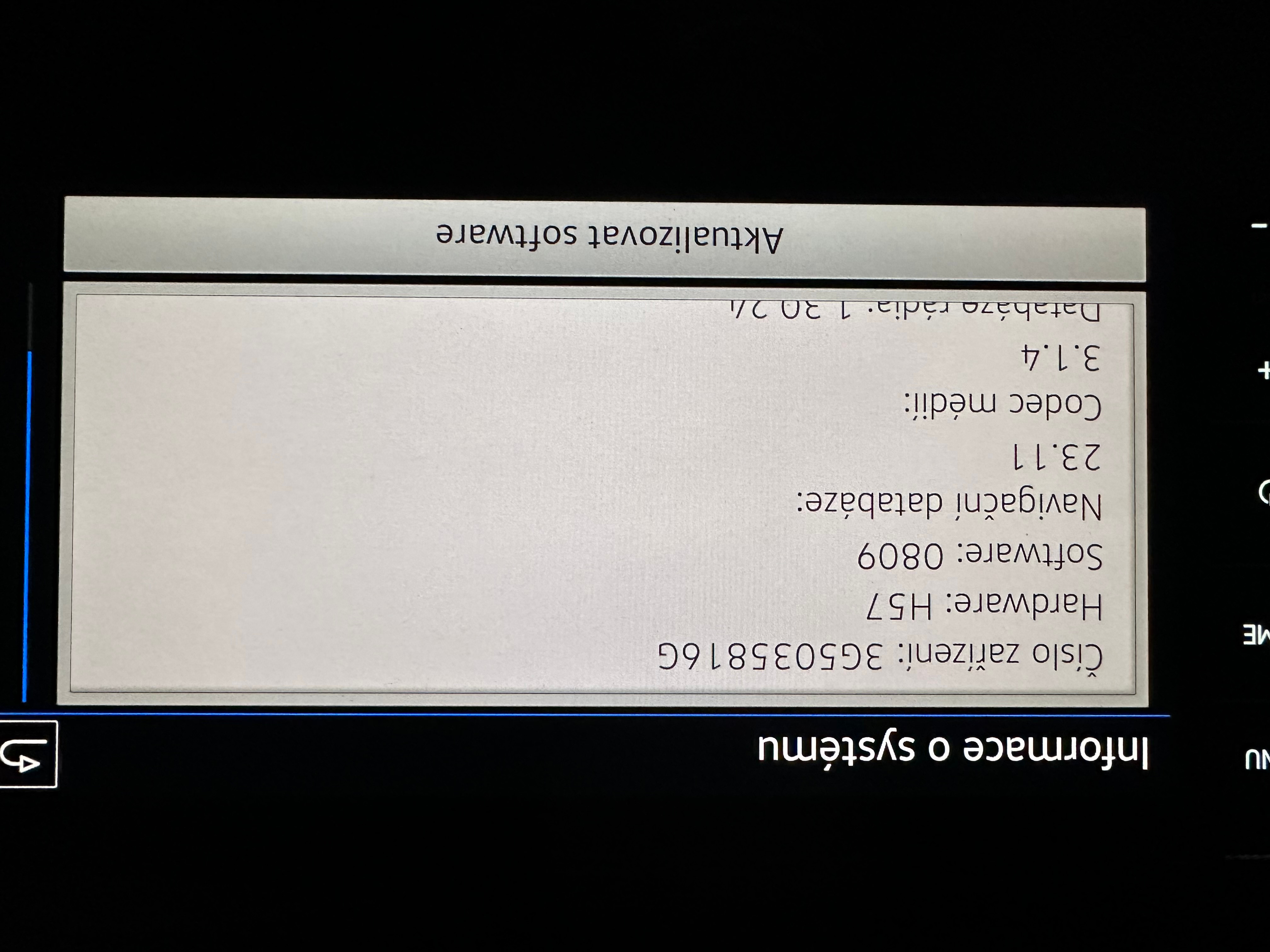
So, I partially solved the problem. I have VW Passat 2021 with infotainment soft version 0809. iphone 13 with iOS 16.2

I did update of infotainment system, but the problem is still existing.


The problem occurs when you use carplay and at the same time your phone is charged from car's usb slot.

I checked both usb slots and sveral lighting/usb-C cables.


Carplay is working properly (without blurring screen and delays) when You use Bluetooth connection only.


Mar 16, 2023 2:16 AM in response to beagpg

Try asking your dealer for a software update (you need to take your car to your dealer, no over-the-air update, at least for now). Users with a VW and Skoda (included me for Skoda) have solved this issue by updating the software, VW-related car companies and dealers are aware of the problem and have already released a fix.

Oct 1, 2023 10:45 PM in response to yeohandy

It's a car software related issue with (wireless) Apple Carplay. I don't know the details, but something with disconnecting the wireless connection. For me and others the problem is solved by updating the car software at the dealership. Before the update I had the issue like every 10 minutes, with different iPhones / iOS verions. After the update, the problem is most certainly solved. I have driven over 1700km since the update without any issue.

Jan 1, 2024 11:49 AM in response to cristiandrg

The unbelievable has come true - I managed to solve the problem of App

Connect working in my VW T6.1 HL with Discover Pro with iPhone 14 PRO.

Since it was very simple, I'm posting detailed instructions. As a

reminder, the whole problem was the image breakup when using iPhone

mirroring (any type) and running navigation software (Sygic, Waze,

Google maps). After running navigation for a while, the response time

and image decay gradually slowed down, and finally the connectivity with

the mobile phone was disconnected. I was very worried and even the

authorized Volkswagen service (Auto Jarov, Tukas) could not solve the

problem, where they tried to convince me that the problem was in my

phone, but definitely not in the vehicle.


Currently, the whole set (iPhone and Discover Pro) works perfectly and

the response of the whole system has improved significantly.


After a long search on various forums, I found the portal https://mibsolution.one,

where it is possible to download firmware updates for the individual

group (VW, Skoda, Seat, Audi) infotainments. Unfortunately, the concern

does not offer any links to download the FW on their site, let alone

allow custom FW updates in this way. Apparently they have dropped the

earlier option of on-line FW update, which caused me to "put to sleep"

the entire infotainment in my vehicle several times and forced me to

leave the vehicle in the workshop for at least a few days each time.


Due to this desperate situation, I was determined to try this

"semi-legal" portal with all the possible risks that result from a

failed update - at least someone in an authorized service would have to

deal with it and somehow deal with it and eventually solve it.


However, it is easier than it may seem at first glance.


To update, you will need a USB drive of at least 16GB capacity,

formatted to the FAT32 file system and a charged battery in the vehicle

(the update takes approximately 20min and the power must not be

interrupted during this time!).


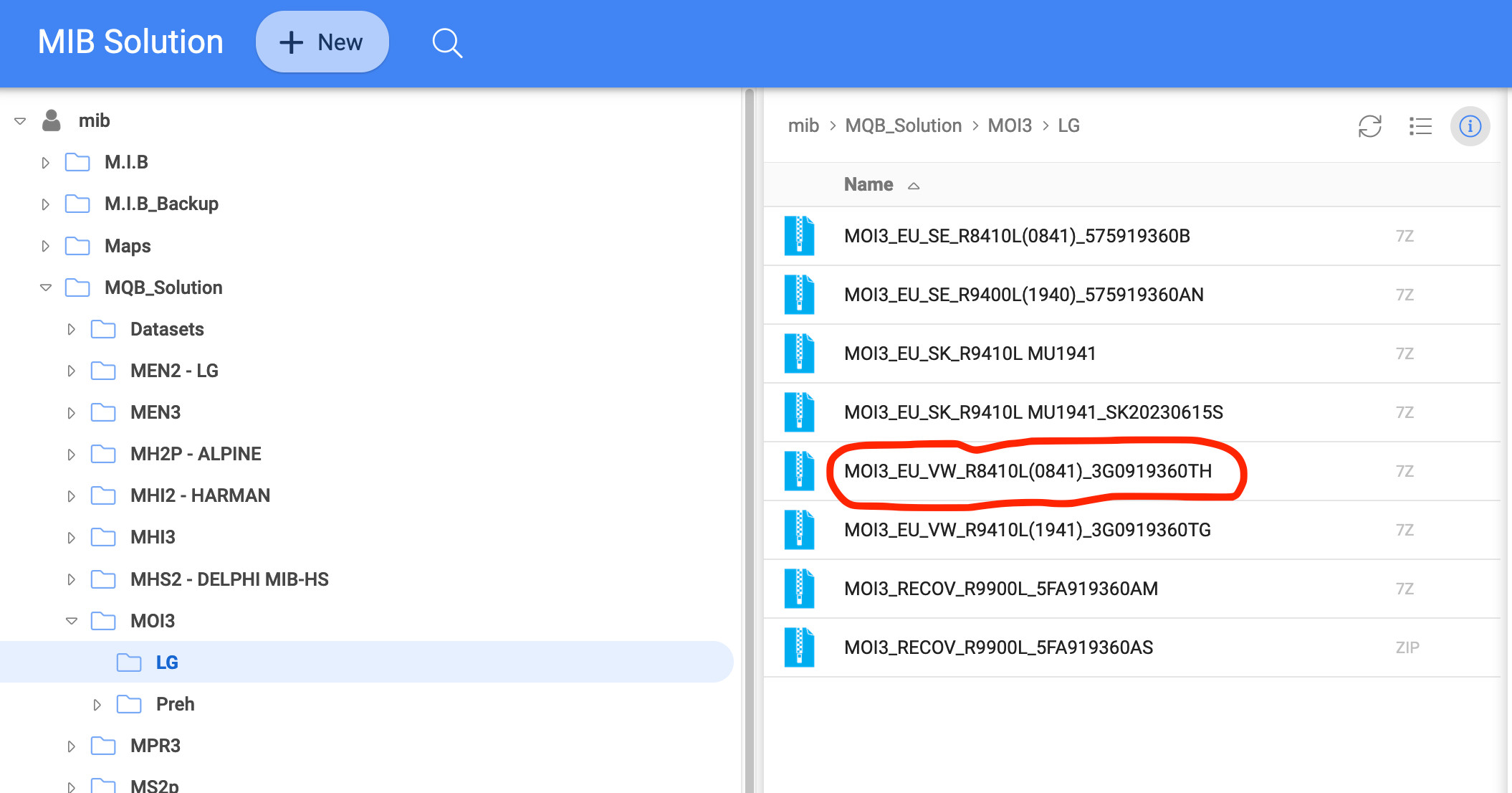
1/ On the above portal (login details are guest/guest) you need to

download the firmware file MOI3_EU_VW_R8410L_(0841)_3G0919360TH - size

approx. 5.8GB - see picture 1, which is compressed (*.7z - can be

unzipped in WinRAR - free download


2/ Once unpacked, copy the entire contents to a formatted USB drive and

plug into one of the two USB-C slots on the dashboard in the vehicle.


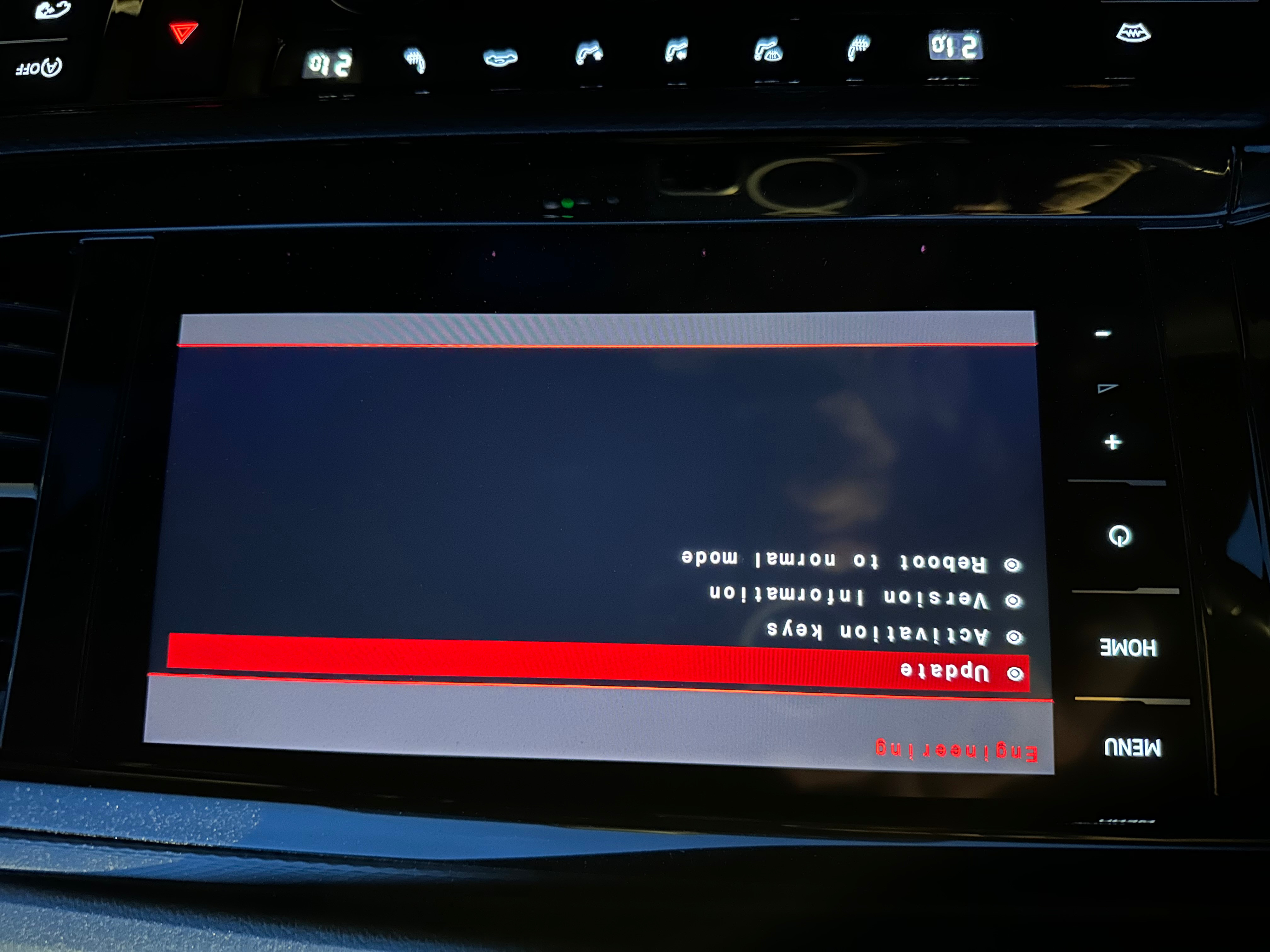
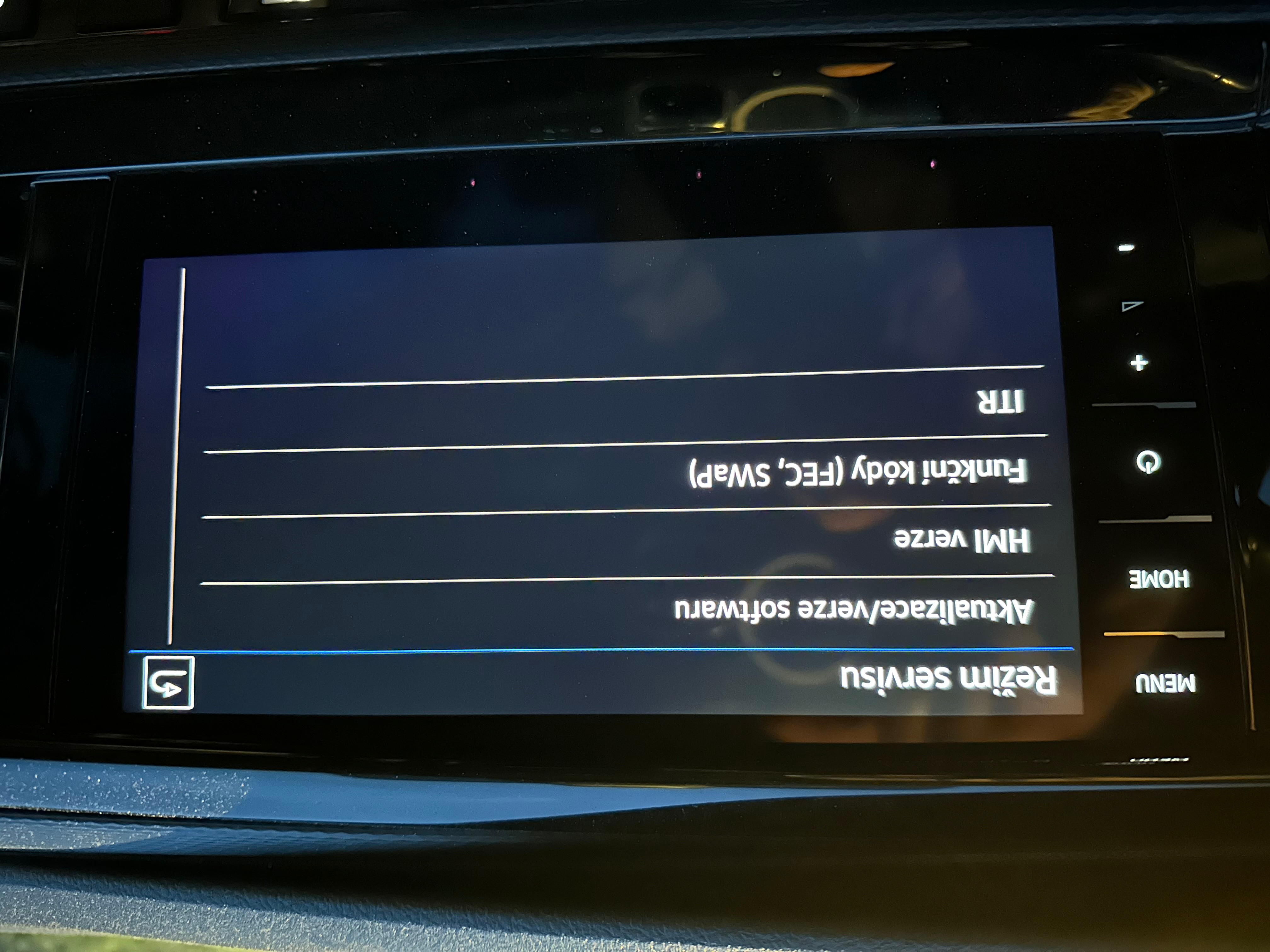
3/ Turn the key to the position where the dashboard comes up completely

and after the infotainment system comes up, long press the MENU button

until the system enters service mode - see figure 2


4/ Then select the first option "Update.....", once selected the system

will reboot and enter the mode where the FW update can be performed -

see figure 3


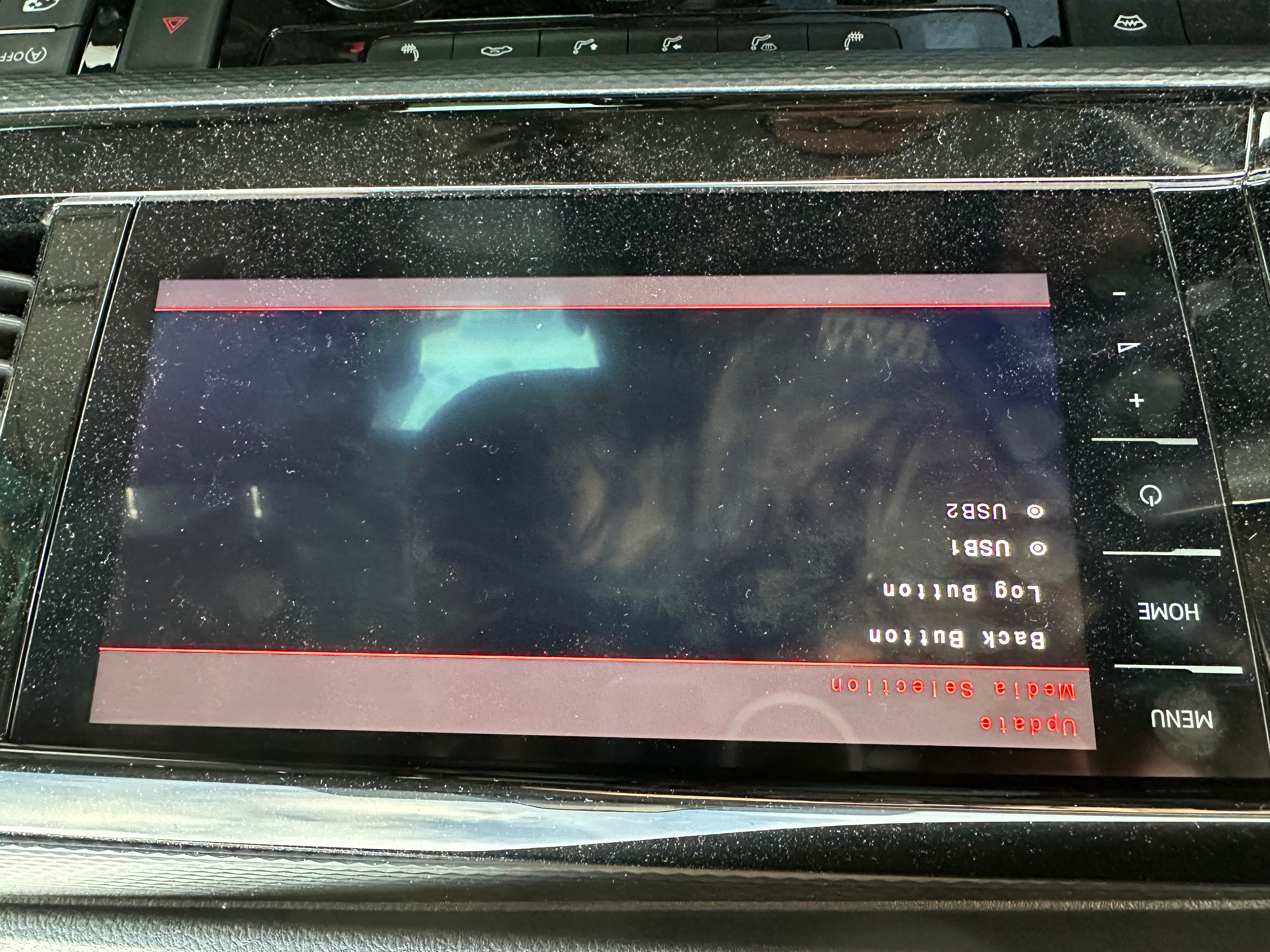
5/ Then select the first menu item - "Update" and select the USB slot in which the USB drive is inserted - see Figure 4


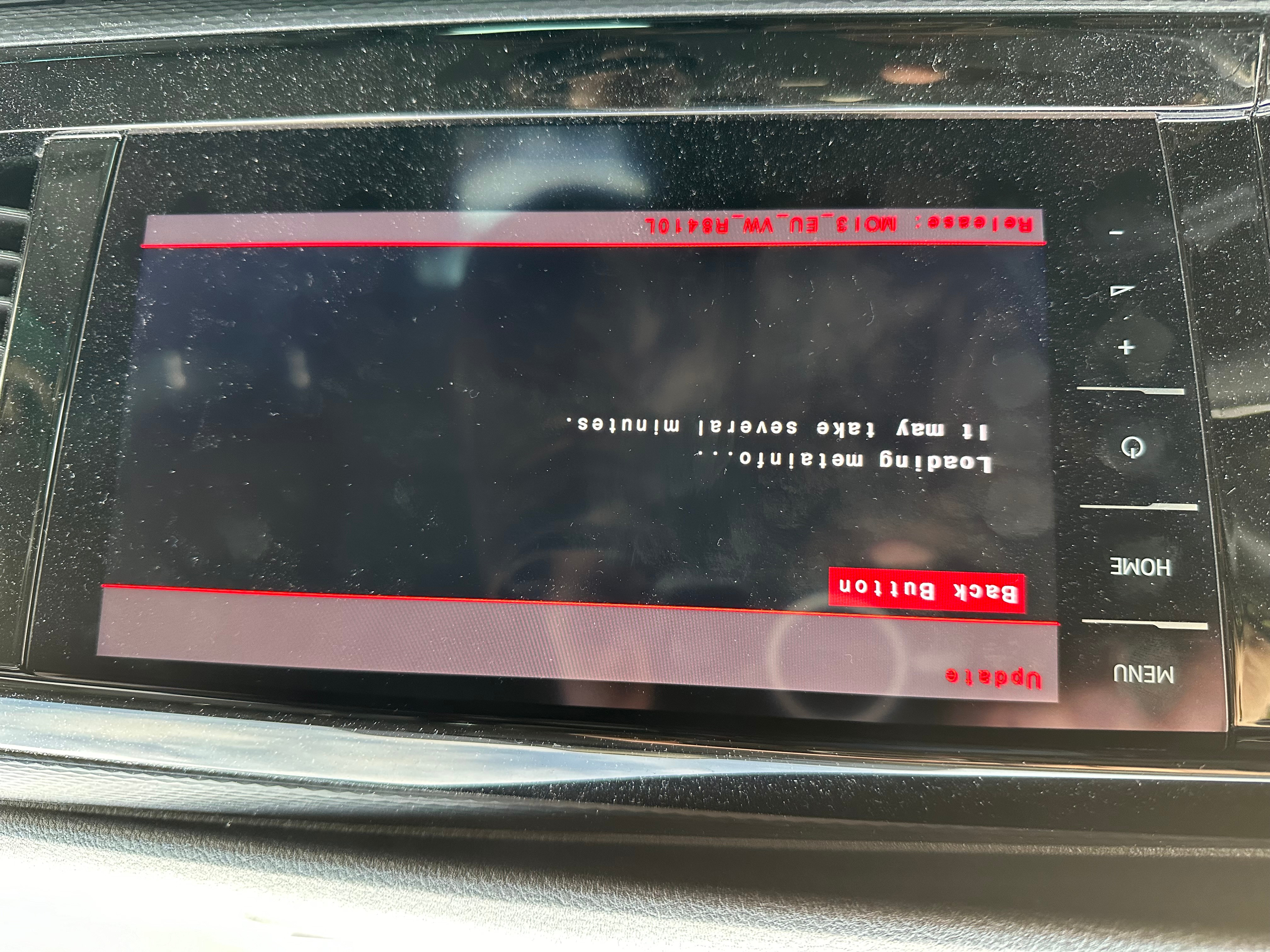
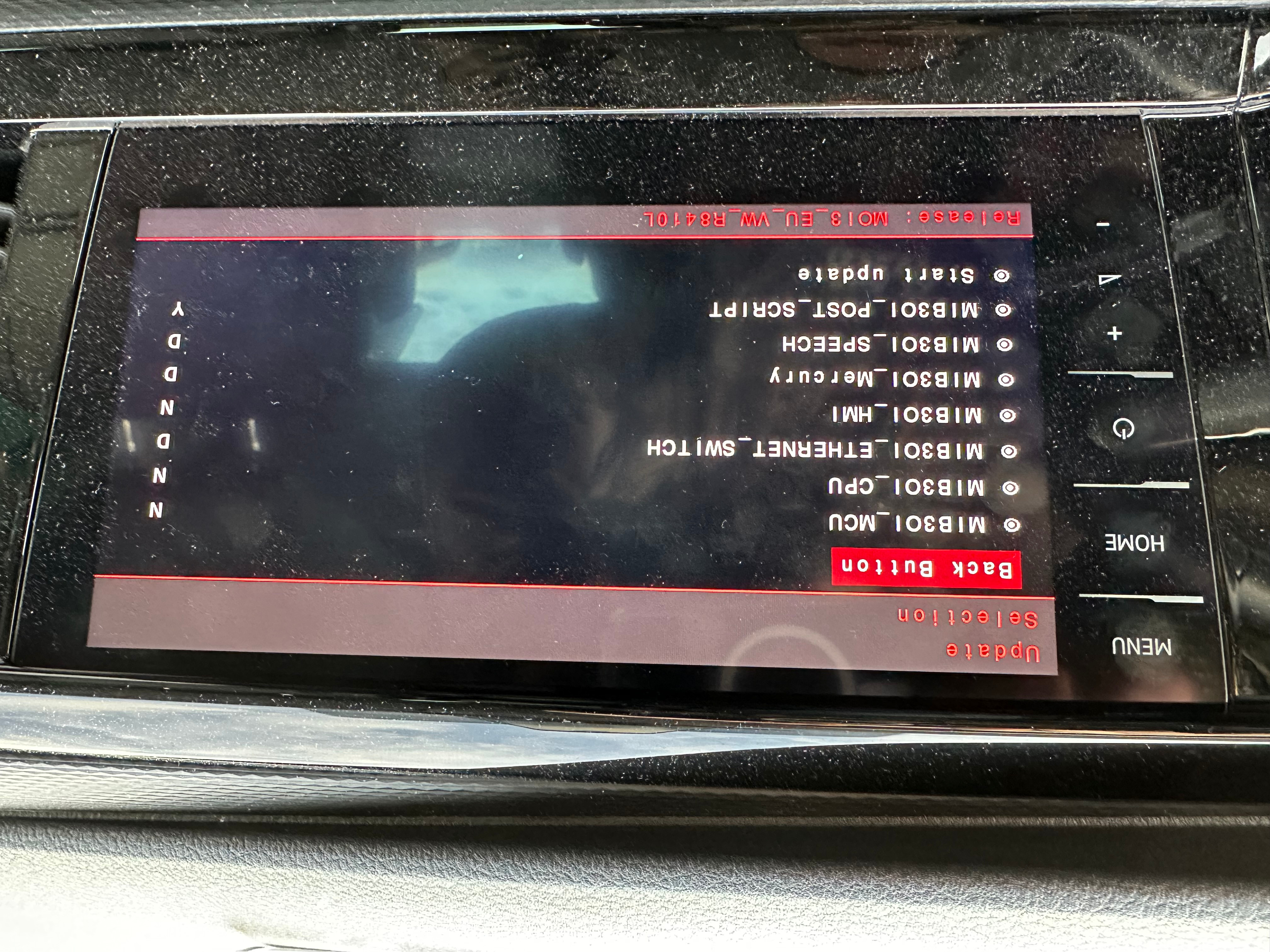
6/ After loading and checking the correctness of the FW version, a

screen will appear indicating the individual modules - see figure 5 and

6, and on the right side will be an update status indicator - N - no

update, D - the uploaded update is lower than the current version, Y -

the update will be performed.


7/ After the update has been performed, you need to exit the service mode, reboot the system and you are done.


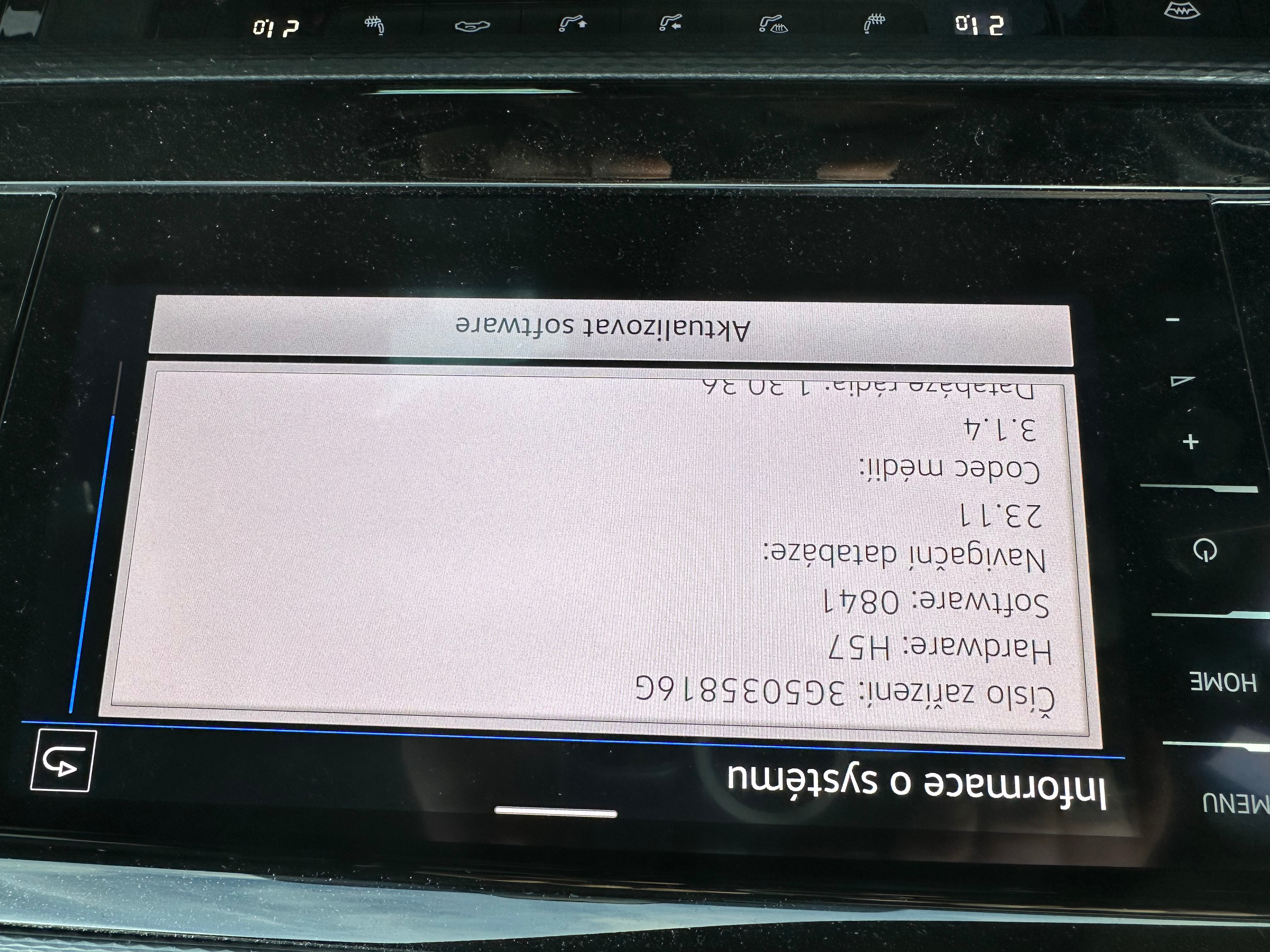
Finally, you can check the execution of the update in the "System

Information" menu - see Figure 7 (before the update) and Figure 8 (after

the update).


Finally, the mirroring of any navigation via Apple CarPlay works in my

vehicle, which I purchased for 2 180 000,- CZK including the extra

charge for the Discover Pro system, and where the authorized service www.autojarov.cz and www.tukas.cz solved me by saying that the fault is in my phone and this fault is not subject to complaint!


Shame on you!
This thread has been closed by the system or the community team. You may vote for any posts you find helpful, or search the Community for additional answers.

Pixelated screen using Apple CarPlay

Welcome to Apple Support Community
A forum where Apple customers help each other with their products. Get started with your Apple Account.