Powerbeats Pro right side touch and volume controls stopped working.

Right side touch and volume control toggle stopped working. Left side still working. Sound good in both. Using with my iphone. Please help me retire touch and volume control to right side.


[Re-Titled by Moderator]


Posted on Oct 1, 2022 10:53 AM

Reply
Question marked as Top-ranking reply

Posted on Oct 3, 2022 8:29 AM

CNBCappdoesnotwork,


Thanks for posting here in Apple Support Communities. Let's have you try resetting your Beats to see if the issue persists.


Reset your Beats earphones - Apple Support


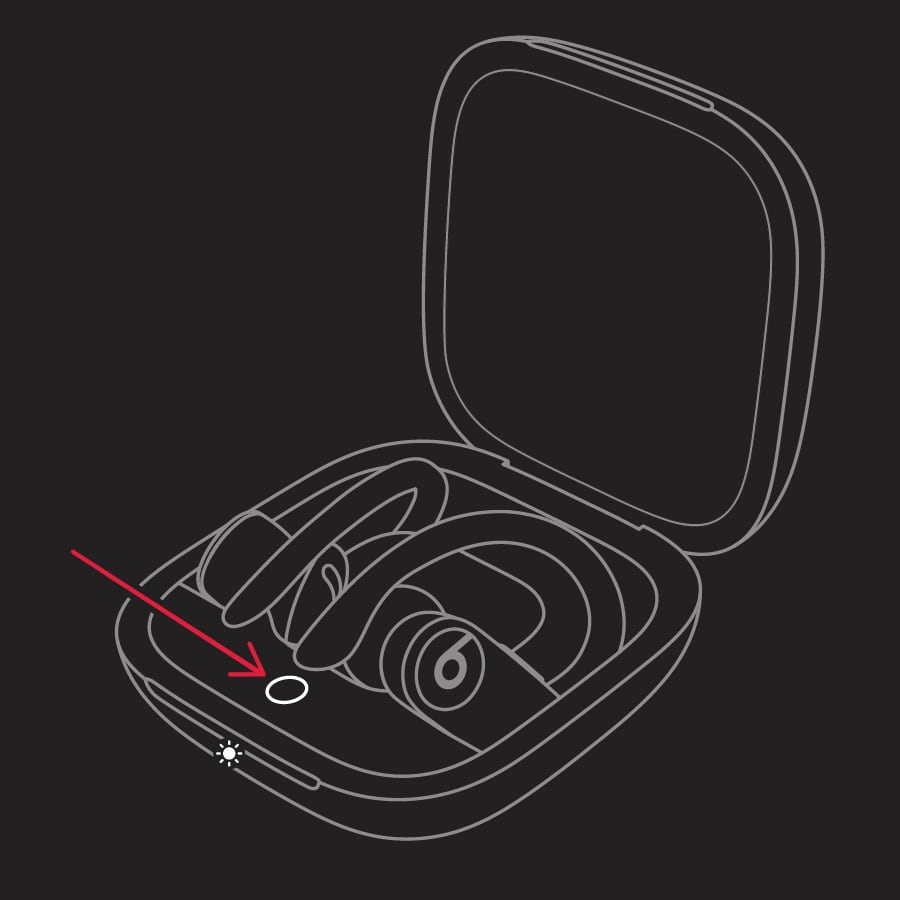
"Reset Powerbeats Pro

  1. Place both earbuds in the case. Leave the case open.
  2. Press and hold the system button on the case for 15 seconds or until the LED indicator light flashes red and white.

Powerbeats Pro indicator light


3. Release the system button."


If the controls still on't work, then please connect with Apple at Get Support for further assistance.


Take care.


1 reply
Question marked as Top-ranking reply

Oct 3, 2022 8:29 AM in response to CNBCappdoesnotwork

CNBCappdoesnotwork,


Thanks for posting here in Apple Support Communities. Let's have you try resetting your Beats to see if the issue persists.


Reset your Beats earphones - Apple Support


"Reset Powerbeats Pro

  1. Place both earbuds in the case. Leave the case open.
  2. Press and hold the system button on the case for 15 seconds or until the LED indicator light flashes red and white.

Powerbeats Pro indicator light


3. Release the system button."


If the controls still on't work, then please connect with Apple at Get Support for further assistance.


Take care.


This thread has been closed by the system or the community team. You may vote for any posts you find helpful, or search the Community for additional answers.

Powerbeats Pro right side touch and volume controls stopped working.

Welcome to Apple Support Community
A forum where Apple customers help each other with their products. Get started with your Apple Account.