Zooming in and out in Google Maps suddenly way too fast!

Google Maps used to work just fine a couple of days ago but suddenly it's almost impossible to zoom in and out accurately.

I only have this problem using the Safari Browser (which I normally use), in Firefox it still works fine.


Any ideas what to do (besides just using Firefox)?


Posted on Oct 6, 2022 9:28 AM

Reply
Question marked as Top-ranking reply

Posted on Oct 21, 2022 2:55 PM

You might try to change User Agent in "Develop menu" in Safari to "Google Chrome - macOS" and it will probably help.

If you do not see "Develop menu" then open Safari's preferences and in the "Advanced" tab check "Show Develop menu in menu bar", then open it, click "User Agent" and select the one I mentioned.

33 replies

Oct 28, 2022 3:15 PM in response to BamRainey

BamRainey wrote:

Response to Comy159
If it is not a Safari problem, then how do you explain what I said before? About two friends with different versions of Safari 15 and perfectly working Google Maps, and that I asked one of them to update to 16, which he did and instantly got this problem.

It is not only fast zoom problem, I mean, not a single person here mentioned that you are actually unable to fully zoom out to see the globe and the Globe View checkbox is unclickable. This definitely has something to do with our original problem.

UPD.
While typing this, I decided to try again and now it is all working fine for me. Safari 16.1

Yes, Google fixed Google Maps for Safari 16.1 but not for Safari 16.0. If it is a Safari problem, then how do you explain that even on Chrome or Firefox, if you change UserAgent to the

Mozilla/5.0 (Macintosh; Intel Mac OS X 10_15_7) AppleWebKit/605.1.15 (KHTML, like Gecko) Version/16.0 Safari/605.1.15

then the problem exists on it also? Changing UserAgent does not change the rendering engine inside your browser.

However Google can use that parameter to serve different data for particular browsers. So no, it was not the Safari issue, it is a problem with Google Maps and their browser recognition system.

Oct 22, 2022 7:55 AM in response to iGnome

Actually perhaps it's the other way round and it's Google trying to force users to use Chrome? I just initiated the suggested work around of activating the develop menu in Safari and then changing the user agent to Google Chrome and it now works perfectly. You have to re do this each time you re launch Safari but at least it works. (And because I haven't a clue what all that means or what I'm actually doing I've no idea if messing with the develop menu might have other consequences but the zoom certainly works now).

Oct 13, 2022 1:38 PM in response to R_Gabriel

This is all well and good info BUT it doesn't answer the question the we all have. Zooming in/out on Google maps in Safari worked very well until very recently (about a couple of weeks or so). NO accessibility OR trackpad OR safari preferences have been changed and yet now the merest touch of the track pad zooms from local streets to whole continent. The slider control for zooming and dragging to change centre or view both still work fine. (open source street map and bing maps still work fine for zooming too). There is a google maps support article for this issue too that is equally unuseful. Asking us to change settings in places we've never ventured is uncomfortable and unsuccessful and doesn't fix anything.

Bottom line is that some change in either MacOS OR Safari OR Google maps, has broken the zooming via trackpad on a MacBook Pro. So could we ask that some engineers from Apple and Google put their heads together and fix it please.

Oct 7, 2022 4:22 PM in response to LySc95

Hey there, and welcome to Apple Support Communities LySc95,


We can certainly understand your concern and can help provide some insight.


We recommend checking out these steps for more information on how to zoom in and out on a Mac and see if everything matches up on your side.


" How to zoom in or out on Mac

Use these accessibility features to zoom all or part of your screen.


To set up zoom, choose Apple menu  > System Preferences, then click Accessibility. Click Zoom in the sidebar, then select any of these zoom features:
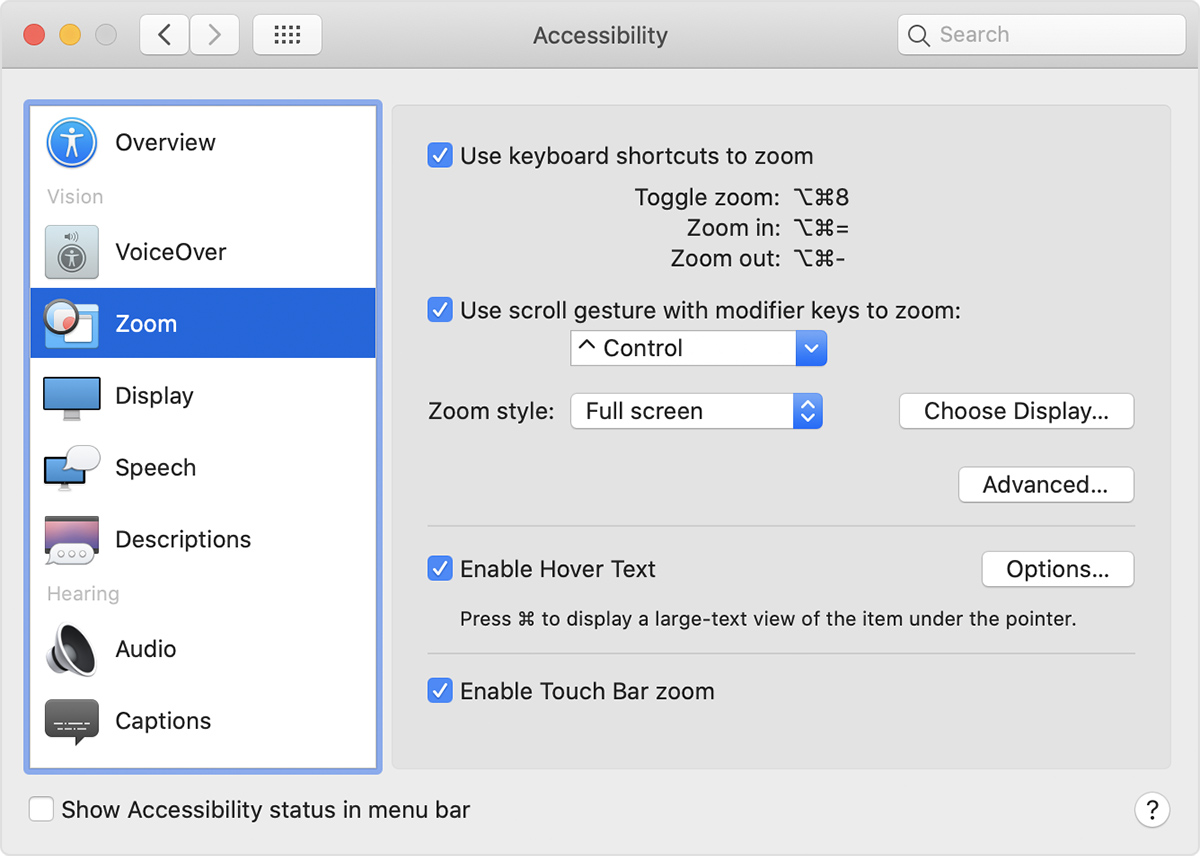
Zoom preferences window


Use keyboard shortcuts to zoom

After selecting ”Use keyboard shortcuts to zoom,” you can use these key combinations to zoom:

Zoom in

To zoom in, press these three keys together: Option, Command, and Equals sign (=).

Zoom out

To zoom out, press these three keys together: Option, Command, and Minus sign (-).

Toggle zoom

To switch between no zoom and your last amount of zoom, press these three keys together: Option, Command, and 8.


Use scroll gesture with modifier keys to zoom

After selecting ”Use scroll gesture with modifier keys to zoom,” you can press and hold the Control key while scrolling with your mouse or trackpad to zoom. Use the ”Zoom style” menu to choose from three zoom styles: full screen, split screen, or picture-in-picture.

Full screen zoom

Split screen zoom

Picture-in-picture zoom "


For additional information, check out this link: How to zoom in or out on Mac - Apple Support


Kindest regards!


Oct 24, 2022 2:23 AM in response to LySc95

I'm experiencing this also, but the main issue here is not about zoom but about Google maps using the fallback of bitmap map tiles instead of using the vector maps with Safari. As some people already said it looks like that Google does this intentionally but I can't see what's the point for them if doing so.

Does anybody knows of an issue/ticket at Google community where this is already mentioned or where I could raise a ticket to Google about that?

This thread has been closed by the system or the community team. You may vote for any posts you find helpful, or search the Community for additional answers.

Zooming in and out in Google Maps suddenly way too fast!

Welcome to Apple Support Community
A forum where Apple customers help each other with their products. Get started with your Apple Account.
