Overheating shuts down my iMac after intensive graphics. Any easy way to track this?

Overheating shuts down my iMac after intensive graphics. Any easy way to track this?


Do I need to clean my iMac? Only happens when running the new WOW Dragonflight BETA!

iMac

Posted on Oct 7, 2022 5:17 AM

Reply
Question marked as Top-ranking reply

Posted on Oct 7, 2022 10:25 AM

Which iMac??? Some should not be opened at home.


As for cleaning, opening any iMac made after 2011 requires getting into a sealed case and, depending on model, you may need to gut the computer to get to the fan. Can't recommend a non-professional cleaning, and a pro job could be expensive--about US $160 for labor not counting the resealing kit.


What you can inspect and clean if needed are the air vents and your workstation setup:


1) Vents: Cool air intakes are on the bottom edge of the case and can get dusty:


DO NOT use canned air! It can blow any dust/lint deeper into the computer, requiring professional repair. Place the computer facedown on a soft cloth. Get a small brush and your vacuum cleaner. Without touching the vac's nozzle to the computer, hold it about an inch from the vents and use the brush to flock dirt toward the nozzle.


The exhaust vent is located under the stand:
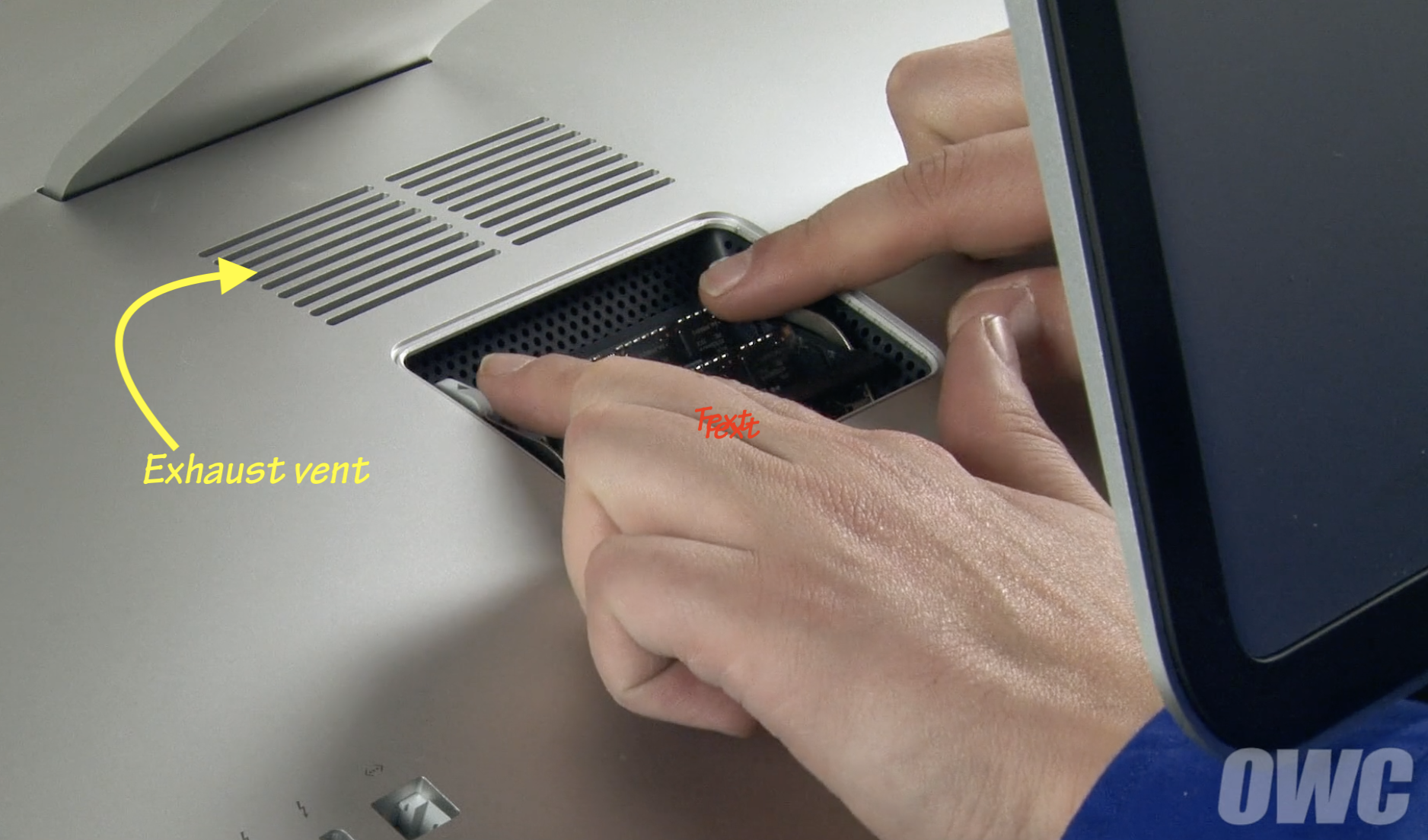


It seldom gets dirty BUT can be obstructed. If you have the computer positioned high and have to tip the display to fully down to use, the stand is too close to the vent and temps can rise fast. I've reproduced that on my 2017 iMac 5K at will. A poster here last year report it was enough to go past the fan speedup and CPU clock-back and shut his iMac down.


2) Workstation: place NOTHING between the intake vent and the deskt surface. Any rducitonin the space can reduce colling capacity. Maintain that approx 3 inches of clearance.


18 replies
Question marked as Top-ranking reply

Oct 7, 2022 10:25 AM in response to Retired in NH

Which iMac??? Some should not be opened at home.


As for cleaning, opening any iMac made after 2011 requires getting into a sealed case and, depending on model, you may need to gut the computer to get to the fan. Can't recommend a non-professional cleaning, and a pro job could be expensive--about US $160 for labor not counting the resealing kit.


What you can inspect and clean if needed are the air vents and your workstation setup:


1) Vents: Cool air intakes are on the bottom edge of the case and can get dusty:


DO NOT use canned air! It can blow any dust/lint deeper into the computer, requiring professional repair. Place the computer facedown on a soft cloth. Get a small brush and your vacuum cleaner. Without touching the vac's nozzle to the computer, hold it about an inch from the vents and use the brush to flock dirt toward the nozzle.


The exhaust vent is located under the stand:


It seldom gets dirty BUT can be obstructed. If you have the computer positioned high and have to tip the display to fully down to use, the stand is too close to the vent and temps can rise fast. I've reproduced that on my 2017 iMac 5K at will. A poster here last year report it was enough to go past the fan speedup and CPU clock-back and shut his iMac down.


2) Workstation: place NOTHING between the intake vent and the deskt surface. Any rducitonin the space can reduce colling capacity. Maintain that approx 3 inches of clearance.

Oct 7, 2022 9:04 AM in response to Retired in NH

If the Mac powers off while running the diagnostic, then it probably is not over heating. You likely have some other sort of hardware issue. Most likely an issue with the power supply or Logic Board (assuming it is powered down and the display is not just dark).


It is extremely rare for a Mac to power off due to overheating since you will first have the fans run at high speed, then the CPU will become throttled to idle speeds (800MHz) in order to lower heat until the fans restore temps to reasonable levels. A CPU running at idle speed doesn't get hot enough to power off the computer these days unless there is a hardware issue with the CPU itself. While the fans & heatsink fins may be filled with dust on an iMac, there is no good way to remove the build-up of dust from the heatsink fins without actually opening the iMac which is very difficult & risky to do as there are a lot of fragile cables & connectors as well as damaging the Display Assembly. Plus the exposed power supply inside can still provide a dangerous shock even after sitting for hours after being unplugged from the AC power.


You can use MacsFanControl to see the various system temperatures. Just don't modify the fan speeds unless you set the fans to run faster than normal.

Oct 7, 2022 11:31 AM in response to Retired in NH

Retired in NH wrote:

Fan speed of ZERO also says "Turned off by Hardware" could the vent be blocked?

Some Macs don't have the fan(s) spin until the temps reach a certain point so this may not be a problem. Most Macs try to keep the CPU temps between 80C - 95C when being used. Again, it does vary by different Mac models. I'm not sure at what CPU temp the fan speed begins to increase as it varies by different models. I haven't really checked the CPU temps and fan speed for iMacs after 2010 so I'm not certain of where Apple likes to keep their temps during use.


Run the Apple Diagnostics to see if any hardware issues are detected. The diagnostics do a good job verifying temperature sensors and whether the fan is operating properly at various speeds. If the diagnostics pass the sensor & fan tests, then they are most likely good from my own personal experience supporting our organization's Macs.

Nov 4, 2022 11:45 AM in response to Retired in NH

I am experiencing the same overheating since the wow DF pre-content download.

Approx. 20°C hotter the previous running temps. Ouch.

As far as opening up the iMac, it’s not that difficult**. Yes, the glass is secured with adhesive, but the kits come with a little tool to slide around the edge and separate it. Once you get the glass open there’s two small cables to detach and the glass comes off. There’s no “gutting“ needed. The fan is right there. Three screws and it slides out. I’m actually going to do this clean out next week + pop in a new fan ($10). The screen removal/ install kits are cheap.

One caveat - Obviously, I would not recommend you do this if your iMac is still under warranty, just case you break/damage something.

** Go to ifixit.com they have GREAT how-to videos on this.

Oct 7, 2022 11:03 AM in response to Retired in NH

That sounds like it needs to be serviced by someone trained to open and reseal the iMac case. The fan(s) may have somehow been disconnected or some other problem.


By the way, I have a late 2015 iMac and recently replaced the internal HDD with a new SSD. The labor for opening the iMac and doing that and resealing it was under $100. I would take your iMac in for an evaluation at an Apple Authorized Service Center. These third party shops will work on all Macs, Apple Store will only do repairs on the most recent ones.

Oct 7, 2022 7:49 AM in response to Retired in NH

Try plugging the iMac into a different electrical outlet or directly into the wall outlet instead of a power/surge strip. Also make sure the AC Cord is fully seated into the back of the iMac and it is not loose.


If the iMac powers off when attempting to run the Apple Diagnostics, then you have some sort of hardware issue that will need to be repaired if the other suggestions do not help. Have Apple or an Apple Authorized Service Provider examine the iMac to provide you with a repair estimate.

Oct 9, 2022 7:57 AM in response to Retired in NH

I have my doubts about the problem being fixed, but hopefully it is. I think you reported the error incorrectly ... did you mean "PPF004" & "PPF003"? If so, then it is an issue with the fan according to this Apple article:

Apple Diagnostics reference codes - Apple Support


Keep in mind a passing diagnostic does not mean there are no problems....only that during that one test run, no problems were detected. A lot of hardware issues will never be detected by the diagnostics. Even if you can reproduce a diagnostic failure seemingly 100% of the time, then make a hardware change and the diagnostics then pass....it does not necessarily mean the problem is fixed although it can give you hope that the problem is resolved ....sometimes it is resolved.


Hope the iMac keeps running fine.


This thread has been closed by the system or the community team. You may vote for any posts you find helpful, or search the Community for additional answers.

Overheating shuts down my iMac after intensive graphics. Any easy way to track this?

Welcome to Apple Support Community
A forum where Apple customers help each other with their products. Get started with your Apple Account.

