New MacBook Pro WiFi connectivity dropping rapidly

I just set up a brand new MBP M1pro 14 inch and it will only connect to my router when in the same room. On all of my other devices (inc 2012 MBP) the router maintains connection across the apartment on 2.4Ghz and mostly on 5Ghz. On this new device I can't leave the room with 5Ghz and 2.4Ghz drops from my top speed on 120mbs to 10mbs in the next room!! I have reset the MacBook but this has not helped. PLEASE HELP!

MacBook Pro Apple Silicon

Posted on Oct 12, 2022 1:24 PM

Reply
Question marked as Top-ranking reply

Posted on Oct 12, 2022 1:30 PM

Wi-Fi slow and/or disconnecting— current accommodations include:


Updating software:

• if on Monterey, Updating to the very latest version of Monterey.


Reducing number of networks being evaluated:

• Checking the [√] ask to Join new networks check box:
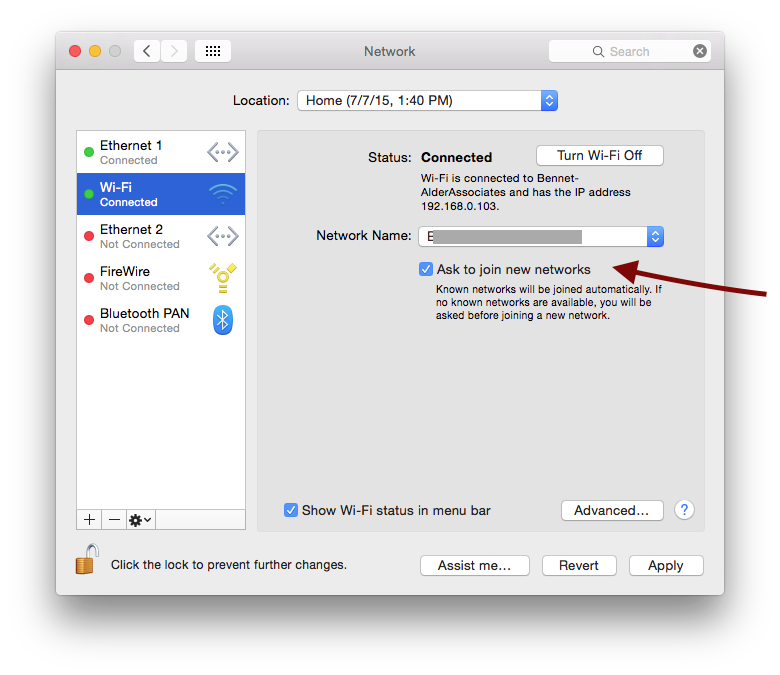


AND purging the list of potentially-available networks in this pane:

System preferences > Network > Wi-Fi > (Advanced) ...

... to leave ONLY the networks you might really join:
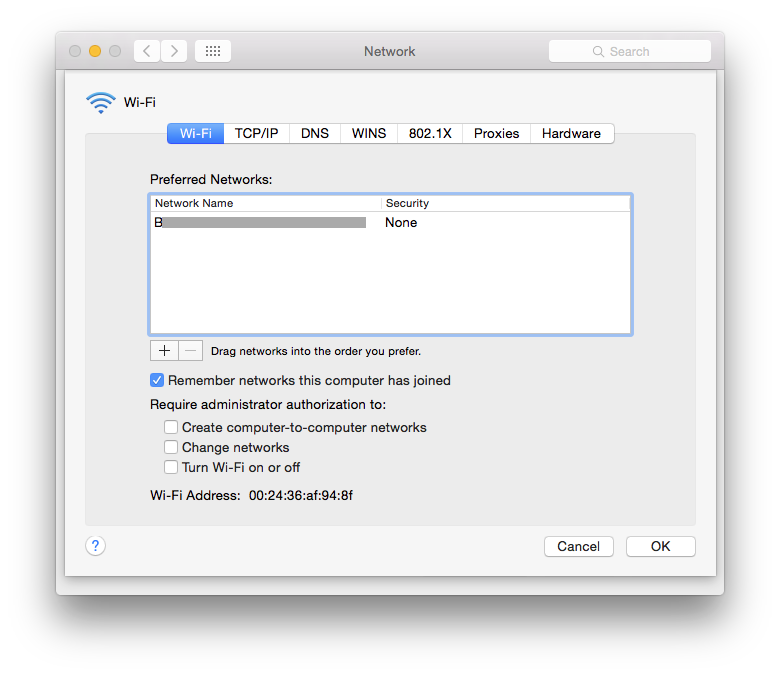


>> all of these reduce the number of networks your Mac is evaluating on a moment-by moment basis, looking for a better connection.


IPv6:

System Preferences > Network > Wi-Fi > (advanced) >TCP/IP > IPv6 ... to Link-local only


ON may cause routing activity that interferes with your networking.

OFF will make it hard to find printers and other services on your network.


“Limit IP address Tracking” has been shown to be an issue on some Networks:

< Limit IP address tracking >


VPN:

If you have enabled ANY VPN features in system preferences > network

these can interfere with regular network operation.


If you are using a VPN you installed on your own, remove it while continuing to debug.

Also remove ALL devices in the left pane related to VPN in:

System Preferences > Network


If this VPN is for an Institutional/Corporate connection, contact your institution for additional guidance.


80Mhz channels:

If your 5GHz band is configured (on your Router) to 80MHz channel-width, some users have reported problems. If they reconfigured the 5GHZ band to back to 40MHz channels, many of their connection and speed problems evaporated.


Network Location:

If you continue to have trouble after using these steps, create a new named Network "Location" -- a collection of settings applied "all at once" when you select it. Every new named "Location" you create starts with all defaults, which lets you walk away from any errant settings that might be causing you trouble:


How to use network locations on your Mac - Apple Support

How to use network locations on your Mac - Apple Support

.


29 replies

Oct 12, 2022 2:46 PM in response to Grant Bennet-Alder

I have tried all of those things and nothing helps. The machine was literally new out the box today and the internet has always been bad. I literally have the two macs next to each other now and my old one is perfectly fine. Wifi diagnostics doesnt pick anything up.. Its as if the aerial in the new macbook just isnt very strong at all? Is it possible that it has broken in someway?

Oct 12, 2022 3:56 PM in response to Grant Bennet-Alder

Yes sorry. That’s confused things. I am currently in a different room testing it. The signal strength shown there is the same as it is on my other devices in this same room. Not ideal but it works. The real problem is the TX rate I think? The problem is regardless of the signal strength, when I do a speed test it is very jittery and very slow. Whilst the other devices do not have this issue. I can barely load a video on the new MacBook, but my old one is fine.

Oct 12, 2022 3:59 PM in response to scoults

I have seen a few things on other forums about M1 Pro connectivity issues, but these seem minor in comparison to total falloff as I’m experiencing… there’s minimal interference in my flat. I’ve power cycled the router and played with the Chanel’s and bands, completely reset the computer. Honestly no clue how to proceed.

Oct 13, 2022 12:02 AM in response to Grant Bennet-Alder

So i do understand poor signal will affect connection. But the 'speed' remains consistent on my old macbook even with poor signal, until it becomes so poor that it drops out. The difference is the new one sees to drop out as soon as the signal becomes even slightly less than perfect. Standing next to the router it works, but 5m away with a direct line of site, the 5ghz drops...


Weirdly, I changed the 2.4ghz mode from auto (b/g/n/ax) to just (b/g/n/) and this channel is now twice as fast when at the sme distance... 5ghz still wont work... Also its a London flat with 3 apartments next to it, the radio interference from other flats is minor...

Oct 13, 2022 10:36 AM in response to Grant Bennet-Alder

yes sure. but I only turned off ac/ax because it was WORSE with them on! AND I only used the 2.4ghz band because its also WORSE when connected to the 5ghz band. Which fine at super close range but when I sit 5m away, it completely drops out... My router is supplied by G.Network here in London. It is FTTP and should be at 140mbps download. It is on all my other devices when connected to 5ghz band. The router is a Nokia, shown here: https://www.youtube.com/watch?v=qO4hjx1Q3us

Oct 13, 2022 11:53 AM in response to Grant Bennet-Alder

yes but in this case it defaulted to created two distinct wifi radios. Essentially as you have it '2.4GHz default name is ALHN-A109, and the default 5GHz name is ALHN-A109-5'


I don't think you understand my original question. I CAN connect to both bands individually and switch between them how I want to. HOWEVER, the performance on both bands in way worse than on my other devices, so much so, that on 5ghz, it only stays connected when closer than 5m.

Oct 13, 2022 12:36 PM in response to Grant Bennet-Alder

I know there's nothing bad showing up there. That's why I'm asking the question. none of this makes sense to me. It is behaving like I've wrapped my MacBook in tin foil or something? Attached are screenshots showing the 5ghz channel wifi at 5m away and then again at 6m away, but behind a plasterboard wall. Behind which I normally get perfect signal on other devices. Channel selection all set to auto.

This thread has been closed by the system or the community team. You may vote for any posts you find helpful, or search the Community for additional answers.

New MacBook Pro WiFi connectivity dropping rapidly

Welcome to Apple Support Community
A forum where Apple customers help each other with their products. Get started with your Apple Account.