Apple maps "Report an issue" is in Norwegian

I'm running MacOS Monterey (Version 12.6 (21G115)) on my M1 MacBook Pro. I went to "Report an Issue" in Apple Maps and all the prompts were in Norwegian. (I had to manually type the prompts into Google Translate to figure out how to report the issue as you can't select and then copy-and-paste them.)


I did check, and System Preferences -> Language & Region -> General is set to English (US). And if you go to -> Apps, you'll quickly discover that Maps isn't one of the apps for which you can choose a language; it isn't in the drop-down list and if you select Other... you'll see it grayed out in the /Applications list.


I did report that issue as part of the primary issue I was reporting, but I am curious if others have seen this, and if anyone knows how to tell Maps that I'd like to report issues in English.

MacBook Pro 16″, macOS 12.6

Posted on Oct 20, 2022 7:41 PM

Reply
5 replies

Oct 26, 2022 7:07 AM in response to SteveChessin

Hi SteveChessin,


At this point, the next step would be reinstall macOS Monterey, using the macOS Recovery steps. This will reinstall what's included with the macOS, without losing any personal data. The thought is that Maps, being included with the macOS, will reinstall and correct whatever is causing this issue.

How to reinstall macOS - Apple Support


Start up from macOS Recovery
First make sure that your Mac has a connection to the internet. Then determine whether you're using a Mac with Apple silicon and follow the appropriate steps:
Apple silicon (Which is your M1 MacBook Pro)
1. Turn on your Mac and continue to press and hold the power button until you see the startup options window.
2. Click the gear icon labeled Options, then click Continue.
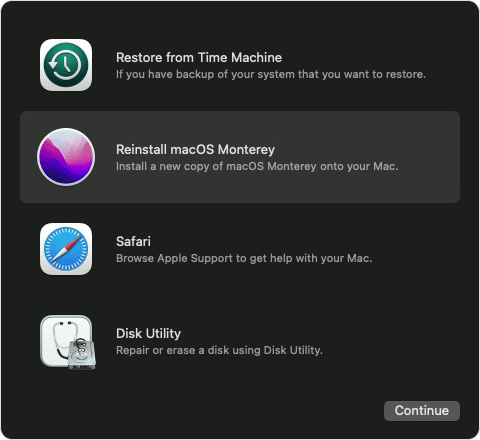
Reinstall macOS
Reinstalling macOS does not remove data from your Mac. To begin installation, select Reinstall macOS from the utilities window in macOS Recovery, then click Continue and follow the onscreen instructions. 
macOS Recovery options with "Reinstall macOS Monterey" selected
Follow these guidelines during installation:
• If the installer asks to unlock your disk, enter the password you use to log in to your Mac.
• If the installer doesn't see your disk, or it says that it can't install on your computer or volume, you might need to erase your disk first.
• If the installer offers you the choice between installing on Macintosh HD or Macintosh HD - Data, choose Macintosh HD.
• Allow installation to complete without putting your Mac to sleep or closing its lid. Your Mac might restart and show a progress bar several times, and the screen might be empty for minutes at a time.
• After installation is complete, your Mac might restart to a setup assistant.

Test Maps, and let us know how it goes.


Thanks!

Oct 22, 2022 5:30 PM in response to SteveChessin

Hello SteveChessin,


Welcome to Apple Support Communities. 


We appreciate you reporting this. We’d like to have you do some isolating troubleshooting steps to isolate the cause.


Please use the steps to start your mac in safe mode to test: How to use safe mode on your Mac - Apple Support


We’d also like you to use the steps as listed here to set up a test user account: Set up users, guests, and groups on Mac - Apple Support

Add a user

  1. On your Mac, choose Apple menu  > System Preferences, then click Users & Groups .
  2. If the lock at the bottom left is locked , click it to unlock the preference pane.
  3. Click the Add button  below the list of users.
  4. Click the New Account pop-up menu, then choose a type of user.
  5. Enter a full name for the new user. An account name is generated automatically. To use a different account name, enter it now—you can’t change it later.
  6. Enter a password for the user, then enter it again to verify. Enter a password hint to help the user remember their password.
  7. Click Create User.
  8. Depending on the type of user you create, you can also do any of the following:
    • For an administrator, select “Allow user to administer this computer.”
    • For an administrator, select “Allow user to reset a password using Apple ID.”
    • Use Sharing preferences to specify whether the user can share your files and share your screen.


Let us know if you have further questions.


Take care.

Oct 25, 2022 10:28 PM in response to green500

I tried it as different other users (both admin and standard, including a newly-created standard one), and "Report an issue" came up in English. I then booted in safe mode, and for the other users it came up in English, but for me it's still in Norwegian.


I see that macOS Ventura 13.0 just came available. Should I upgrade to that and see if the problem still occurs, or is there more debugging we should do to try to isolate the cause? Is there a way to find out why Maps is selecting the Norwegian strings file (I gather under no.lproj) instead of the English one (under en.lproj)? (I see that Xcode has a debugging facility but I don't know how to use it.)

Oct 28, 2022 6:16 AM in response to SteveChessin

Hey there SteveChessin, 


Testing in a new user helps to identify if the behavior is isolated to a specific user setting, or system wide. Since the issue does not persist while in a new user, there is a setting or preference exclusive to your user profile contributing to the behavior. The install of Maps is the same between each user. Reinstalling macOS should rectify the issue within your user. Should you continue to experience issues following a reinstall, you may want to Apple Support for assistance.


Have a good one!

Oct 27, 2022 10:38 PM in response to mingoslkd

This is troubleshooting and not debugging. While I'm willing to reinstall the OS (after I first take a backup, of course), is there no interest in trying some debugging to see why Maps is picking the no.lproj directory instead of the en.lproj directory for Report an Issue (if that is indeed what it is doing)?


BTW, I note that if I ask Maps for directions, the directions are in English. And if I click on the "Report an Issue" that shows up on the bottom of the directions, that form comes up in English. Compare this:

with this:

This thread has been closed by the system or the community team. You may vote for any posts you find helpful, or search the Community for additional answers.

Apple maps "Report an issue" is in Norwegian

Welcome to Apple Support Community
A forum where Apple customers help each other with their products. Get started with your Apple Account.