Screen shaking/shivering, Iphone 13 Pro Max

Hello,

I have got iPhone13 Pro max, 6 months old.

recently the following problem started to appear on the screen.

when using Facebook marketplace, and clicking on filter button the screen shake/shiver.

I face this problem only on this application so far, could anyone help to fix this issue?


iPhone 13 Pro Max, iOS 16

Posted on Oct 22, 2022 1:15 PM

Reply
Question marked as Top-ranking reply

Posted on Oct 24, 2022 11:23 AM

Hi M_KM,


If the issue only occurs when using the Facebook marketplace, then we'd recommend reaching out to the developer of the app by completing the steps listed here: How to contact an app developer - Apple Support that can also be found below.


Contact the developer of an iOS, iPadOS, or watchOS app

  1. "Open the App Store on your iPhone, iPad, or iPod touch.
  2. Search for the app, then tap it. If you can't find it, tap the account button  or your photo at the top of the screen, tap Purchased, tap "Not on this [device]," then tap the app.
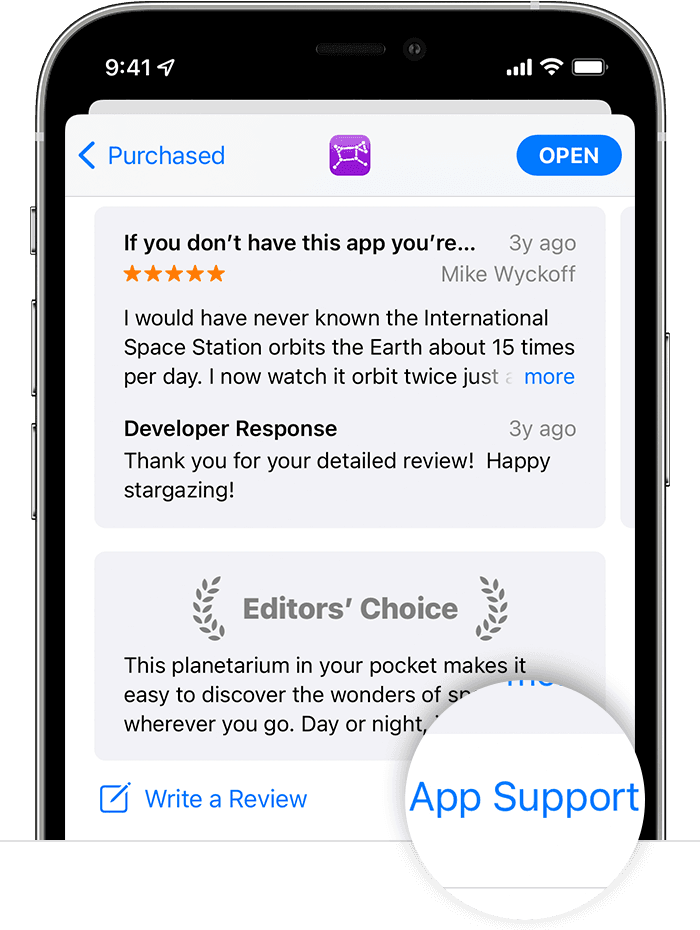
  3. The app's product page appears. Scroll to the Ratings & Reviews section, then tap App Support. If you don't see App Support, make sure that you're signed in with the correct Apple ID."

In the App Store on iPhone, the App Support button is at the bottom of the app's page.

Best regards

1 reply
Question marked as Top-ranking reply

Oct 24, 2022 11:23 AM in response to M_KM

Hi M_KM,


If the issue only occurs when using the Facebook marketplace, then we'd recommend reaching out to the developer of the app by completing the steps listed here: How to contact an app developer - Apple Support that can also be found below.


Contact the developer of an iOS, iPadOS, or watchOS app

  1. "Open the App Store on your iPhone, iPad, or iPod touch.
  2. Search for the app, then tap it. If you can't find it, tap the account button  or your photo at the top of the screen, tap Purchased, tap "Not on this [device]," then tap the app.
  3. The app's product page appears. Scroll to the Ratings & Reviews section, then tap App Support. If you don't see App Support, make sure that you're signed in with the correct Apple ID."

In the App Store on iPhone, the App Support button is at the bottom of the app's page.

Best regards

This thread has been closed by the system or the community team. You may vote for any posts you find helpful, or search the Community for additional answers.

Screen shaking/shivering, Iphone 13 Pro Max

Welcome to Apple Support Community
A forum where Apple customers help each other with their products. Get started with your Apple Account.