
Edit memo on iPhone XR: trim and delete in grey only
When I am trying to delete 30 sec from the beginning of a selection neither trim or delete are highlighted - only grey so can’t select either
When I am trying to delete 30 sec from the beginning of a selection neither trim or delete are highlighted - only grey so can’t select either
Hi Musicstand1956,
For help with editing Voice Memos, test the steps below found in the article here: Edit or delete a recording in Voice Memos on iPhone - Apple Support
"Trim the excess
 , then tap Edit Recording.
 at the top right, then drag the yellow trim handles to enclose the section you want to keep or delete.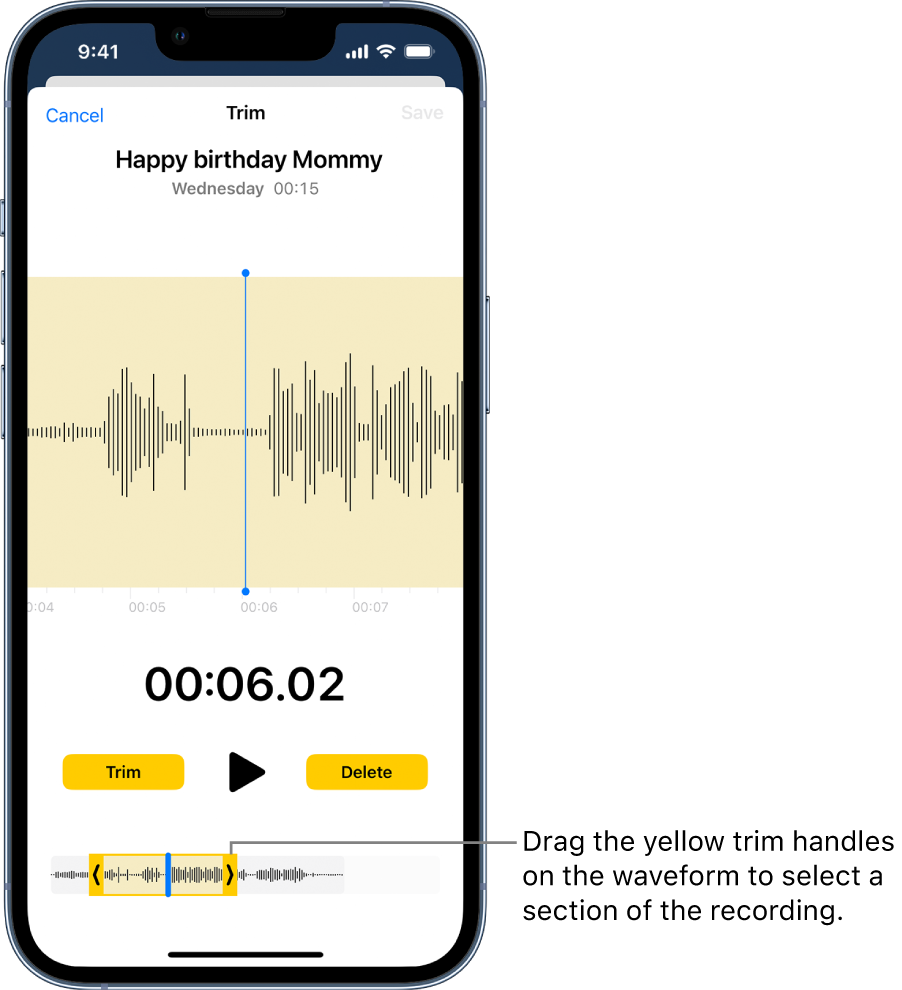
 .
.If the issue continues, ensure your iOS is fully updated, close the Voice Memo app and complete a normal restart of your iPhone to test.
Update your iPhone or iPad - Apple Support
Close an app on your iPhone or iPod touch - Apple Support
Restart your iPhone - Apple Support
If the issue remains, test with a different Voice Memo or from a different device. Should you continue to have trouble, reach out to Apple Support directly to further assist.
Contact - Official Apple Support
Contact Apple for support and service - Apple Support
Best.
Hi Musicstand1956,
For help with editing Voice Memos, test the steps below found in the article here: Edit or delete a recording in Voice Memos on iPhone - Apple Support
"Trim the excess
, then tap Edit Recording. at the top right, then drag the yellow trim handles to enclose the section you want to keep or delete..If the issue continues, ensure your iOS is fully updated, close the Voice Memo app and complete a normal restart of your iPhone to test.
Update your iPhone or iPad - Apple Support
Close an app on your iPhone or iPod touch - Apple Support
Restart your iPhone - Apple Support
If the issue remains, test with a different Voice Memo or from a different device. Should you continue to have trouble, reach out to Apple Support directly to further assist.
Contact - Official Apple Support
Contact Apple for support and service - Apple Support
Best.
Edit memo on iPhone XR: trim and delete in grey only

