Watch, stopping haptic notification for the end of the sleep cycle?

While using Watch to monitor my sleep, I don't use an alarm, preferring to try to wake up naturally. I've started to notice that I am waking up after the watch turns off sleep focus because it seems to do that with some haptic feedback, it buzzes on my wrist.


I've had a look at notifications, but I can't seem to find how to turn this off so it isn't an alarm to me to wake up.


I suppose I could increase the time for sleep focus so the turn off was later when I was awake too, but I wanted to see if turning off this notification was an option too.

Apple Watch

Posted on Nov 9, 2022 6:43 AM

Reply
1 reply

Nov 11, 2022 10:14 AM in response to MTUser2007

Hey MTUser2007,


It seems you need help adjusting your Apple Watch haptics and we can help.


With the options you're describing, one thing you might want to do is turn off Haptics entirely:

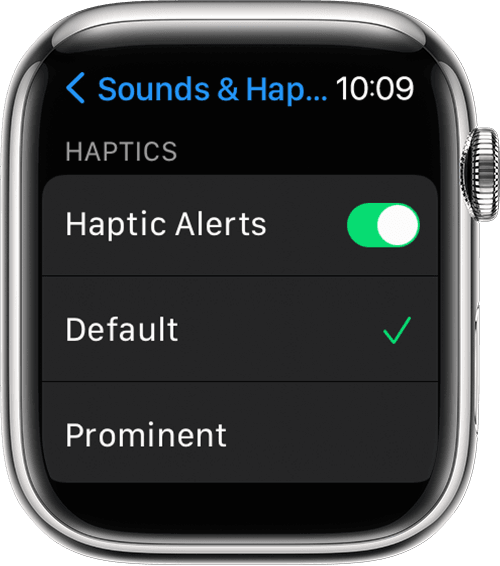
How to manage Apple Watch Haptic Alerts
1. Open the Settings app. 
2. Scroll down and tap Sounds & Haptics.
3. Turn Haptic Alerts on or off.
Apple Watch showing the Sounds & Haptics screen in Settings

4. To add extra emphasis to haptic alerts, tap Prominent. This feature adds an additional haptic tap that pre-announces some of your other haptic alerts. 

Change the audio and notification settings on your Apple Watch


Let us know if that helps get this solved where it's not vibrating when you need it silent.


Thanks for using the Apple Support Communities.

This thread has been closed by the system or the community team. You may vote for any posts you find helpful, or search the Community for additional answers.

Watch, stopping haptic notification for the end of the sleep cycle?

Welcome to Apple Support Community
A forum where Apple customers help each other with their products. Get started with your Apple Account.