Second HomePod now starting to pop ...

Earlier this year, I had an original HomePod which started to periodically pop. Under the advice from Apple support, I did a hard reset ... which bricked my HomePod ... and sent it into an infinite boot loop. When at the Apple Store, they would not repair it (they can't) and would only replace it (at full price). I was so angry, I told them to keep the thing and left the store.


Now my second HomePod is starting with the same popping sound, and I have no idea what to do. Following Apples advice will brick it entirely, rendering it completely useless. This issue is clearly a manufacturing hardware/software fault that Apple is refusing to accept responsibility for.


Has this issue come about for many other people? Particularly in the EU? I wonder would a class action suit bring any resolution for those in the same position?


Or, alternatively, if anyone had some other resolution that will save my HomePod of barely 2 years ... this would also be welcome.

HomePod

Posted on Nov 10, 2022 3:17 AM

Reply

Similar questions

4 replies

Nov 12, 2022 12:39 PM in response to Spa_ced

I understand the fear of resetting/bricking. When mine popped, I unplugged it for over 24 hrs, plugged back in, then Immediately did the hard reset by pressing the top method. It did not get bricked and the popping stopped. I can’t promise this will work for you but I think the key might be in doing this early when the popping just started happening. Good luck with it!

Nov 12, 2022 7:48 AM in response to Spa_ced

Hi Spa_ced,


Resetting your HomePod would be the only recommendation we can advise for this scenario. To confirm, are these the steps you took to reset the first one?


"Before you begin

If you have two HomePod speakers set up as a stereo pair, you'll need to ungroup the stereo pair before you can reset HomePod.


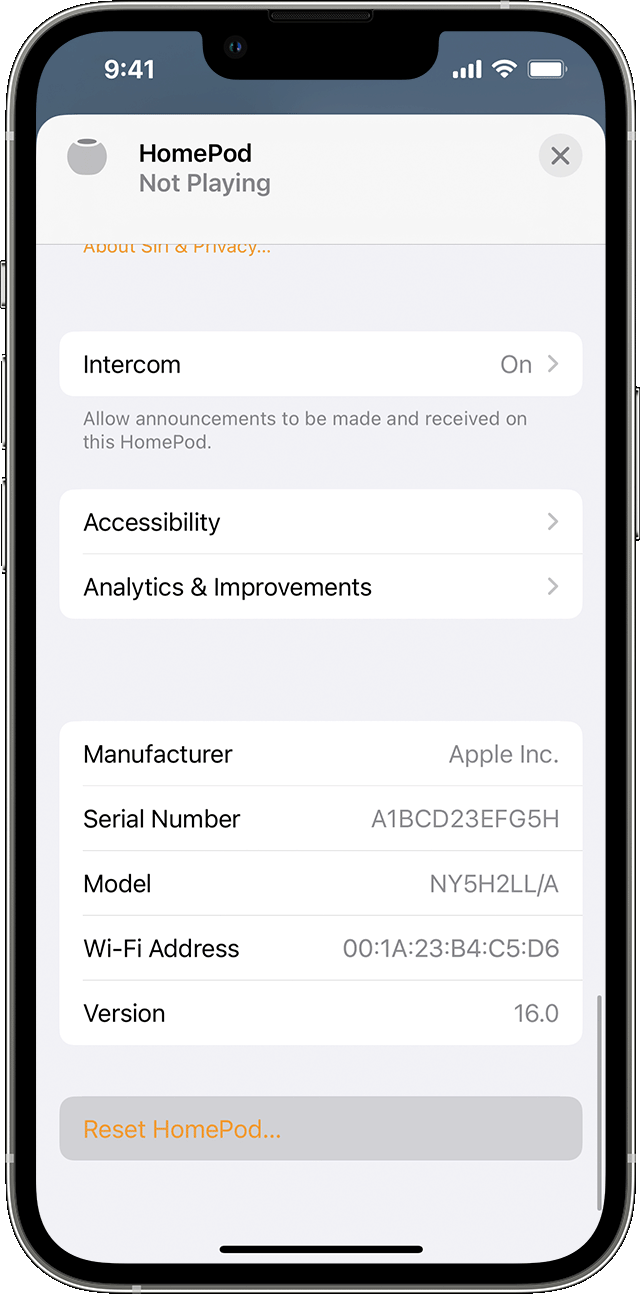
iPhone with Home app open showing Reset HomePod  

Reset HomePod with the Home app

  1. Open the Home app on your iPhone, iPad, or Mac that's signed in with the Apple ID that you used to set up HomePod.
  2. Tap or click HomePod.
  3. Select the Settings icon  or scroll down to HomePod settings.
  4. Select Reset HomePod.
  5. Select Reset.


Press the top of HomePod to reset it

If you can't reset HomePod using the Home app, you can press the top of HomePod to reset it.

  1. Unplug HomePod or unplug the power adapter for HomePod mini. Wait 10 seconds, then plug HomePod back in.
  2. Wait 10 seconds, then touch your finger to the top of HomePod and hold it there.
  3. The white spinning light will turn red. Keep your finger down. 
  4. Siri will say that your HomePod is about to reset. When you hear three beeps, you can lift your finger.
  5. Remove HomePod from the Home app."


If those are the steps you took, we'd advise contacting Apple Support directly for assistance.


Take care.

Nov 14, 2022 4:16 AM in response to DerekM87

I can confirm that these steps were followed ... reseting using the Home app, sent the device into an infinite booting loop, after which the second method (long press on the the top of the HomePod) would not work at all.


I live in the Rep. of Ireland, where there are no Apple stores. Apple support advised me to travel to the Apple Store in Belfast, Northern Ireland (technically another country) ... which I did, only to be told that these devices cannot even be opened. So, there was nothing at all they could do, aside from offering me a replacement HomePod (2018) at full price (€300+) ... more than 3 times the cost of a single HomePod mini ... and I would also have to travel back to Northern Ireland on a different date to collect it. Absolutely rubbish advice from Apple Support. So, while I very much appreciate your reply here, I won't be contacting Apple Support again.


As for trying the reset, I have little doubt I will have to try it at some point. However, this is not an isolate problem ... and I think Apple need to own their manufacturing/software issues, as there are hundreds of threads all over the internet of users experiencing the same problem.

This thread has been closed by the system or the community team. You may vote for any posts you find helpful, or search the Community for additional answers.

Second HomePod now starting to pop ...

Welcome to Apple Support Community
A forum where Apple customers help each other with their products. Get started with your Apple Account.