Tunes from iPad to iPod with no computer
Replaced my laptop with iPad. Want to put more music on iPod. How can I transfer from my iPad to iPod with no computer ?
iPad, iPadOS 15
Replaced my laptop with iPad. Want to put more music on iPod. How can I transfer from my iPad to iPod with no computer ?
iPad, iPadOS 15
Hello Bucco123,
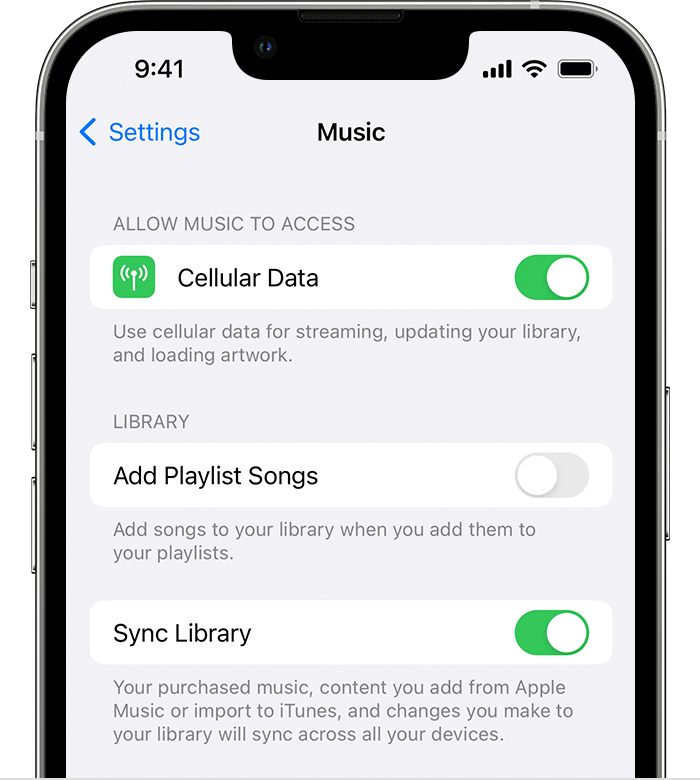
If you're using Apple Music on both devices, you can enable Sync Library and this will help the libraries to sync across each device.
This page can help with enabling that: Use Sync Library to access your music library across your devices - Apple Support
1. Make sure that your iPhone or iPad is signed in with the same Apple ID that you use with your Apple Music subscription.
2. Go to Settings.
3. Tap Music.
4. Turn on Sync Library.
5. Turn on Sync Library on your other devices.
If you're not using Apple Music, but the songs in question were purchased from the iTunes Store then you may opt to re-download them to the desired device: Redownload music - Apple Support
Cheers.
Tunes from iPad to iPod with no computer