How do I get my right AirPod to connect to my phone and charge on the charging case
How do I get my right AirPod to connect to my phone and charge on the charging case.
iPhone 7 Plus, iOS 15
How do I get my right AirPod to connect to my phone and charge on the charging case.
iPhone 7 Plus, iOS 15
Greetings sanaa298,
If one AirPod is not working as expected, follow the guidance found here:
If your left or right AirPod isn't working - Apple Support
These steps may say for audio issues, but the steps can still help with your right AirPod.
If there's no sound in one AirPod
1. Make sure that your charging case is fully charged.
2. Place both AirPods in your charging case and let them charge for 30 seconds.
3. Open the charging case near your iPhone or iPad.
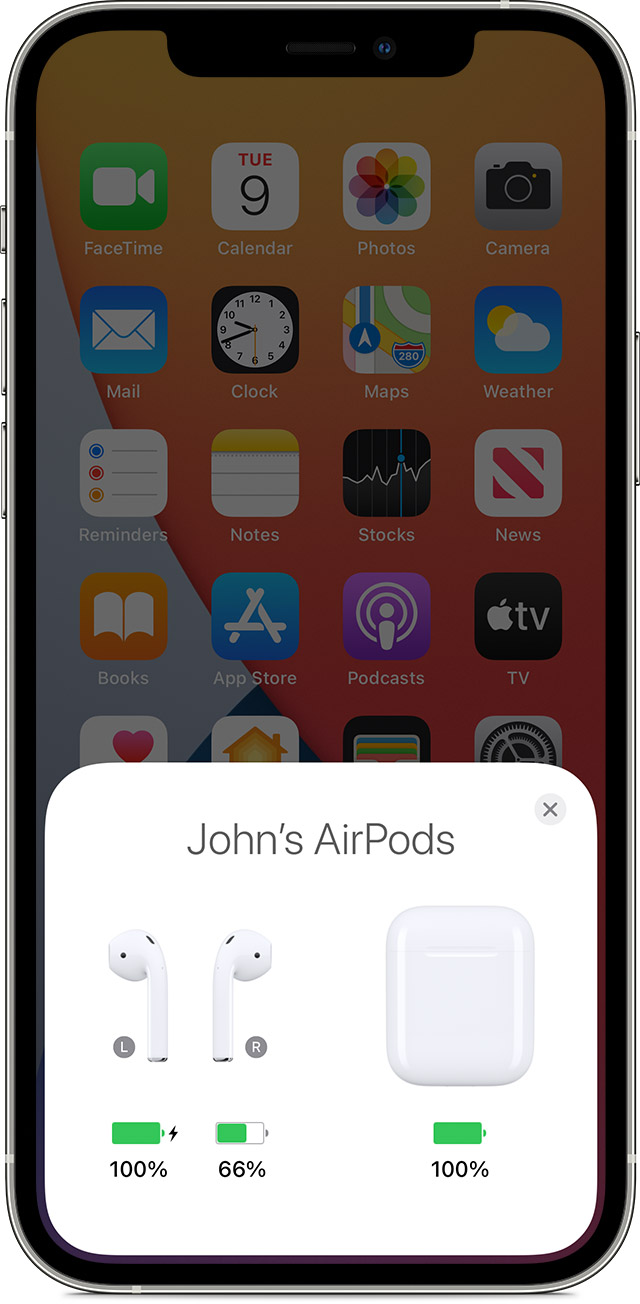
4. Check the charge status on your iPhone or iPad to make sure that each AirPod is charging.
5. Put both AirPods in your ears.
6. Play audio to test both AirPods.
7. If an AirPod still isn't working, reset your AirPods or contact Apple Support.
Also, check out this page:
If your AirPods won’t charge - Apple Support
Take care.
Greetings sanaa298,
If one AirPod is not working as expected, follow the guidance found here:
If your left or right AirPod isn't working - Apple Support
These steps may say for audio issues, but the steps can still help with your right AirPod.
If there's no sound in one AirPod
1. Make sure that your charging case is fully charged.
2. Place both AirPods in your charging case and let them charge for 30 seconds.
3. Open the charging case near your iPhone or iPad.
4. Check the charge status on your iPhone or iPad to make sure that each AirPod is charging
5. Put both AirPods in your ears.
6. Play audio to test both AirPods.
7. If an AirPod still isn't working, reset your AirPods or contact Apple Support.
Also, check out this page:
If your AirPods won’t charge - Apple Support
Take care.
How do I get my right AirPod to connect to my phone and charge on the charging case