New Maps app

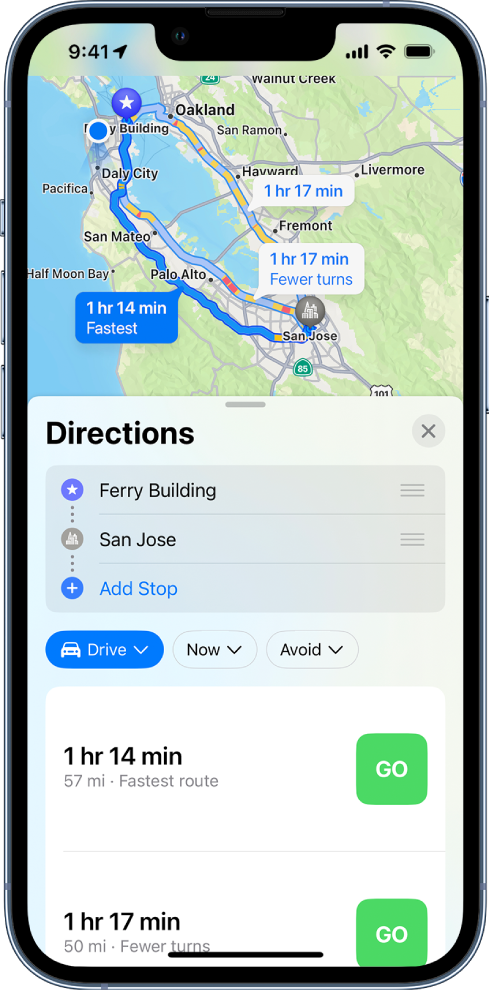
In the old maps application, you used to be able to get directions from two locations without your current location being used to find out how long it would take to drive. The new maps application that service doesn’t seem to be available. Now you can only go from a current location which is very frustrating. Unless I am missing something.

Posted on Dec 8, 2022 2:19 PM

Reply
1 reply

Dec 11, 2022 4:00 PM in response to Cavies1234

Greetings Cavies1234,


You can see the available ways to get directions in Maps on iPhone here:


Get driving directions in Maps on iPhone - Apple Support


"Get directions for driving

  1. Do one of the following:
    • Say something like “Hey Siri, give me driving directions home.” Learn how to use Siri.
    • Tap your destination (such as a search result in Maps or a landmark on a map), or touch and hold anywhere on the map, then tap the directions button.
  1. When a suggested route appears, you can do any of the following:
    • Switch to driving directions: If driving isn’t your default mode of travel or if you’re viewing a transit map, tap the travel mode button (below the Directions list), then tap the Drive button.
    • Choose a future departure or arrival time: Tap Now (below the Directions list), select a time or date for departure or arrival, then tap Done. The estimated travel time may change based on predicted traffic.
    • Add stops along your route: You can add up to 14 stops on the way to your destination. See Add a stop to your driving directions.
    • Avoid tolls or highways: Tap Avoid (below the Directions list), choose your options, then tap Apply.
    • View a route’s directions in a list: On the route card, tap the route’s estimated travel time so that the route appears at the top of the card, then tap the estimated travel time again. To share the directions, scroll to the bottom of the card, then tap Share.
    • Choose other route options: You can switch the starting point and destination, select a different starting point or destination, and more. See Select other route options.
  1. Tap Go for the route you want.
  2. A map showing multiple driving routes between two locations, with the fastest route selected. The route card at the bottom provides details for the routes, including estimated travel times, distance, and a brief description. A Go button appears next to each route description.
  3. As you travel along your route, Maps speaks turn-by-turn directions to your destination.
  4. While following the route, you can share your ETAfind a place to stopturn off spoken directions, and view a route overview or a list of turns."


Take care.

This thread has been closed by the system or the community team. You may vote for any posts you find helpful, or search the Community for additional answers.

New Maps app

Welcome to Apple Support Community
A forum where Apple customers help each other with their products. Get started with your Apple Account.