How do I add a person to my family sharing

I am trying to add my sons new phone to my family sharing to access Apple Music and Apple TV ,we currently have his old phone subscribed but are trying to change it or add new email . Can you help us please and thanks

iPhone 11

Posted on Dec 10, 2022 2:34 AM

Reply
Question marked as Top-ranking reply

Posted on Dec 12, 2022 3:40 PM

Hey PT007,


We'd recommend reviewing the information in this article as it provides steps needed to create and join a family sharing group: Set up Family Sharing - Apple Support


You'll want to first send an invite to the account you want to add with the following steps:


"Invite people to join your family

If you choose to invite people later or want to add another member to your family, you can send an invitation via Messages, email, or in person.

If you have multiple Apple IDs, you can invite each of your accounts to the group, so you can share purchases from your other Apple IDs with your family.


On your iPhone or iPad with iOS 16 or later

  1. Go to Settings.
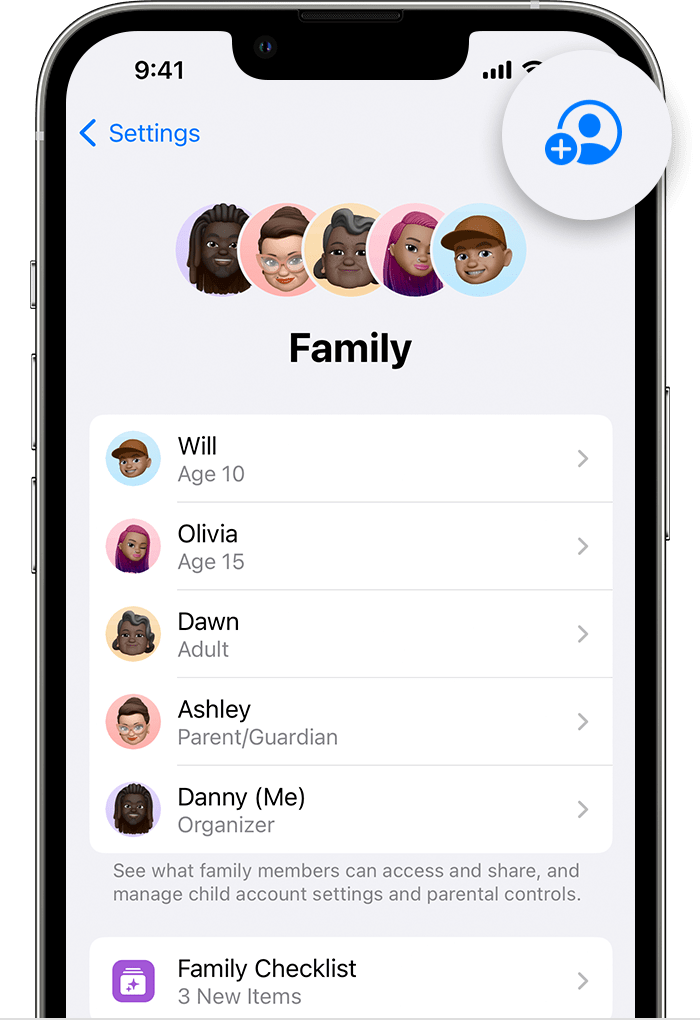
  2. Tap Family. 
  3. Tap Add Member .
  4. The Add Member button is on the upper right.
  5. If your child doesn't have an Apple ID, tap Create an Account for a Child. But if your child already has an Apple ID, tap Invite People. They can enter their Apple ID password on your device to accept the invitation.
  6. Follow the onscreen instructions to set up parental controls, location sharing, and more."


Then they will need to accept that invite.


"Join a family group

Accept or decline an invitation to join a family directly from your device. You'll get an invitation by email or in a text message. Then you can respond right from the invitation. If you miss the email or text invitation, use the steps below to respond from your device. You can be a part of only one family at a time.

On your iPhone, iPad, or iPod touch

  1. Go to Settings.
  2. Tap your name.
  3. Tap Invitations.

To accept an invitation, follow the onscreen instructions. When you join a family, you might be asked to confirm your account information and to opt in to any features or services your family set up."


Thanks!

1 reply
Question marked as Top-ranking reply

Dec 12, 2022 3:40 PM in response to PT007

Hey PT007,


We'd recommend reviewing the information in this article as it provides steps needed to create and join a family sharing group: Set up Family Sharing - Apple Support


You'll want to first send an invite to the account you want to add with the following steps:


"Invite people to join your family

If you choose to invite people later or want to add another member to your family, you can send an invitation via Messages, email, or in person.

If you have multiple Apple IDs, you can invite each of your accounts to the group, so you can share purchases from your other Apple IDs with your family.


On your iPhone or iPad with iOS 16 or later

  1. Go to Settings.
  2. Tap Family. 
  3. Tap Add Member .
  4. The Add Member button is on the upper right.
  5. If your child doesn't have an Apple ID, tap Create an Account for a Child. But if your child already has an Apple ID, tap Invite People. They can enter their Apple ID password on your device to accept the invitation.
  6. Follow the onscreen instructions to set up parental controls, location sharing, and more."


Then they will need to accept that invite.


"Join a family group

Accept or decline an invitation to join a family directly from your device. You'll get an invitation by email or in a text message. Then you can respond right from the invitation. If you miss the email or text invitation, use the steps below to respond from your device. You can be a part of only one family at a time.

On your iPhone, iPad, or iPod touch

  1. Go to Settings.
  2. Tap your name.
  3. Tap Invitations.

To accept an invitation, follow the onscreen instructions. When you join a family, you might be asked to confirm your account information and to opt in to any features or services your family set up."


Thanks!

This thread has been closed by the system or the community team. You may vote for any posts you find helpful, or search the Community for additional answers.

How do I add a person to my family sharing

Welcome to Apple Support Community
A forum where Apple customers help each other with their products. Get started with your Apple Account.