iPhone won't automatically connect to car Wi-Fi

My iphone used to be able to Auto-Join my car Wifi with SW ver 15, but when i upgraded to SW ver 16, my phone stopped Auto-Join Car Wifi and now I have to connect manually. I do not have any issues auto-joining Home network or any other Auto-Join networks. This seems to only impact my Car Wifi. I have also turned "Private Wi-Fi Address" On and Off and that did not work. Is anyone else seeing this issue with the latest Software release? Thanks!


[Re-Titled by Moderator]

iPhone 7 Plus, iOS 14

Posted on Dec 12, 2022 11:00 AM

Reply
Question marked as Top-ranking reply

Posted on Jul 28, 2023 1:28 PM

I struggled with the same issue and I was able to resolve it by creating a configuration profile that tells the iPhone to connect to the Car wifi.


Here is a website that helps to create such a profile:

https://daduckmsft.github.io/WiFiProfileGenerator/


I have selected WPA2, Hidden yes, Auto Join yes. Save the content of the window as some_name.mobileconfig and send it to your iPhone (e.g. by email). Open it and then go to Settings to completed the activation.


Hope that helps someone.


65 replies
Question marked as Top-ranking reply

Jul 28, 2023 1:28 PM in response to Basic_AF

I struggled with the same issue and I was able to resolve it by creating a configuration profile that tells the iPhone to connect to the Car wifi.


Here is a website that helps to create such a profile:

https://daduckmsft.github.io/WiFiProfileGenerator/


I have selected WPA2, Hidden yes, Auto Join yes. Save the content of the window as some_name.mobileconfig and send it to your iPhone (e.g. by email). Open it and then go to Settings to completed the activation.


Hope that helps someone.


Dec 14, 2022 2:41 PM in response to Basic_AF

Hello Basic_AF,


Thanks for choosing the Apple Support Communities. if your iPhone won't connect to a Wi-Fi network, we suggest following these steps to resolve the issue.


If your iPhone or iPad won't connect to a Wi-Fi network - Apple Support


"Make sure that your router is on and that you're within range

If you're too far from your Wi-Fi router, you can't get a signal, so make sure that you're within range.

Make sure that Wi-Fi is on and that you can see your network

Go to Settings > Wi-Fi and make sure that Wi-Fi is on. Tap the name of your Wi-Fi network to join. A blue checkmark beside a network name means that you're connected.

If you see Auto Join disabled under Settings > Wi-Fi > [Your Network], tap the More Info button and then tap Auto-Join.
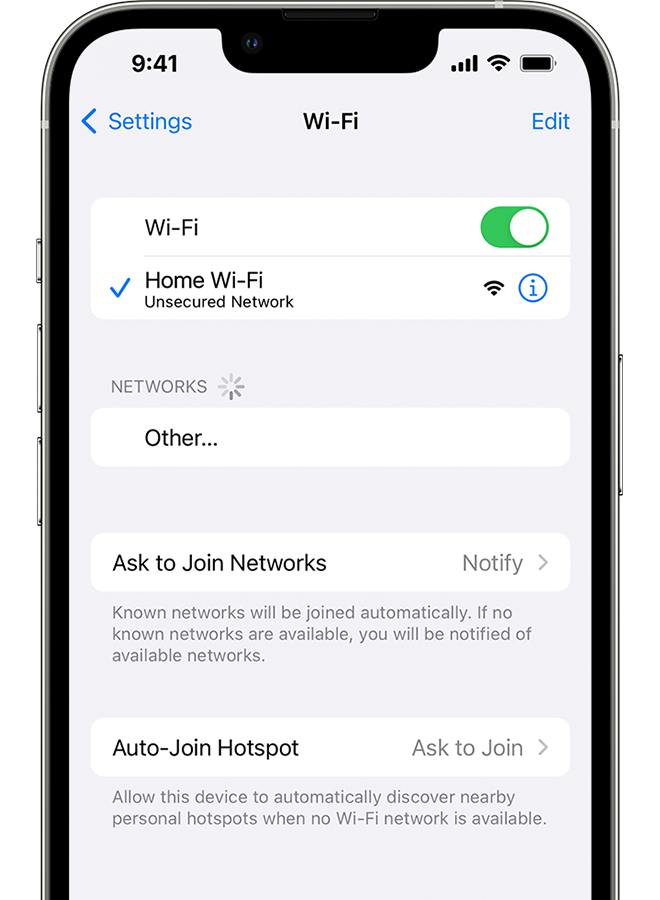
An iPhone showing the Wi-Fi screen. There's a blue a checkmark next to the Wi-Fi network's name.

If asked, enter your Wi-Fi password

If asked, enter the password for your Wi-Fi network. Get help if you don't know your password.

Even if you enter the correct password, you might see an "unable to join the network" message or an "incorrect password" message. Restart all of your devices, then try to enter your password again.

Check for issues with your Wi-Fi network

If iOS or iPadOS detects an issue with your Wi-Fi connection, you might see a Wi-Fi recommendation under the name of the Wi-Fi network that you're connected to. For example, you might see the alert "No Internet Connection." To get more information, tap the Wi-Fi network.

 

An iPhone showing the Wi-Fi screen. There's an alert message under the Wi-Fi network's name.

Check your cables and connections

If you still can't connect to your network or get online, make sure that your router is connected to the modem and turned on.

Restart

Restart your iOS or iPadOS device.

Restart your router and cable or DSL modem by unplugging the device and then plugging it back in.

After you restart each device, see if you fixed the issue.

Reset your network settings

If you're using iOS or iPadOS 15 or later, tap Settings > General > Transfer or Reset [Device] > Reset > Reset Network Settings.

If you're using iOS or iPadOS 14 or earlier, tap Settings > General > Reset > Reset Network Settings.

This also resets Wi-Fi networks and passwords, cellular settings, and VPN and APN settings that you've used before.
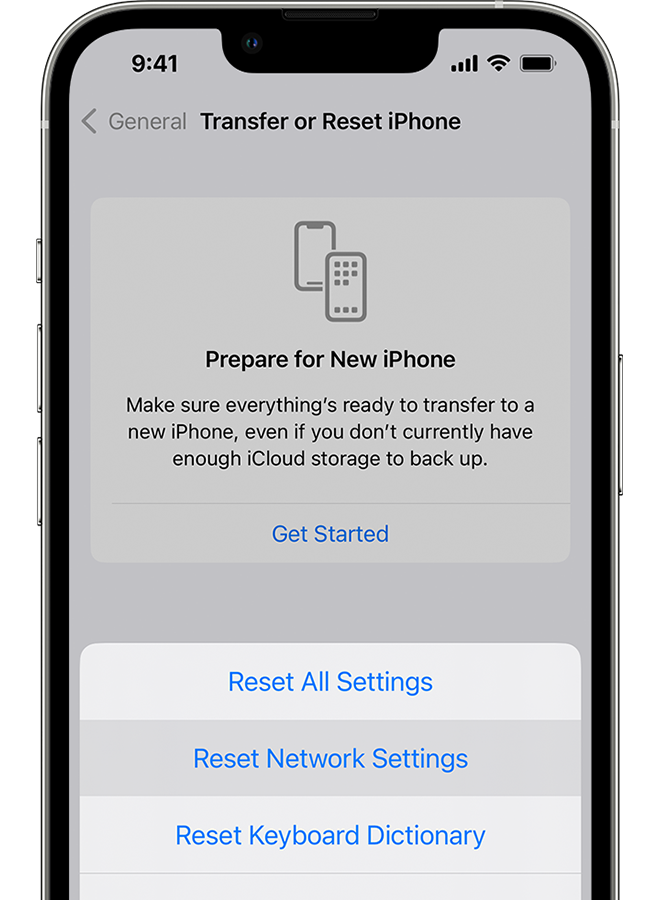
An iPhone showing the Transfer or Reset iPhone screen.

Get more help

  • If you're connected to a Wi-Fi network but you can’t get online, try to use your Wi-Fi network on other devices. If you can't get online using your other devices, there might be a service outage. Call your cable company or internet provider for help.
  • Try connecting to a Wi-Fi network in a different location. If your device can connect, you need to get help with your Wi-Fi network. If your device can't connect to any Wi-Fi networks, contact Apple.
  • Update your Wi-Fi router with the latest firmware and make sure that the router supports your Apple product. For more information, contact the router's manufacturer."


We hope this helps.


Cheers!


Mar 15, 2023 6:14 AM in response to Basic_AF

Apple points the finger at OnStar, Onstar points the finger at Apple. Troubleshooting network issues is what I have been doing professionally for 37 years. Through the process of elimination and trying all steps necessary, What you have left after elimination, no matter how improbable you think may be, has to be the problem. How can it be Apple if it is affecting Galaxy devices too? This is a issue in the onboard WiFi system (Onstar/Chevrolet). We need to all pursue a fix there. Wi-Fi evolves and RFCs change OnStar needs to keep up. If you recall, they lagged behind on the switch from analog to digital.

Jan 9, 2024 12:17 PM in response to Basic_AF

My Iphone also used to connect to my car Wi-Fi. ….BUT.. Since I updated to IOS 17.2.1 it will no longer connect, automatically or manually. I can connect automatically to my home network.

My wife has not done the update on her Iphone and she can get Wi-Fi in the car.

It’s not a problem with the car, its the update. Is there a fix ??

Feb 5, 2023 7:02 AM in response to CCUNetman

We are having the same auto join issue to our cars. We can manually join. Auto join works when we arrive home. We have tried. Reset Car Link system. Update to new IOS 16.3. Forget network, reconnect. Forget the phone on the car system. reconnect. No solution. with all of the other posts for the same issue seems like an IOS issue. Does apple have a possible solution in the near future?

May 18, 2023 7:53 PM in response to Basic_AF

AutoJoin in an Audi 2020 A6 with wirelesss CarPlay and in-vehicle WiFi does not work. So, as a result, if manual connect is overlooked, phone data plan continually exceeds the shard data allocation. Apple support is not acknowledging the issue. It’s been over a year waiting for a response/fix. Defeats the purpose of in-viehicle WiFi. I feel like sending Apple the bill for the Mobile Carrier overcharges to my cell phone data plan. APPLE MANAGEMENT — GET IT FIXED PLEASE!


if other users have this same issue, complain loudly please.

May 3, 2023 9:50 AM in response to Basic_AF

This is not just GM issue. I have this problem with my Jeep Grand Cherokee also. tried resetting entire radio unit on vehicle, deleting and re-syncing phone to vehicle and still no auto connect. Used to work great across multiple Jeep/Ram vehicles. I don't use car play just connect as phone/iPod normally. Have tried with and without CarPlay and no success.

This thread has been closed by the system or the community team. You may vote for any posts you find helpful, or search the Community for additional answers.

iPhone won't automatically connect to car Wi-Fi

Welcome to Apple Support Community
A forum where Apple customers help each other with their products. Get started with your Apple Account.
