What good is all the workout data from Apple Watch if there is no place to aggregate and compare workouts to each other?

The workout app on Apple Watch sends data to both the health app and the fitness app on the iPhone. The health app gives you biometric information that is not linked to what you did. The fitness app tells you what you were doing in better detail but does not let you compare two or more incidences of that same type of workout. This would let you see trends or just see how your efforts show on paper over time. I am using a third party app called Health Auto Export to review workouts on my MacBook Pro which is ok but it does not let you compare multiple workouts of the same type.

Apple Watch Series 4, watchOS 8

Posted on Dec 14, 2022 1:40 PM

Reply
3 replies

Dec 17, 2022 10:50 AM in response to EZEVANS

Hi EZEVANS,


Thanks for contacting Apple Support Communities!


You can edit the workout metrics for your Apple Watch if you wanted to include more data for each workout type. This article will show you how to do so: View and edit workout metrics on Apple Watch


"View and edit workout metrics on Apple Watch

During a workout, Apple Watch displays information (or metrics) such as active calories, heart rate, and distance to help you monitor your progress. Each workout type displays a set of default metrics appropriate for that activity, which you can modify.


Switch workout views during a workout

Start a workout, then turn the Digital Crown to scroll through workout views.

Personalize workout views

The workout views you see depend on the kind of workout you’re doing. Cardio-focused workouts have more workout views by default, but you can edit some of them to suit your workout style.

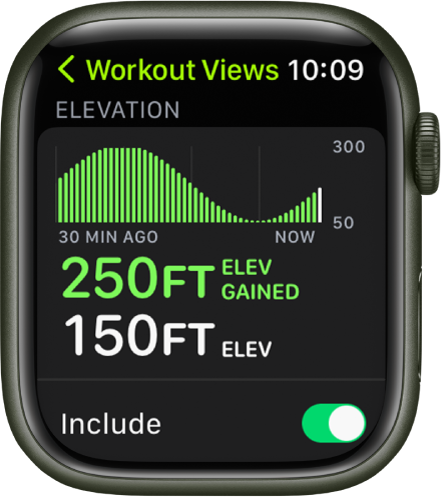
The Workout Views screen showing the Elevation metric. Near the top is a graph showing elevation increases and decreases over time. Below is the amount of elevation gained and the current elevation. At the bottom is the Include switch.

  1. Open the Workout app  on your Apple Watch.
  2. Turn the Digital Crown to the workout you want to do.
  3. Tap the More button, tap the Edit button in any tile, then tap Workout Views.
  4. Scroll through the workout views, then tap “Include” next to the metrics you want to appear during the workout.
  5. To select the metrics that appear in the first two workout views, tap the Edit button in the Metric 1 or Metric 2 set, tap a metric, then choose a different metric."


We hope this helps.


Cheers!


Dec 21, 2022 6:41 AM in response to Miche11e_P

Thanks Miche11e_P,


I was speaking about having a place( the Mac would be the best) where you could compare like workouts to each other over time using graphs etc. People have done this with paper spreadsheets for at least a hundred years and more recently digital spreadsheets. This would be such an easy app for apple to build for the Mac where you could actually see the data laid out in a useful way. Just looking at the data on your phone or even worse on your watch is very limited and underwhelming.

This thread has been closed by the system or the community team. You may vote for any posts you find helpful, or search the Community for additional answers.

What good is all the workout data from Apple Watch if there is no place to aggregate and compare workouts to each other?

Welcome to Apple Support Community
A forum where Apple customers help each other with their products. Get started with your Apple Account.