Hello katynasada97,
Welcome to Apple Support Communities.
We understand that you are unable to use your iPad as a second display. We are happy to help.
Please try the steps as listed here: Use an iPad as a second display for a Mac - Apple Support
"Move a Mac window to your iPad
Move your pointer over the full-screen button  of a window on your Mac, then choose the option to move that window to your iPad.
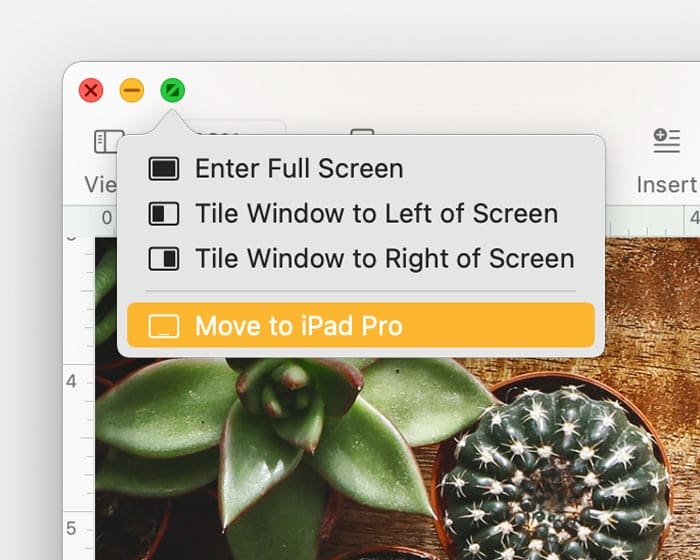
You can repeat this step for other Mac windows, or simply drag other Mac windows to and from your iPad. To move a window back to your Mac, you can also move your pointer over the full-screen button and choose Move Window Back to Mac.
If you want your iPad to mirror your Mac screen instead of extending its desktop:
- In macOS Monterey or later, choose a mirroring option from the Screen Mirroring menu
 in the menu bar.1
 - In macOS Big Sur, choose a mirroring option from the Display menu in Control Center or the menu bar.
- In macOS Catalina, choose a mirroring option from the AirPlay menu (
 or
or  ) in the menu bar.2
We also recommend checking for wireless interference using the steps here: Resolve Wi-Fi and Bluetooth issues caused by wireless interference - Apple Support
How to reduce wireless interference
These general steps can help achieve a cleaner, stronger wireless signal:
- Bring your Wi-Fi device closer to your Wi-Fi router. Bring the Bluetooth devices that are connecting to each other closer together.
- Avoid using your wireless devices near common sources of interference, such as power cables, microwave ovens, fluorescent lights, wireless video cameras, and cordless phones.
- Reduce the number of active devices that use the same wireless frequency band. Both Bluetooth and Wi-Fi devices use the 2.4 GHz band, but many Wi-Fi devices can use the 5 GHz band instead. If your Wi-Fi router supports both bands, it might help to connect more of your Wi-Fi devices to the 5GHz band. Some dual-band routers manage this for you automatically.
- Configure your Wi-Fi router to use a different Wi-Fi channel, or have it scan for the channel with the least interference. Most routers perform this scan automatically on startup or when reset."
Let us know if you have further questions.
Take care.



