Airpods Pro Gen2's Case sound issue. The activation menu is gone.


The Activation Menu has gone, and it doesn't accept any input.


And I have three issues with the malfunction above.

  1. The Case shows No response in FInd My. Earbuds, either in the Case. Not just sound but the whole response.
  2. No sounds in starting charging. Nothing sounds but a flashing lamp.
  3. The Case shows an odd charge gauge level. 100% holding earbuds, 50% without earbuds, for example.


I replaced mine twice for this issue.

It's Ok. I have Applecare+ with it.

They will replace it again at my request. But...

It is irritating to go to Bestbuy again with the same issue. :(


Please help me.


Ah, One more issue with me.

I have an M1 MBP. I am using APP2, switching between two devices. iPhone 13 PM and MBP.

My right APP2 is for controlling Siri, and the Left is for Noise.

The all-earbuds control turns to noise control and gets out of control(Can change to Siri Control, but nothing changes in real) sometimes in changing devices between iPhone and MBP.

I cured this malfunction by resetting APP2 and reconnecting. I didn't need to replace my APP2 with this problem. Please check this Bug.

Thank you.

iPhone 13 Pro Max, iOS 16

Posted on Dec 19, 2022 10:51 PM

Reply
Question marked as Top-ranking reply

Posted on Jan 7, 2023 5:15 PM

I think I found out a solution.

I fixed successfully through steps below.


How to figure out the issue?

  1. Turn off iPhone.
  2. Remove APP2 device(Forget Device) from MacBook Pro
  3. Connect APP2 to MacBook using lightning to USB-C cable which is in the APP2 Box, not through Bluetooth. Then the MacBook will ask you to accept an accessory or not. Accept it. This is important. I guess MacBook resets the case of APP2 via this wired connection. But I... don't know the why exactly.
  4. Cut the wired connection above step3.
  5. Reset your App2; Press white button back side of the APP2 Case.
  6. Establish new Bluetooth connection of APP2 to MacBook.
  7. You can hear charging sound of APP2 case again after the step6 in connecting charge cable.
  8. Turn on iPhone.
  9. Turn off the "Find my iPhone". The menu is Setting -> ID -> Find My. And Turn it on again. APP2 will be on the map of Find My again after this step.
  10. Play sound of APP2 in Find My. If you can hear APP2's sound, Almost done.But iPhone doesn't show the connection with APP2 Box.
  11. APP2 case will establish new connection to your iPhone in couple min. You can check it out by the APP2's case icon on iPhone's battery check gadget.
  12. Enjoy Fixed APP2.


I think this is a software issue. I could not figure may issue without my MacBook Pro.

Good luck.

3 replies
Question marked as Top-ranking reply

Jan 7, 2023 5:15 PM in response to Onikusama

I think I found out a solution.

I fixed successfully through steps below.


How to figure out the issue?

  1. Turn off iPhone.
  2. Remove APP2 device(Forget Device) from MacBook Pro
  3. Connect APP2 to MacBook using lightning to USB-C cable which is in the APP2 Box, not through Bluetooth. Then the MacBook will ask you to accept an accessory or not. Accept it. This is important. I guess MacBook resets the case of APP2 via this wired connection. But I... don't know the why exactly.
  4. Cut the wired connection above step3.
  5. Reset your App2; Press white button back side of the APP2 Case.
  6. Establish new Bluetooth connection of APP2 to MacBook.
  7. You can hear charging sound of APP2 case again after the step6 in connecting charge cable.
  8. Turn on iPhone.
  9. Turn off the "Find my iPhone". The menu is Setting -> ID -> Find My. And Turn it on again. APP2 will be on the map of Find My again after this step.
  10. Play sound of APP2 in Find My. If you can hear APP2's sound, Almost done.But iPhone doesn't show the connection with APP2 Box.
  11. APP2 case will establish new connection to your iPhone in couple min. You can check it out by the APP2's case icon on iPhone's battery check gadget.
  12. Enjoy Fixed APP2.


I think this is a software issue. I could not figure may issue without my MacBook Pro.

Good luck.

Dec 21, 2022 12:08 PM in response to Onikusama

Howdy Onikusama,


It sounds like you are having some issues with your AirPods Pros. We know how important having a working pair of AirPods Pro is for you, and we will help get you to the right place to find a resolution.


The first thing to try is a reset of the AirPods, which can often resolve this type of issue:

How to reset your AirPods and AirPods Pro
You might need to reset your AirPods if they won't charge, or to fix a different issue.

1. Put your AirPods in their charging case, and close the lid.
2. Wait 30 seconds.
3. Open the lid of your charging case, and put your AirPods in your ears.
4. Go to Settings > Bluetooth. Or go to Settings > [your AirPods].
• If your AirPods appear there as connected, tap the More Info button  next to your AirPods, tap Forget This Device, then tap again to confirm.
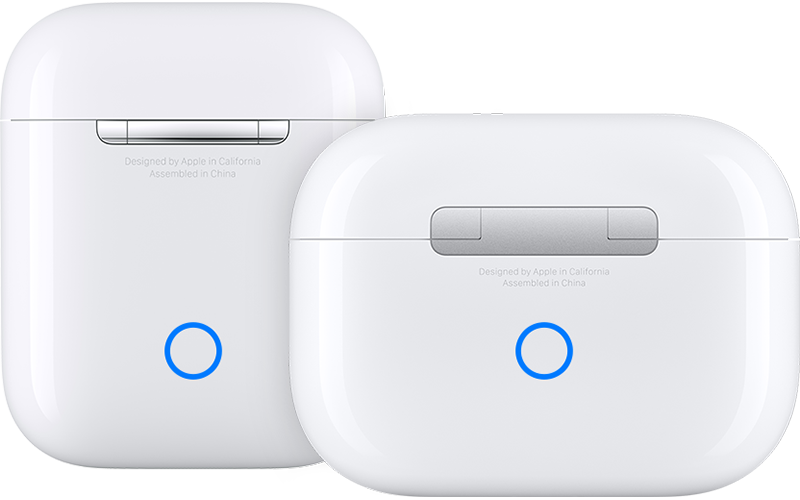
• If your AirPods don't appear there, continue to the next step. 
5. Put your AirPods in their charging case, and keep the lid open. 
6. Press and hold the setup button on the back of the case for about 15 seconds, until the status light on the front of the case flashes amber, then white.*
AirPods charging cases

7. Reconnect your AirPods: With your AirPods in their charging case and the lid open, place your AirPods close to your iPhone or iPad. Follow the steps on your device's screen.

AirPods can be associated with one Apple ID. If you want to use AirPods (3rd generation) or AirPods Pro (1st or 2nd generation) that someone else has used, they first need to remove the AirPods from their Apple ID.

This info is located in this support article: How to reset your AirPods and AirPods Pro


Another good place to check out is Change settings for AirPods Pro (all generations)


If you go through all of that and the issue persists, you'll find a link at the end of the article that will allow you to Contact Apple Support for further help.


Farewell!

This thread has been closed by the system or the community team. You may vote for any posts you find helpful, or search the Community for additional answers.

Airpods Pro Gen2's Case sound issue. The activation menu is gone.

Welcome to Apple Support Community
A forum where Apple customers help each other with their products. Get started with your Apple Account.