Face ID issues iOS 16.1+

So, im yet another customer who had massive issues with face ID since the update to iOS 16.1... Im on 16.2 now and the issue still plagues me. The face ID rarely working anymore & this happend right after the update to 16.1. Does anyone have some magic fix for this perhaps thats not already stated out there?


I have tried every single solution you can find on the web. LITERALLY. After some searching i found out TONS of people with the exact same issue, after the exact same iOS update. I have not found a response from apple regarding this issue and if someone has please link it. And if someone has some kind of magic solution to this i would appreciate it. Its not an coincidence that so many people are reporting this exact problem at the exact same patch.


EDIT: A "solution" i found out to work to make the face ID work TEMPORARLY for like 5 minutes (then it bugs out again):

Place the iphone on a flat surface with the screen down, press the power button to light up the screen then slightly lift up the bottom end of it to be able to swipe up. Then place it down again while the screen is on & then lift it up to unlock. This for some reason magically makes the Face ID to work temporarly as stated. I found this "solution" from another user.


And remember, just because it WORKS FOR YOU doesnt mean that the patch is NOT the main issue. Any solutions/fix to this annoying problem is appreciated. Thanks.

Posted on Dec 25, 2022 2:32 PM

Reply

Similar questions

4 replies

Dec 28, 2022 9:05 PM in response to bryanr14

Hey and thanks for trying to help. Unfortunately as stated i have tried every single solution possible that a person can find online. Including every step you pasted. I misspelled in original post tho, this actually happend right after the iOS 16 update (i wrote 16.1 on my first post).


I have also got it checked just incase it was a hardware issue somehow which came back positive, it wasnt. I was already 99,9% sure of this tho since it literally happend immidietly after the software update & i did not drop the phone, or in anyway possible accidently injured the dot cam somehow. So the hardware is not the problem.


This is 100% related to iOS 16. So its a bug and hopefully Apple will fix it by next patch. Also as i stated the only ”fix” to this that ive found is to:


  1. Lock the phone and lay it down with the SCREEN SIDE(front camera) down on a flat surface.
  2. Press the power button to light up the sceen.
  3. Slightly lift/tilt up the bottom edge of the phone so u can manage to swipe upwards like your going to unlock it (without lifting the whole phone).
  4. After the swipe lay it down again just like it was before. And wait 2 seconds.
  5. Now lift up the phone & point it towards your face and it will lock up without a problem.


IMPORTANT: The reason behind step 1, 2 & 3 is because this only works if its the FIRST attempt to scan/unlock. Since it only works on the first try you cant just hold the phone in your hand and do step 4&5 unfortunately. Because Face ID will have attempted to scan a face once & this only works on the first scan attempt. If your on step 3 & you accidently lift up the phone to high so the front cam tries to scan a face and fails(leaving you with 2nd attempt to scan a face) then u have to re-do everything from step 1… meaning > unlock the phone with passcode then procceed from step 1 and onwards again.


IMPORTANT: For some reason this only works on a FLAT horizontal SURFACE (straight horizontal angle).


After doing these steps the Face ID will work for like 5 minutes if even that. Then it glitches again and u have to re-do the steps -.-

So i wouldnt call it a solution/fix just a weird interaction to unglitch the dot cam/Face ID for the moment..


For people with this same issue that resetted their Face ID in hope to fix it and are now stuck with setting up a new Face ID & only getting ”Lower/Higher your phone” or ”Face ID is not avalible right now” while doing so these steps also works for that..


tons and tons of people got this exact issue with Face ID after iOS 16. Fyi im on a IPhone 13 mini.

Dec 27, 2022 11:55 AM in response to sofyien

Hello sofyien,


Thank you for reaching out in Apple Support Communities. To troubleshoot issues with Face ID, were you able to follow these steps?


1. Check for updates
Update your iPhone or iPad to the latest version of iOS or iPadOS. And make sure that your iPhone or iPad model supports Face ID.
 
2. Check your Face ID settings
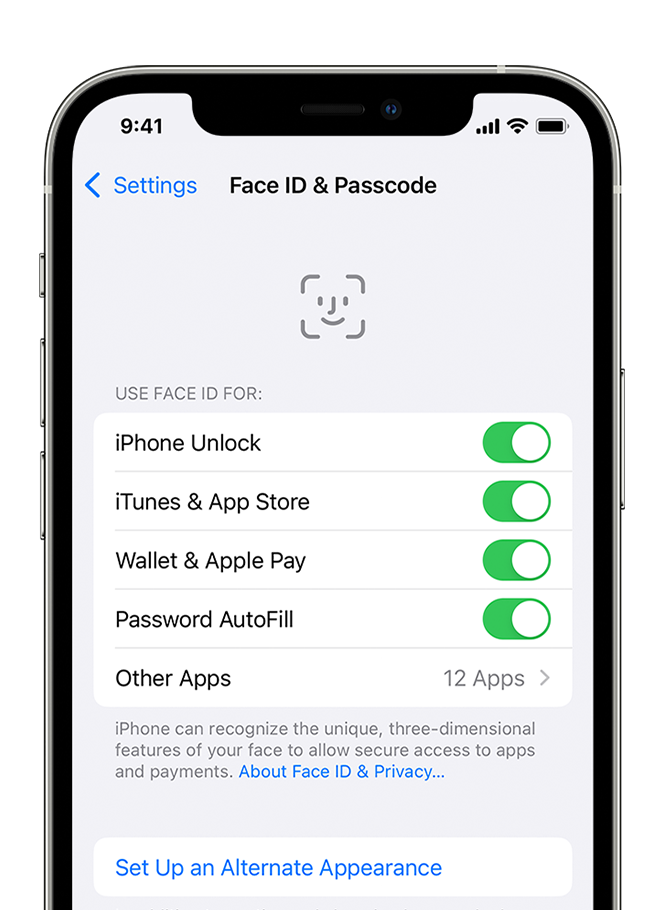
To check your Face ID settings, go to Settings, then tap Face ID & Passcode. Make sure that Face ID is set up and that the features you're trying to use Face ID with are turned on.
An iPhone showing the screen at Settings > Face ID & Passcode.

3. Check that nothing is covering the TrueDepth camera
emove anything that might be covering the TrueDepth camera like dirt, a case, or a screen protector.
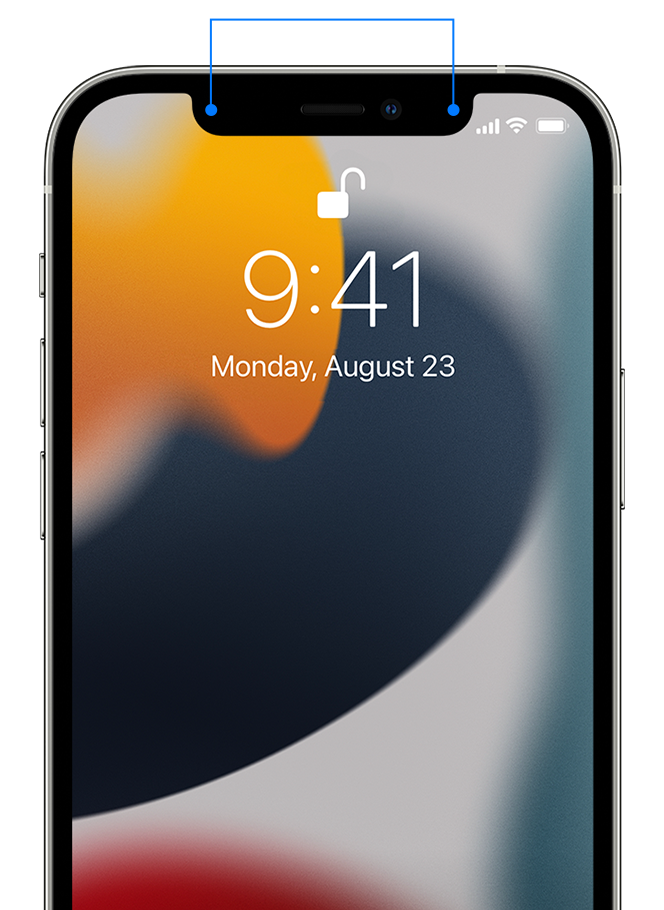
If you're using an iPad in landscape orientation, make sure that your finger or palm isn't covering the TrueDepth camera. If it is, an alert might appear at the top of the screen that says "Camera covered" with an arrow pointing at the TrueDepth camera.

An iPhone with lines pointing to the TrueDepth camera, two spots at the top of screen, one on each side of the center notch.

4. Make sure that your face isn't blocked
Make sure that your eyes, nose, and mouth are fully visible to the TrueDepth camera. By default, Face ID doesn't work if anything is covering your mouth and nose. If you're wearing a face mask and have already set up Face ID with a mask,* make sure that your eyes aren't blocked. You might need to hold your iPhone higher if you're wearing a face mask. If you wear a face mask too high or too close to your eyes, your iPhone might not unlock.

Face ID works with many sunglasses, though Face ID with a mask isn't designed to work with sunglasses. If you're wearing sunglasses designed to block certain types of light, then your sunglasses might be blocking the infrared light used by the TrueDepth camera. Try using Face ID without your sunglasses.

* You can use Face ID with a mask on iPhone 12 and later using iOS 15.4 and later.
 
5. Make sure that you're facing the TrueDepth camera
Face ID works on iPhone only when it's in portrait orientation and you're facing the TrueDepth camera. On iPad, you can use Face ID when your iPad is in any orientation.

The TrueDepth camera has a similar range of view as when you take a selfie or make a FaceTime call. Whether your iPhone or iPad is lying on a surface or you're holding it in a natural position, make sure that your iPhone or iPad is an arm's length or closer (10-20 inches) from your face.
 
6. Restart your device
Restart your iPhone or iPad and enter your passcode. Then try using Face ID again.
 
7. Add an alternate appearance 
For most users, Face ID will continuously learn as they change. If you have an appearance that can look vastly different, you can set up an alternate appearance so Face ID still recognizes you.

To set up an alternate appearance:
1. Go to Settings, then tap Face ID & Passcode. If asked, enter your passcode.
2. Tap Set Up an Alternate Appearance.
3. Look straight into your iPhone or iPad and place your face inside the frame.
4. Gently move your head to complete the circle. If you're unable to move your head, tap Accessibility Options.
5. When you finish the first Face ID scan, tap Continue.
6. Gently move your head to complete the circle for a second time.
7. When Face ID setup is complete, tap Done.


8. Reset Face ID
If you still need help, reset Face ID, then set it up again. Go to Settings, tap Face ID & Passcode, then tap Reset Face ID. Next tap Set up Face ID to set it up again.

These steps are outlined in this article: If Face ID isn't working on your iPhone or iPad Pro


If these steps did not resolve your issue with Face ID, we recommend for you to contact Apple Support to review this further. You can contact them through this link here: Apple - Get Support


Best regards.


This thread has been closed by the system or the community team. You may vote for any posts you find helpful, or search the Community for additional answers.

Face ID issues iOS 16.1+

Welcome to Apple Support Community
A forum where Apple customers help each other with their products. Get started with your Apple Account.