removing “ask to buy” permission

We have a family plan and me (guardian) is trying to remove the “Ask To Buy” selective, we are able to remove it but when my child tries to buy something it still says “Ask to buy?”. Help me remove it please!

iPhone 12, iOS 16

Posted on Jan 4, 2023 5:51 PM

Reply
1 reply

Jan 7, 2023 8:40 AM in response to kyndal258

Hello kyndal258,


The "How to turn on or turn off Ask to Buy" section here can help out with providing the necessary steps for turning the feature off: Approve what kids buy with Ask to Buy


On your iPhone, iPad or iPod touch
1. Open the Settings app.
2. Tap your name.
3. Tap Family Sharing.
4. Tap your family member's name, then tap Ask to Buy. In iOS 15 or earlier, tap Ask to Buy, then tap your family member's name. 
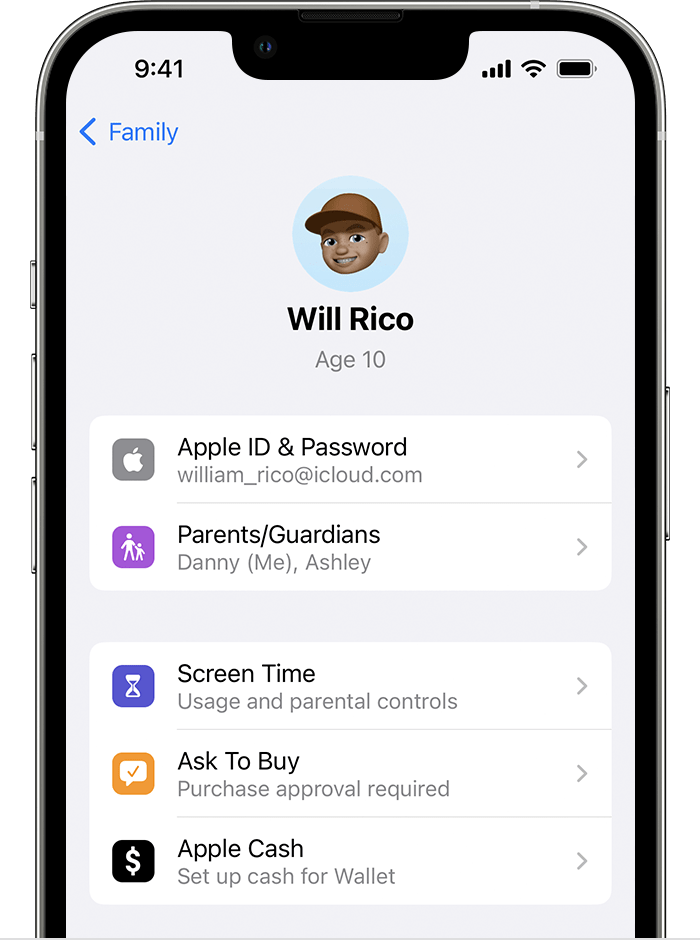
Ask to Buy is located below Screen Time.

5. Turn Require Purchase Approval on or off. 


If the alert still appears, you may wish to try restarting your device and the child's device, and then attempt to have them make a purchase again.


Cheers.

This thread has been closed by the system or the community team. You may vote for any posts you find helpful, or search the Community for additional answers.

removing “ask to buy” permission

Welcome to Apple Support Community
A forum where Apple customers help each other with their products. Get started with your Apple Account.
